

jstarkseo
Regular Member
- Sep 24, 2018
- 272
- 217
Getting backlinks from these authoritative websites in pretty easy—but it’s still only one piece of the puzzle.
For Google to pay attention to you (and your backlinks), those links need to be indexed.
Backlink indexation is similar to content indexation in SERPs. It means the backlink will be acknowledged and added to a search engine’s database, which is the first step to ranking.
How to Index Profile Backlinks??
1. Make Sure You Build Links for Relevance.
Links aren’t supposed to be pasted anywhere willy-nilly. They should be in places where it makes sense to link back to you and preferably surrounded with useful, relevant content. Eg:

That’s right: relevant, polished content.
(Let’s Wait for 2 days and relax the backlink) Sometimes google index the backlinks without doing anything if not indexed go with this.
2. Build Tier Two Comment Links?
To make the linking content more discoverable by Google, it’s time for some tier two Comment link building.
In a nutshell, second-tier links are links that promote the content that contains the first-tier link. The first-tier link, on the other hand, is the primary backlink that aims to rank the page it points to.
Sound complicated?
To clear things up, let’s say you shared a post that contains the backlink to your site on Facebook. Congratulations, you’ve just created a second-tier link!
Easy, right?
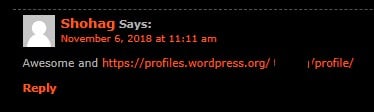
Make at least 10 to 15 Comment backlinks and wait for 3 to 4 days for indexation.
3. How to Find EDU Blogs to Comment?
You can easily find EDU blogs to comment on http://dropmylink.com/ (I am not affiliated to this in any way.

Just go through the link and enter your niche or keyword and this tool will give many blogs to comment since here the target is to index the profile backlinks so any blogs can work.
4. Monitoring Link Indexation
There are many ways to monitor the links here you go:
Search Console: You can check your indexed domain in Webmaster tools.

Ahrefs: Just paste your URL and check RD you will find your profile links.

Google SERP: Type site: https://about.me/YourProfileName

You can try this with any link you want to get indexed faster.
Do let me know if you have any questions regarding this.
For Google to pay attention to you (and your backlinks), those links need to be indexed.
Backlink indexation is similar to content indexation in SERPs. It means the backlink will be acknowledged and added to a search engine’s database, which is the first step to ranking.
How to Index Profile Backlinks??
1. Make Sure You Build Links for Relevance.
Links aren’t supposed to be pasted anywhere willy-nilly. They should be in places where it makes sense to link back to you and preferably surrounded with useful, relevant content. Eg:
That’s right: relevant, polished content.
(Let’s Wait for 2 days and relax the backlink) Sometimes google index the backlinks without doing anything if not indexed go with this.
2. Build Tier Two Comment Links?
To make the linking content more discoverable by Google, it’s time for some tier two Comment link building.
In a nutshell, second-tier links are links that promote the content that contains the first-tier link. The first-tier link, on the other hand, is the primary backlink that aims to rank the page it points to.
Sound complicated?
To clear things up, let’s say you shared a post that contains the backlink to your site on Facebook. Congratulations, you’ve just created a second-tier link!
Easy, right?
Make at least 10 to 15 Comment backlinks and wait for 3 to 4 days for indexation.
3. How to Find EDU Blogs to Comment?
You can easily find EDU blogs to comment on http://dropmylink.com/ (I am not affiliated to this in any way.
Just go through the link and enter your niche or keyword and this tool will give many blogs to comment since here the target is to index the profile backlinks so any blogs can work.
4. Monitoring Link Indexation
There are many ways to monitor the links here you go:
Search Console: You can check your indexed domain in Webmaster tools.
Ahrefs: Just paste your URL and check RD you will find your profile links.
Google SERP: Type site: https://about.me/YourProfileName
You can try this with any link you want to get indexed faster.
Do let me know if you have any questions regarding this.


