LiveDrive and I'm confused!

Joined
Mar 17, 2018
Messages
761
Reaction score
263
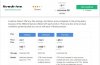
Hey, was looking at online backup for backing up work and I saw Livedrive offering unlimited storage and then 2000 gb on the higher plan? A bit confused at this:
ld.jpg

Unlimited GB means any "number" GB? like 5000 GB or 6000 GB? lol

Google Drive and DropBox give 1 TB @ $9.99 and these guys are claiming unlimited GB. What's the real catch here? Anyone using LiveDrive?

I just need an online cloud to back up my daily work when I'm finished working for the day. Lappy is a bit old so advance precaution is better than regretting at the point. Any recommendation for a stable one with good storage at a reasonable price?
 
They offer unlimited on backup. The limit is for briefcase which is different to backup - it’s like dropbox
You have no idea of how excited I'm right now and laughing too. I mean there is NO limit on the backup plan? Why is the higher plan have limit then?

I have over 6 TB of contents related to work. Can I upload in the backup plan?

Please tell me you are kidding. :)
 
The only issue with livedrive backup is this scenario - you use backup, you get cryptolocker and all your files get encrypted, livedrive backs up the encrypted files.

Then you can’t get them back because it only allows you to restore the most recent backup en-mass.

Apart from that it’s pretty decent. But I’d still recommend doing a periodic backup yourself and keeping it offsite.

You have no idea of how excited I'm right now and laughing too. I mean there is NO limit on the backup plan? Why is the higher plan have limit then?

I have over 6 TB of contents related to work. Can I upload in the backup plan?

Please tell me you are kidding. :)

Correct. Backup has no limit. BUT it’s not the same as briefcase, or Dropbox or google drive - with livedrive backup you can’t access the files anywhere, it’s purely for backup and restore purposes.

The storage limit mentioned in the higher plans is referring to briefcase storage space which is different to backup.
 
Last edited:
The only issue with livedrive backup is this scenario - you use backup, you get cryptolocker and all your files get encrypted, livedrive backs up the encrypted files.

Then you can’t get them back because it only allows you to restore the most recent backup en-mass.
Two things on this:
1) Do LiveDrive themselves encrypt my files OR do I have to encrypt them manually and then upload?
2) You said I can't get them back and they only allow to restore recent files? Why would I not be able to download from their cloud to my lappy again?

Suppose I upload 5 TB worth of contents for like 1 week (Huge size) and then I decide to download back from their cloud to my system. Will I be able to or not?

Correct. Backup has no limit. BUT it’s not the same as briefcase, or Dropbox or google drive - with livedrive backup you can’t access the files anywhere, it’s purely for backup and restore purposes.

The storage limit mentioned in the higher plans is referring to briefcase storage space which is different to backup.
Let me see if I got this correctly - If I use the backup plan, then it is restricted to ONE DEVICE and NO cloud option, right? I can't access my files outside my home laptop? I have to access my files in their cloud from the SAME LAPTOP that I used to upload those, right?
 
Two things on this:
1) Do LiveDrive themselves encrypt my files OR do I have to encrypt them manually and then upload?
2) You said I can't get them back and they only allow to restore recent files? Why would I not be able to download from their cloud to my lappy again?

Suppose I upload 5 TB worth of contents for like 1 week (Huge size) and then I decide to download back from their cloud to my system. Will I be able to or not?


Let me see if I got this correctly - If I use the backup plan, then it is restricted to ONE DEVICE and NO cloud option, right? I can't access my files outside my home laptop? I have to access my files in their cloud from the SAME LAPTOP that I used to upload those, right?

With livedrive backup, you can still access the files from anywhere if you want to restore them. But you can only back up one device as far as I know. So you back up your files, then you can restore those files to the same computer, or to a different computer (For example if the main computer crashed).

And yes, in the scenario you described, if you upload your files one week and then want to restore them all to a new device next week, you can do this. Keep in mind that the initial backup (and any subsequent restore) for that size of files will be very long.

Regarding encryption, livedrive keep the files securely stored so i wouldnt worry too much about that.

I think you didnt understand what I was saying about the encryption thing though; what I am saying is this - YES, livedrive will do everything that you mentioned regarding backup, BUT please keep in mind that it is quite a simple form of backup and so I would not use it as your ONLY form of backup. There are some scenarios where you cannot rely on livedrive backup. So you should keep that in mind, and it depends how important the data is that you are backing up.
 
With livedrive backup, you can still access the files from anywhere if you want to restore them. But you can only back up one device as far as I know. So you back up your files, then you can restore those files to the same computer, or to a different computer (For example if the main computer crashed).
Yes and in the Briefcase and the other higher plan just gives more than 1 device to backup. That's the main difference right mate?
The writing in their site is a bit confusing for noobies like me haha.

BUT please keep in mind that it is quite a simple form of backup and so I would not use it as your ONLY form of backup. There are some scenarios where you cannot rely on livedrive backup. So you should keep that in mind, and it depends how important the data is that you are backing up.
Hmm true. I plan to use 7-Zip's 256 AES encryption of my folders and files.

This is how I planned: My files -> Archive with 7-Zip's Encryption using 28 characters special symbol pass -> Upload the RAR file to cloud. I will do that for each single file with different pass everytime. :)

Will that be enough? Is 7-Zip's encryption strong? Of course, I would use my password manager's pw generator to generate me a 28 long special character password and will put that as my encrypted 7-zip archive's password. Will that be good? I don't think that will be vulnerable. What do you advise?

And do you mean I should use multiple cloud storage, like keep some in Google Drive and some in LiveDrive?

I have to back up things in advance until I get a new lappy.
 
Hmm, maybe they introduce limits on the bigger plans. Maybe they only have 1 pc as unlimited because they know it’s not feasible for a single pc to have that much data.

7z is good, but I don’t know if this will work - are you planning to zip up 6tb into a single file and upload it, or you are spaning the archive or what?

Maybe let me know exactly what you want to achieve, and I can advise further.
 
Hmm, maybe they introduce limits on the bigger plans. Maybe they only have 1 pc as unlimited because they know it’s not feasible for a single pc to have that much data.

7z is good, but I don’t know if this will work - are you planning to zip up 6tb into a single file and upload it, or you are spaning the archive or what?

Maybe let me know exactly what you want to achieve, and I can advise further.
First of all, thanks a lot for helping me on all this mate :)

And no mate, I won't archive the whole 6 TB into a single file. I will do like 100 GB, 200 GB, 300 GB and so on but not more than 300 GB for a single file. Will do like this until I reach 6 TB to upload. And I will put different passwords for each archive. What will be the BEST way to encrypt such files/folders for uploading into the cloud and have peace of mind?

Also, one more thing, I downloaded 4-5 IM courses from the internet that are worth like $999+ each from so-called "Gurus". And I would like to encrypt them with a different name for uploading into cloud too because if they see the real name of the courses in the cloud, (which I know they WON'T because they say that the words and other things, when uploading into the cloud, gets encrypted into unreadable characters) it may cause problem for me and won't be good. So, what will be the BEST way to encrypt them and upload them to?

Also, I have Adobe Photoshop, Illustrator and couple of other costly softwares that are cracked and I would like to upload those too by encrypting. So, what will be the good way to encrypt those software files with crack files for uploading into the cloud so that they DON'T see (I know they WON'T due to encrypted unreadable characters)?
 
Last edited:
Livedrive comes with built in encryption feature which you can turn on, so you can leave the 7z out.

Then just get livedrive backup and it will do the job. Size is the only issue - I’ve never backed up more than about 500gb but even so, I’m sure it’ll be fine.

For your other query, you can use 7z if you want, and I think there is an option to encrypt filenames.
 
Livedrive comes with built in encryption feature which you can turn on, so you can leave the 7z out.

Then just get livedrive backup and it will do the job. Size is the only issue - I’ve never backed up more than about 500gb but even so, I’m sure it’ll be fine.

For your other query, you can use 7z if you want, and I think there is an option to encrypt filenames.
Alright and thanks once again mate :)
 
Back
Top