Help with deploying CPAbuild landing page + content locker

Joined
Oct 3, 2011
Messages
14
Reaction score
2
Hi guys, newbie here. i need some help with CPAbuild. So I've created a template and content locker on CPAbuild and I have my own domain and hosting. How do I deploy them? I watched the video tutorial on the help/FAQ section in CPAbuild but I couldn't grasp it. The files are all PHP. Uploaded them to my cPanel using filezilla but the page doesn't show. Seems that the config.php file needs to be edited but I don't know how or what to edit. Any help would be deeply appreciated.
 
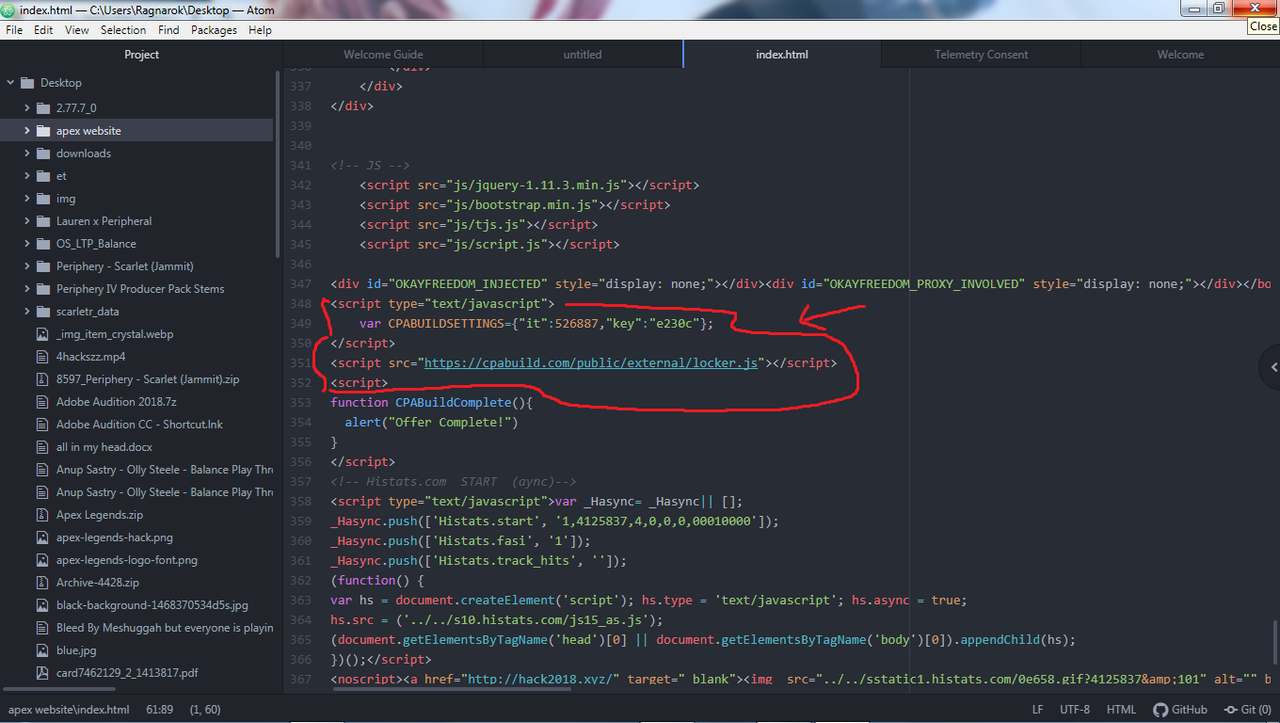
I'm not even sure because I deal with HTML and not very verse on php stuff, I use a program called ATOM https://atom.io/ it's a program that organizes the code of your website and puts it nice and neat in readable format that you can also easily edit, add links, code and save. I'll give you a picture example how my locker code is place below.

code.png


This is how it should look like when the locker code is implemented correctly. Hope this helped you a little.
 
I've downloaded the deployment package from CPAbuild and uploaded them to my cPanel using Filezilla
Capture.JPG

Then when i go to my website, the following appears:
tempsnip.jpg

What should be my next step?
 
It gives you directions right there in the Summary

Go into cPanel and choose file explorer
Edit the config.php file with your uri from cpabuild
Last be sure to delete the install.php file
 
Back
Top