
You are using an out of date browser. It may not display this or other websites correctly.
You should upgrade or use an alternative browser.
You should upgrade or use an alternative browser.
[Guide] Incredibly easy and effective wordpress site speed optimization
- Thread starter sparkh
- Start date


KlaudiaK
Banned - selling outside of the marketplace.
- Jul 26, 2019
- 421
- 320
Fast Velocity Minify tweaks + htacces mod

hey i am currently trying to speed up my website, are you able to help me on the htaccess mod ?

Get Web Growth
Registered Member
- May 31, 2020
- 97
- 28
will give this a try

Northstarr
Regular Member
- Apr 8, 2017
- 281
- 201
You can achieve your results just by installing wprocket out of the box without tweaking any settings.
Larby Amirouche
Junior Member
- Jan 18, 2018
- 100
- 15
Optimizing a wordpress site can be a nightmare for many, especially newbies. But power of wordpress is in it’s community and the many free and awesome plugins you can use. Today I will tell you how you can get A grade in this straightforward guide!
Plugin needed
Cache and minification
- Wp Supercache
- Phastpress
We will use Wp supercache for caching database requests but you must also enable file minification.
It’s free and easy to setup. I never touch any configurations, usually I just install and activate cache in settings.
Used for:
- Page caching
- Page compression/minification

Page Optimization
Here's my secret, it's called PhastPress! This plugin is insane, you have just to install it and activate it with a click! It covers every page optimization possible and you need just one click to activate it!
Used for:
- Image optimization
- Asynchronous scripts and stylesheets

Test on my website
I totally disabled all caching and optimizations on site and checked site without Defer style option in Phastpress in the first two > 22 / 49
I activated the two plugins with two clicks and checked again the score of my website on PageSpeed > 63 / 97

Let me know if you tried it and leave a thanks if the content was helpful and you want more tutorials from me
A big thank you! And yes, more tutorials please!


sparkh
Junior Member
- Apr 25, 2020
- 118
- 77
Great tip mate. Does optimizing stylesheets don't affect on the design of the website?
Sometimes it can be buggy while loading

Tariq Lanre
Junior Member
- May 23, 2017
- 105
- 30
for me didn't work out Bro. help
phone

PC

I use to use wp-rocket which is little much batter
any other recommendation and help would be highly appreciated.
What matters is the speed

kimomalcolmx
Power Member
- Apr 11, 2011
- 727
- 263
Oldish thread but I wanted to share my results as they are quite good,
I was not able to install wo super cache do to some bug, but I have installed
PhastPress
WP Rocket
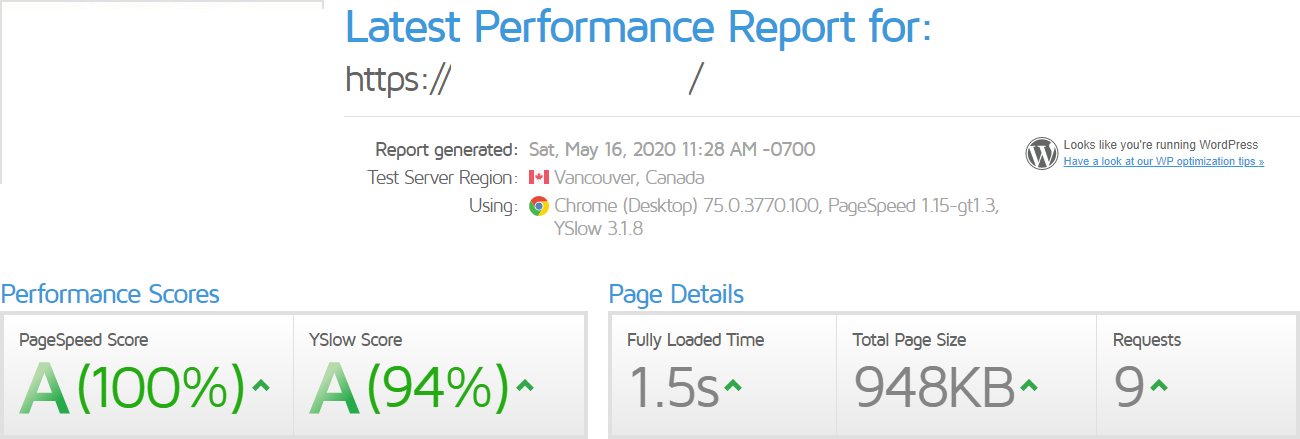
here are the before and after:
Before:

After:

Also, I tested just with Wp Rocket and the results where not as good as with PhastPress and wp rocket.
also, thiis is a affiliate site with no ads like adsense or similar, I will test it out on a site with Ezoic ads that are very heavy and see how it goes.
Also thanks OP for the share!
I was not able to install wo super cache do to some bug, but I have installed
PhastPress
WP Rocket
here are the before and after:
Before:
After:
Also, I tested just with Wp Rocket and the results where not as good as with PhastPress and wp rocket.
also, thiis is a affiliate site with no ads like adsense or similar, I will test it out on a site with Ezoic ads that are very heavy and see how it goes.
Also thanks OP for the share!
D
Deleted member 1107112
Guest
Would implement it
Thanks
Thanks

thethirdtier
Newbie
- Dec 6, 2020
- 5
- 0
Can't thank you enough man. It works like a charm. Was getting around 70-80 score in GTmetrix, added these two plugins and Booom... 91, right off the bat.

hmmst
Newbie
- Jan 1, 2021
- 22
- 10
My site goes from 91 Mobile (using NitroPack) to ~25 (with PhastPress + WP-Rocket on Nginx).
From what I'm seeing, it's not even minimizing/merging CSS.
I'm eager to get it to work and I'll probably try on Apache to make sure, but it'll take a bit since I'm using Nginx for all my sites right now.
Anyone have similar experiences?
EDIT: Also, thank you for the tip, OP. I hadn't heard of PhastPress until reading this post.
From what I'm seeing, it's not even minimizing/merging CSS.
I'm eager to get it to work and I'll probably try on Apache to make sure, but it'll take a bit since I'm using Nginx for all my sites right now.
Anyone have similar experiences?
EDIT: Also, thank you for the tip, OP. I hadn't heard of PhastPress until reading this post.
D
Deleted member 657006
Guest
Load time needs ms......
D
Deleted member 657006
Guest
Load score to high. Should be under 1 s sec milliseconds
Try a imAge compression app.
Change the image smaller with tiny pic online


fb3003
Elite Member
- Aug 14, 2015
- 5,035
- 3,500
you still using phastpress?Optimizing a wordpress site can be a nightmare for many, especially newbies. But power of wordpress is in it’s community and the many free and awesome plugins you can use. Today I will tell you how you can get A grade in this straightforward guide!
Plugin needed
Cache and minification
- Wp Supercache
- Phastpress
We will use Wp supercache for caching database requests but you must also enable file minification.
It’s free and easy to setup. I never touch any configurations, usually I just install and activate cache in settings.
Used for:
- Page caching
- Page compression/minification
Page Optimization
Here's my secret, it's called PhastPress! This plugin is insane, you have just to install it and activate it with a click! It covers every page optimization possible and you need just one click to activate it!
Used for:
- Image optimization
- Asynchronous scripts and stylesheets
Test on my website
I totally disabled all caching and optimizations on site and checked site without Defer style option in Phastpress in the first two > 22 / 49
I activated the two plugins with two clicks and checked again the score of my website on PageSpeed > 63 / 97
Let me know if you tried it and leave a thanks if the content was helpful and you want more tutorials from me