
You are using an out of date browser. It may not display this or other websites correctly.
You should upgrade or use an alternative browser.
You should upgrade or use an alternative browser.
[Guide] Get this telegram backlink
- Thread starter Rachmaninoff
- Start date

Razorfeast
Banned - Inappropriate behavior
- Sep 26, 2021
- 111
- 35
Thanks for Sharing this method with us !
affordableseocambodia
Junior Member
- May 16, 2020
- 193
- 50
If an indexer can index these links, he is a winner

ajabahey60
Registered Member
- Feb 28, 2021
- 75
- 30
Awesome share dude

typically
Newbie
- Oct 13, 2021
- 7
- 0
Yes, same here.Anyone not finding the "preview channel" button in the telegram url?
if I manually force it, like : https://t.me/s/mychannelurl it redirects to https://t.me/mychannelurl without preview button there. Maybe they updated it.
I also never get what is "broadcast". Was that just the old way of displaying the "message" field?


Ashish Singh
Junior Member
- Jul 16, 2017
- 129
- 38
Very impressive information. Thanks for sharing

Spinethetic
Junior Member
- Dec 10, 2015
- 111
- 98
Eh, not all backlinks need to be do follow; Best to keep a healthy balance of no and do and not stress too much about it.Is this Do or Not f.ollow?

cyberwild3
Regular Member
- Mar 9, 2021
- 270
- 62
I've follow this tutorial but channel not indexed, any idea?Yeah I’ve heard you can use Telegram for making money, getting audiences or even clients, but how about getting a link juice there? Have you ever thought about it yet? If you haven’t, then read on.
Disclaimer: This guide is for newbie who doesn’t know how to create a backlink on Telegram channel. If you happen to have a channel already, check whether it’s indexed on Google or not. If not, then it’s time to index it, don’t miss the link juice. If it's indexed, then congrats! You can close this thread now.

First things first, you need to install Telegram on your device. I’m currently installed it on desktop as it’s easier for me to copy paste articles than from a phone. But choice is yours. Just make sure you have an active phone number to receive a verification code.
Click the Message icon on your device. Then add a New Channel.

Add a channel name, description and a photo profile. Set your channel as Public. Important! Then type your desired channel link. Make sure you copy this link in a Note / Notepad for later.

Place your article and naked URL into Broadcast field. Then add an image. Then hit the Send button. And voila! You made it!

To see the result, paste your channel link into your browser. And then click Preview Channel. Copy the new link from the browser.
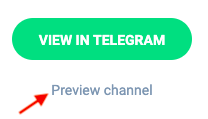
The link you’re supposed to index should look like this t.me/s/yourchannelname (with the /s/ in between)

You can create multiple channel in one account. I’d suggest you to create one channel for each of your moneysite. This link has a high indexing rate and you don’t need to worry about having a zero member or zero views on your new channel as this is meant for link building only.
Link indexed on Google

So that’s pretty much it. I hope you find this useful.
affordableseocambodia
Junior Member
- May 16, 2020
- 193
- 50
neither managed to index it so farI've follow this tutorial but channel not indexed, any idea?

royalGnocchi
Registered Member
- Aug 30, 2020
- 58
- 37
Thanks for the tip

Rachmaninoff
Elite Member
- Jan 19, 2011
- 3,634
- 5,399
The preview channel is still there. Or you can just use this link https://t.me/s/yourusername and replace it with your username, that should do.Yes, same here.
I also never get what is "broadcast". Was that just the old way of displaying the "message" field?
Do-followIs this Do or Not f.ollow?
It's still working. You just need to automate it with telegram bot to make it easier to index.Can someone confirm if this method is still working today? It seems not to work for me.
Have you created any tier2 links to it?I've follow this tutorial but channel not indexed, any idea?
just because you can not index it, that doesn't mean others can't. You can check on google that they're still indexing this link on hourly basis.neither managed to index it so far


Master SEO Links
Regular Member
- Dec 5, 2019
- 219
- 29
thanks for this

Cityscapeimages
Newbie
- Dec 24, 2021
- 3
- 0
Is there a way to have more than 10 public channels ?
perloss-559
Newbie
- Mar 22, 2022
- 1
- 0
Yeah I’ve heard you can use Telegram for making money, getting audiences or even clients, but how about getting a link juice there? Have you ever thought about it yet? If you haven’t, then read on.
Disclaimer: This guide is for newbie who doesn’t know how to create a backlink on Telegram channel. If you happen to have a channel already, check whether it’s indexed on Google or not. If not, then it’s time to index it, don’t miss the link juice. If it's indexed, then congrats! You can close this thread now.
First things first, you need to install Telegram on your device. I’m currently installed it on desktop as it’s easier for me to copy paste articles than from a phone. But choice is yours. Just make sure you have an active phone number to receive a verification code.
Click the Message icon on your device. Then add a New Channel.
Add a channel name, description and a photo profile. Set your channel as Public. Important! Then type your desired channel link. Make sure you copy this link in a Note / Notepad for later.
Place your article and naked URL into Broadcast field. Then add an image. Then hit the Send button. And voila! You made it!
To see the result, paste your channel link into your browser. And then click Preview Channel. Copy the new link from the browser.
The link you’re supposed to index should look like this t.me/s/yourchannelname (with the /s/ in between)
You can create multiple channel in one account. I’d suggest you to create one channel for each of your moneysite. This link has a high indexing rate and you don’t need to worry about having a zero member or zero views on your new channel as this is meant for link building only.
Link indexed on Google
So that’s pretty much it. I hope you find this usef
How long did it take to get the telegram chanel link indexed?Yeah I’ve heard you can use Telegram for making money, getting audiences or even clients, but how about getting a link juice there? Have you ever thought about it yet? If you haven’t, then read on.
Disclaimer: This guide is for newbie who doesn’t know how to create a backlink on Telegram channel. If you happen to have a channel already, check whether it’s indexed on Google or not. If not, then it’s time to index it, don’t miss the link juice. If it's indexed, then congrats! You can close this thread now.
First things first, you need to install Telegram on your device. I’m currently installed it on desktop as it’s easier for me to copy paste articles than from a phone. But choice is yours. Just make sure you have an active phone number to receive a verification code.
Click the Message icon on your device. Then add a New Channel.
Add a channel name, description and a photo profile. Set your channel as Public. Important! Then type your desired channel link. Make sure you copy this link in a Note / Notepad for later.
Place your article and naked URL into Broadcast field. Then add an image. Then hit the Send button. And voila! You made it!
To see the result, paste your channel link into your browser. And then click Preview Channel. Copy the new link from the browser.
The link you’re supposed to index should look like this t.me/s/yourchannelname (with the /s/ in between)
You can create multiple channel in one account. I’d suggest you to create one channel for each of your moneysite. This link has a high indexing rate and you don’t need to worry about having a zero member or zero views on your new channel as this is meant for link building only.
Link indexed on Google
So that’s pretty much it. I hope you find this useful.
