
You are using an out of date browser. It may not display this or other websites correctly.
You should upgrade or use an alternative browser.
You should upgrade or use an alternative browser.
[Guide] Get this telegram backlink
- Thread starter Rachmaninoff
- Start date


batikmerah
Registered Member
- Feb 25, 2019
- 77
- 17
The homepage is 301 redirected to telegram.org and that's why it's not indexed. I'm also surprised knowing that you're still following PR which is outdated metric. The thing is this link passes the link juices and it's an authority link. If that's not enough for you, then I don't know what is.
calm down, no need to be aggressive like that ..im not trying to discourage you or something like that im just pointing something..in fact i like to thank you for sharing to our community
but no, you wrong ..what you called link juices and authority link basically is Pagerank , the term of link juices and authority link is all made up by seo community to replace PageRank term..and its not outdated metric,its surely updated (internally) it just googles didn't publish the exact score anymore so we come up with PA, DA , but most of the times this metric fooled us

vinayseo
Power Member
- Jun 15, 2020
- 739
- 379
Yeah I’ve heard you can use Telegram for making money, getting audiences or even clients, but how about getting a link juice there? Have you ever thought about it yet? If you haven’t, then read on.
Disclaimer: This guide is for newbie who doesn’t know how to create a backlink on Telegram channel. If you happen to have a channel already, check whether it’s indexed on Google or not. If not, then it’s time to index it, don’t miss the link juice. If it's indexed, then congrats! You can close this thread now.

First things first, you need to install Telegram on your device. I’m currently installed it on desktop as it’s easier for me to copy paste articles than from a phone. But choice is yours. Just make sure you have an active phone number to receive a verification code.
Click the Message icon on your device. Then add a New Channel.

Add a channel name, description and a photo profile. Set your channel as Public. Important! Then type your desired channel link. Make sure you copy this link in a Note / Notepad for later.

Place your article and naked URL into Broadcast field. Then add an image. Then hit the Send button. And voila! You made it!

To see the result, paste your channel link into your browser. And then click Preview Channel. Copy the new link from the browser.
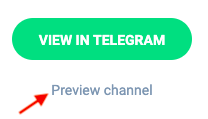
The link you’re supposed to index should look like this t.me/s/yourchannelname (with the /s/ in between)

You can create multiple channel in one account. I’d suggest you to create one channel for each of your moneysite. This link has a high indexing rate and you don’t need to worry about having a zero member or zero views on your new channel as this is meant for link building only.
Link indexed on Google

So that’s pretty much it. I hope you find this useful.
@Rachmaninoff Thanks for sharing this information. I never knew this technique before until I found this post.
I tried it and it is good and also I tried with some different technique. In the first place I always try to get link on my keyword If I found the site has authority so same thing I apply for telegram and successfully got the backlink on my keyword text.
I tested it on telegram desktop based app and not on mobile so if you want to do it you should do it on telegram desktop based app
Here are the steps I follow
- Create the channel as you already described.
- Copy and paste the content from my word (I pasted around 500 word article with anchor text just to experiment but got no luck as after pasting all formatting was gone.)
- To format the text I just use the word shortcuts ex. to bold the text CTRL+b, for italics CTRL+i
- Select the keyword you want to link and press CTRL+K and VOILA you will prompt with the box to paste your link for that particular keyword.
- Now If you want add image content will truncate to 150 words or if you don't add image the whole content you can post just like blog or article posting.
Again thanks for the post.

shelly Shelly
Registered Member
- Apr 21, 2020
- 86
- 43
good one that can be used by anyone at this forum!

CasinoLinks
BANNED
- May 31, 2020
- 106
- 19
That's a great share... I will start using this.
Thank you very much for the useful information.
Thank you very much for the useful information.
Thanks for your good share @Rachmaninoff
It looks like telegram changed something. The backlink t.me/s/yourchannelname now redirects to t.me/yourchannelname (checked with multiple backlinks) which can only be opened with telegram desktop app and not in the browser anymore.
It does get indexed though (as t.me/yourchannelname ), but on that page the article and backlink are not displayed (only in app, when the channel is opened). So it looks like this method does not work anymore.
It does get indexed though (as t.me/yourchannelname ), but on that page the article and backlink are not displayed (only in app, when the channel is opened). So it looks like this method does not work anymore.
Theaccused
Newbie
- Jul 11, 2019
- 3
- 5
Thank you so much, if people like you did not take the time to write such amazing stuff, i would end up a 60 year old Noob, and as for Lorem of the Ip, i always wondered, Thanks again.


Barium
Regular Member
- Feb 24, 2017
- 290
- 81
Anyone not finding the "preview channel" button in the telegram url?
if I manually force it, like : https://t.me/s/mychannelurl it redirects to https://t.me/mychannelurl without preview button there. Maybe they updated it.
if I manually force it, like : https://t.me/s/mychannelurl it redirects to https://t.me/mychannelurl without preview button there. Maybe they updated it.

Hey @vinchenson
Yes that happens to some of my channels too but i still have not figured out why. In some Channels the Webpreview returned after a while.
If you have an idea, let me know ^^
Reasons i could exclude are: Use of "inappropriate" channel pictures. Link in the description. Content posted in the channel. (I made test with channels that have non of that and they lost the preview)
Only Channel Name and Description is left :/
Yes that happens to some of my channels too but i still have not figured out why. In some Channels the Webpreview returned after a while.
If you have an idea, let me know ^^
Reasons i could exclude are: Use of "inappropriate" channel pictures. Link in the description. Content posted in the channel. (I made test with channels that have non of that and they lost the preview)
Only Channel Name and Description is left :/


dealmein923
Regular Member
- Feb 13, 2013
- 249
- 79
Thank you for this direction.

DigitalUpdate
Registered Member
- Jul 10, 2017
- 83
- 28
Sonds really good to me,make don't try to spam.love your stuff man

terry12138
Newbie
- Jun 20, 2021
- 4
- 0
This is a really impressive method.
