[GET] Python Domain Name Hunting Script + BONUS INSIDE

Status
Not open for further replies.

moosicles

Registered Member
Joined
Sep 19, 2013
Messages
83
Reaction score
44
Hey guys, I just thought I'd give back some to this great community that's helped me learn so much.

This is a simple little python script to help you quickly search for new domains. I call it domainer :) It takes an input of keyword(s) in a comma seperated list, and merges each one with a preset list set in the script. It then takes the new created list and copies it to your clipboard so you can paste it into a bulk domain name checker.

In order to use it you will need some version of python and the library pyperclip. If you dont have python, google "how to install python" and follow a tut. You can use 3.x if you want, but for the sake of this post I will be using 2.7 If you dont have pyperclip, open your cmd and run pip install pyperclip,

Here is the code. Hopefully it is readable enough for anybody to grasp exactly what is going on under the hood.

Code:
#domainer.py
import pyperclip

mergeList = ["marketing", "design", "web", "webdesign", "websolutions", "solutions", "agency", "360", "emarketing", "digital", "digitalmarketing", "digitalmedia", "media", "network", "net"]
endlist = []
endstring = ""
keyword = raw_input("input comma seperated keyword(s) to merge:")
keywords = keyword.split(",")

for keyword in keywords:
  for item in mergeList:
  endlist.append(keyword + item + ".com")
   
  for item in endlist:
  endstring = endstring + item + "\n"
pyperclip.copy(endstring)
print "The list has been copied to your clipboard"

As you can see there is plenty of room for improvement and tweaks, so feel free to run with it and make it your own!

BONUS!
You can make this script execute from your run console! That means you push WinKey+R and type "domainer" and it automatically executes without having to navigate to your directoy and typing the usual "python scriptName". This is a neat little trick that you can use with any python script.

To do this, copy the domainer.py script into your python path. For most people, its C:\Python27 or something similar. Then make a new bat file with this code:

Code:
@python.exe C:\Python27\domainer.py %*
@pause

and save it in your python path as well. Obviously adjust this for your python version.

once you have that saved there hit WinKey+R and type domainer, or whatever you've named your files. Congrats! You now have a handy little domain hunting script to help you on your future ideas.

Hopefully this will help somebody out. If you have any suggestions for edits, feel free to post them. Or you can try to learn some python and make them yourself ;)
 
Bruh I would love this man. Please Pm me or give me your skype. Let's talk
 
Nice idea!
A little suggestion: You can take a list of commonly used prefixes/suffixes for domain names instead of sourcing them from a small in-program array.
You can find a good list here. Copy the list into a txt file and use this txt file (file handling) inside of the program to generate the domain suggestion!
It should give higher and better results
 
Bruh I would love this man. Please Pm me or give me your skype. Let's talk

It's all in the OP. If anything is unclear, please post in this thread and I'll help you work through it.

Nice idea!
A little suggestion: You can take a list of commonly used prefixes/suffixes for domain names instead of sourcing them from a small in-program array.
You can find a good list here. Copy the list into a txt file and use this txt file (file handling) inside of the program to generate the domain suggestion!
It should give higher and better results

Hey thanks, nice idea! I will definitely try coding up a version that uses filehandling and bring it back to share. The possibility for placeholders in the txt file also appeals to me
 
For the uninformed: python is a programming language that is highly readable and easy to code with.

If you do not have python, you can download it here: https://www.python.org/downloads/

You can choose to install either version 2.7 or 3.5 of python, but this post will be focused on 2.7 because that's what I know :p hahahaha. From my last understanding, there are some changes in 3.x that break some older libraries as not all libraries have migrated to the new code or are not actively maintained. For that reason, I recommend 2.7. All major libraries that you want as an Internet Marketer will be available in this version.

So download and run the installer for Python 2.7 When you get to this screen:

511x440xPython-8.jpg.pagespeed.gp+jp+jw+pj+js+rj+rp+rw+ri+cp+md.ic.NtuEe2aDZ1.jpg


make sure you click on "Add python.exe to Path" and select "Will be installed on local hard drive". Then click through the installation. You will notice that it will bring up a command prompt during the install. Don't worry, this is normal. Once complete, click finish and complete the installation.

Open your start menu and type "system environment". Then click on "environment variables". With the Environment Variables windows open, click new under system variables.

478x497xPython-13.jpg.pagespeed.gp+jp+jw+pj+js+rj+rp+rw+ri+cp+md.ic.ShFk1NSH2K.jpg


Enter any arbitrary name for the "Variable Name". Python or Pythonpath would be fine. Under "Variable Value" you should paste in C:\Python27\;C:\Python27\Scripts;

431x501xPython-14.jpg.pagespeed.gp+jp+jw+pj+js+rj+rp+rw+ri+cp+md.ic.cIfuTNDclG.jpg


Press okay through everything and accept all changes.

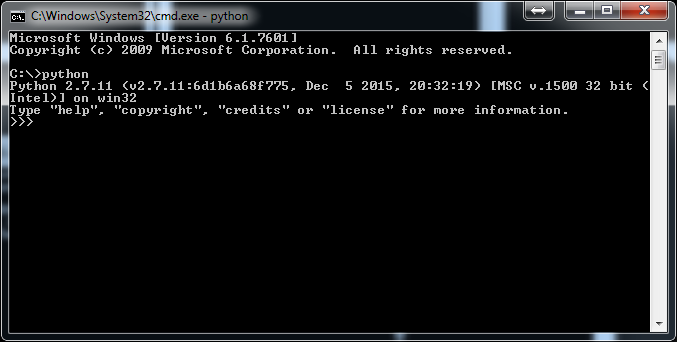
Now start up your command prompt by opening your start menu and typing "cmd". Then type "python". If you see this:

vsXlfPn


Then congratulations! You've installed python correctly. Now simply type Ctrl-Z and press enter to exit out of python.

If python is installed correctly, then chances are pip is installed too. pip is an tool that installs other libraries for you to use with python. There are plenty of great libraries that can help you scrape websites, build bots, or just be more productive overall. If you haven't learned a programming language yet, python is a great place to start. We're going to use pip to install pyperclip.

type "pip install pyperclip" into your command prompt window. You should see something similar to this

phpBM4aBv.jpeg


Now you're all set. Just copy the code in the OP into a .py file and follow the instructions. Also, with python installed, you should invest a little time learning and develop your own scripts to do all sorts of cool things. The uses it has for marketers is something to be praised.

I hope this easy enough for everybody to follow.
 
UPDATE:

I found an error in the OP code. I accidentally nested a for loop while I was simplifying the code. A small error, but an important one. Here is the fixed version:

Code:
import pyperclip
mergeList = ["marketing", "design", "web", "webdesign", "websolutions", "solutions", "agency", "360", "emarketing", "digital", "digitalmarketing", "digitalmedia", "media", "network", "net"]
endlist = []
endstring = ""
keyword = raw_input("input comma seperated keyword(s) to merge:")
keywords = keyword.split(",")

for keyword in keywords:
  for item in mergeList:
  endlist.append(keyword + item + ".com")
  
for item in endlist:
  endstring = endstring + item + "\n"
  
pyperclip.copy(endstring)
print endstring
print "The list has been copied to your clipboard"

Also, here is a version that uses an external text file for the merge list with $kw placeholders for keyword placement. Some small changes here, but allows for external management of keywords. In order for this to work, you will need this script and its text file (which I have named as mergeList.txt) in the same directory.

Code:
import pyperclip
f = open('mergeList.txt', 'r')
mergeList = f.readlines()
endlist = []
endstring = ""
keyword = raw_input("input comma seperated keyword(s) to merge:")
keywords = keyword.split(",")

for keyword in keywords:
    endlist = [line.replace('$kw', keyword).rstrip("\n") for line in mergeList]

for item in endlist:
    endstring = endstring + item + ".com" + "\n"

pyperclip.copy(endstring)
print endstring
print "The list has been copied to your clipboard"

I thought placeholders would be good so you can use more descriptive and well placed suffix/prefixes with your keywords. Here is the text file that goes along with the new script. As you can see, $kw designates where the keyword will be added in that line. Save this as mergeList.txt

Code:
$kwmarketing
$kwdesign
design$kw
$kwweb
$kwwebdesign
webdesign$kw
websolutions$kw
$kwsolutions
agency$kw
$kw360
$kwemarketing
digital$kw
$kwdigital
$kwdigitalmarketing
digitalmarketing$kw
$kwdigitalmedia
$kwmedia
$kwnetwork
$kwnet

When running this new script against the keyword turbo, I was returned this list:

turbomarketing.com
turbodesign.com
designturbo.com
turboweb.com
turbowebdesign.com
webdesignturbo.com
websolutionsturbo.com
turbosolutions.com
agencyturbo.com
turbo360.com
turboemarketing.com
digitalturbo.com
turbodigital.com
turbodigitalmarketing.com
digitalmarketingturbo.com
turbodigitalmedia.com
turbomedia.com
turbonetwork.com
turbonet.com

out of which these 7 domains were available for registration:

webdesignturbo.com
websolutionsturbo.com
agencyturbo.com
turboemarketing.com
turbodigitalmarketing.com
digitalmarketingturbo.com
turbodigitalmedia.com

Not great, but not too horrible, and a lot of room for improvement depending on how you manage your merge list.
 
Hey guys, once you know well Python, could you reffer me some Python forums, I'm interested on this language.
 
I might get into domaining soon, so let's see.
 
Hey guys, once you know well Python, could you reffer me some Python forums, I'm interested on this language.

Hey man, check out these sites to start learning the language.
https://docs.python.org/3/ - The Docs, everything you need to learn is really in here. Rather dense to read though.
https://www.codecademy.com/learn/python - An interactive tutorial based around teaching you the basics of the language.
https://automatetheboringstuff.com/ - A great book with lots of practical and well written examples. Costs money to download, but its available for free in html format directly from the authors site. I'd call it a beginner to intermediate book.

Also look around on youtube. There's tons and tons of great video tutorials available to get yourself started.

I might get into domaining soon, so let's see.

Good for you, hope this tool helps you out. :)
 
Hey man, check out these sites to start learning the language.
https://docs.python.org/3/ - The Docs, everything you need to learn is really in here. Rather dense to read though.
https://www.codecademy.com/learn/python - An interactive tutorial based around teaching you the basics of the language.
https://automatetheboringstuff.com/ - A great book with lots of practical and well written examples. Costs money to download, but its available for free in html format directly from the authors site. I'd call it a beginner to intermediate book.

Also look around on youtube. There's tons and tons of great video tutorials available to get yourself started.


Good for you, hope this tool helps you out. :)

automateboringstuff was also recommended to me by a member of this forum...
 
Hey man, check out these sites to start learning the language.
https://docs.python.org/3/ - The Docs, everything you need to learn is really in here. Rather dense to read though.
https://www.codecademy.com/learn/python - An interactive tutorial based around teaching you the basics of the language.
https://automatetheboringstuff.com/ - A great book with lots of practical and well written examples. Costs money to download, but its available for free in html format directly from the authors site. I'd call it a beginner to intermediate book.

Also look around on youtube. There's tons and tons of great video tutorials available to get yourself started.


Good for you, hope this tool helps you out. :)

Hey! Very good stuff! Thank you so much
 
Status
Not open for further replies.
Back
Top