Bypass Verification needed

Milbo Agency

Regular Member
Joined
Oct 13, 2022
Messages
347
Reaction score
100
When you access Facebook Business Manager, occasionally Facebook will ask you to verify your email. It will send a code to your email, and you will be required to enter the code.
1736570400501.png

Method 1: Click the 'Verify Account' button and enter the code sent to your email as usual.

Method 2:

1 Right-click above the verification box and select 'Inspect'.2 Delete the element.
1736570413886.png

3 After the verification box disappears, right-click again, select 'Inspect', and delete the element once more.
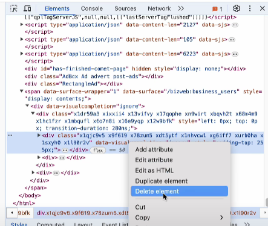
1736570436476.png

4 At this point, you can use the Business Manager normally.

This is a trick to bypass the 'Verification Needed' message. You can use it multiple times but avoid overusing it. Only use it when Facebook is lagging and not sending the code to your email as mentioned in Method 1.
 
When you access Facebook Business Manager, occasionally Facebook will ask you to verify your email. It will send a code to your email, and you will be required to enter the code.
View attachment 411108
Method 1: Click the 'Verify Account' button and enter the code sent to your email as usual.

Method 2:

1 Right-click above the verification box and select 'Inspect'.2 Delete the element.
View attachment 411109
3 After the verification box disappears, right-click again, select 'Inspect', and delete the element once more.
View attachment 411110
4 At this point, you can use the Business Manager normally.

This is a trick to bypass the 'Verification Needed' message. You can use it multiple times but avoid overusing it. Only use it when Facebook is lagging and not sending the code to your email as mentioned in Method 1.
Great info! Thank you for this!
 
OK, so you deleted the HTML element. Does it come back if you refresh the page?

If not, would it not make sense for it to go away by itself on next refresh, if deleting the DOM element made any difference? Nothing is sent back to the FB server so how can FB know that you should not be getting verified again just because you tinkered with the locally rendered HTML?

Try to record it next time it happens as it would be very interesting to see if this really works and why, because it shouldn't:)
 
OK, so you deleted the HTML element. Does it come back if you refresh the page?

If not, would it not make sense for it to go away by itself on next refresh, if deleting the DOM element made any difference? Nothing is sent back to the FB server so how can FB know that you should not be getting verified again just because you tinkered with the locally rendered HTML?

Try to record it next time it happens as it would be very interesting to see if this really works and why, because it shouldn't:)
It will still display the verification request after reloading the page. However, after removing the HTML section, you can still click the BM function buttons and they will work as normal. I believe Facebook is only showing this message to cover the BM buttons but has not restricted access to BM. That's why I made a note at the end of the post. We should not abuse this method and only use it when Facebook does not send the verification code to the email or when there is a lag when clicking to send the code.
 
When you access Facebook Business Manager, occasionally Facebook will ask you to verify your email. It will send a code to your email, and you will be required to enter the code.
View attachment 411108
Method 1: Click the 'Verify Account' button and enter the code sent to your email as usual.

Method 2:

1 Right-click above the verification box and select 'Inspect'.2 Delete the element.
View attachment 411109
3 After the verification box disappears, right-click again, select 'Inspect', and delete the element once more.
View attachment 411110
4 At this point, you can use the Business Manager normally.

This is a trick to bypass the 'Verification Needed' message. You can use it multiple times but avoid overusing it. Only use it when Facebook is lagging and not sending the code to your email as mentioned in Method 1.
What browser do you use? I use google chrome and followed your instructions but the mail notification still does not go away.
 
This is what I want right now, my clients are on the record and doing a lot of work, I will share this with them, it's really helpful.
 
I have encountered such situations so this knowledge is very useful to me. thanks for sharing
 
This trick is very cool. I will try it to see if it works or not
 
This case happens a lot recently, thanks for sharing.
 
Very useful, I will test it to see if it works ok with different accounts
 
Thank you for share! Every time I go to my advertising accounts I get verified, it takes a lot of time
 
When you access Facebook Business Manager, occasionally Facebook will ask you to verify your email. It will send a code to your email, and you will be required to enter the code.
View attachment 411108
Method 1: Click the 'Verify Account' button and enter the code sent to your email as usual.

Method 2:

1 Right-click above the verification box and select 'Inspect'.2 Delete the element.
View attachment 411109
3 After the verification box disappears, right-click again, select 'Inspect', and delete the element once more.
View attachment 411110
4 At this point, you can use the Business Manager normally.

This is a trick to bypass the 'Verification Needed' message. You can use it multiple times but avoid overusing it. Only use it when Facebook is lagging and not sending the code to your email as mentioned in Method 1.
I also often encounter this situation of asking for xm codes, thank you for sharing these useful things
 
This is a useful tip when encountering verification errors, but should be used carefully to avoid affecting the account. Thanks for sharing how to handle when Facebook does not send the code in time!
 
Back
Top