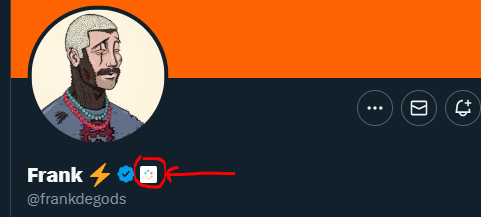
Affiliation badges on twitter ??

SeedPhrase

Elite Member
Jr. VIP
Joined
Feb 4, 2020
Messages
1,696
Reaction score
2,071
Hey, does anyone know how to get Affiliation badges on Twitter? like image below

1678961555203.png


we've got a gold badge in the company profile, subscribed to blue.
but still can't find the source/option to apply. neither is any video available on YT.

I'd really appreciate your help.
 
As far as I know, those badges apply to accounts connected to an organization on Twitter to some significant capacity. Besides meeting that qualifier, there's no other way to get that an affiliation badge.
 
As far as I know, those badges apply to accounts connected to an organization on Twitter to some significant capacity. Besides meeting that qualifier, there's no other way to get that an affiliation badge.
we meet all criteria, our company profile has a gold badge and Twitter blue subscribed. can you refer me to a link where I can apply for that?
 
we are already a verified organization (gold badge)
Twitter Verified Organizations lets any organization add accounts affiliated with their organization. You are responsible for any account you affiliate as per our Purchaser Terms of Service, Terms of Service, and other policies. To add affiliated accounts:

  1. Click Add accounts.
  2. A popup will appear where you can search for any account on Twitter.
  3. You can add as many affiliates as you want. These accounts must be related to your account and conform to our Purchaser Terms of Service.
  4. To add an affiliate click the “Send Invite” button.
  5. When you send an invite, the affiliated user will be notified (via email and push notification) that you have invited them to join.
  6. They will be added to the “Pending” tab in the Portal.
  7. Once the user accepts, they will immediately get a checkmark and affiliate badge, and they will move from the “Pending” tab to the “Accounts” tab.

https://help.twitter.com/en/using-twitter/verified-organizations

https://help.twitter.com/en/using-twitter/verified-organizations#verifiedorgs-howto
 
Twitter Verified Organizations lets any organization add accounts affiliated with their organization. You are responsible for any account you affiliate as per our Purchaser Terms of Service, Terms of Service, and other policies. To add affiliated accounts:

  1. Click Add accounts.
  2. A popup will appear where you can search for any account on Twitter.
  3. You can add as many affiliates as you want. These accounts must be related to your account and conform to our Purchaser Terms of Service.
  4. To add an affiliate click the “Send Invite” button.
  5. When you send an invite, the affiliated user will be notified (via email and push notification) that you have invited them to join.
  6. They will be added to the “Pending” tab in the Portal.
  7. Once the user accepts, they will immediately get a checkmark and affiliate badge, and they will move from the “Pending” tab to the “Accounts” tab.

https://help.twitter.com/en/using-twitter/verified-organizations

https://help.twitter.com/en/using-twitter/verified-organizations#verifiedorgs-howto
first of thanks for this guide, but where is that "add accounts" option?
 
first of thanks for this guide, but where is that "add accounts" option?

If you have paid and then the link should be in your activation email.

How to use Twitter Verified Organizations​


The Twitter Verified Organizations portal is designed to be as flexible and easy to use as possible. Once your organization is onboarded, you’ll be able to add and remove affiliated accounts, and manage your billing all in one place.

How to activate your account

  1. If your organization is granted access after Twitter reviews the application, you’ll be notified (via email) that your account is ready to activate.
  2. Follow the link in your activation email.
  3. This will take you to an authentication page where you’ll be asked to log in through your organization’s Twitter account.
  4. You must agree to any Terms and Conditions.
  5. After you activate your account, you’ll be taken to a page where you can add your payment details via our payment provider Stripe.
  6. Here, you’ll submit your billing details.
  7. After payment for the Verified Organizations subscription, your account will be ready to use and you can begin adding affiliated accounts.

How to add affiliated accounts

Twitter Verified Organizations lets any organization add accounts affiliated with their organization. You are responsible for any account you affiliate as per our Purchaser Terms of Service, Terms of Service, and other policies. To add affiliated accounts:

  1. Click Add accounts.
  2. A popup will appear where you can search for any account on Twitter.
  3. You can add as many affiliates as you want. These accounts must be related to your account and conform to our Purchaser Terms of Service.
  4. To add an affiliate click the “Send Invite” button.
  5. When you send an invite, the affiliated user will be notified (via email and push notification) that you have invited them to join.
  6. They will be added to the “Pending” tab in the Portal.
  7. Once the user accepts, they will immediately get a checkmark and affiliate badge, and they will move from the “Pending” tab to the “Accounts” tab.

How to remove affiliated accounts

  1. You can remove affiliated accounts quickly and easily by clicking the “X” remove button in the row next to any affiliated account.
  2. You’ll be prompted to confirm with “Are you sure you want to remove @handle?”
  3. Clicking “Yes, do it” will immediately remove both verification and affiliation badges for the affiliated account.
  4. Note: The removed affiliated account will lose verification and affiliation but you will continue to be billed for the affiliated account until the end of the next billing cycle for that account.

https://help.twitter.com/en/using-twitter/verified-organizations#verifiedorgs-howto
https://help.twitter.com/en/forms
 
Thanks bro, it worked finally.
Nice! The affiliation badge is one of the most eye-catching badges on the platform and the certain primo fascie of seeing one on the account is undeniably swaying.
 
Is there a charge to add affiliate badges to people?
If you have or want to make money, please reply me
it has a limit of 5 affiliates for free, after that per affiliate per month will cost you $50.
 
Back
Top