

- Jul 4, 2020
- 4,879
- 3,908
Hello blackhatworlders,
I decided to share a simple guide on finding expired domains if you are planning on creating a new blog. This guide is just to help you find a good enough expired domain so that you don't have to start your new blog from 0.
This is what i actually do myself when i want to make a new Blog and i don't want to spend any money on expired domains.
What you need:
expireddomains.net account
namesilo.com -> to check domain availability
ahrefs.com/backlink-checker -> Ahref's free backlink checker to check DR and backlinks
web.archive.org -> Wayback machine to check domain's history
moz.com/domain-analysis -> Moz Free Domain Authority Checker to check DA, Spam score and top linking domains
1) Head over to expireddomains.net and create a free account
After creating the account, you will land in this page:

Click on Deleted .com to see all .com domains (I always go for .com domains for my blogs, if you want other TLDs you can also check .net .org .info, etc)
When you click Deleted .com, you will see all .com domains in their database. You will need to filter these results first. To do that, please click on Show FIlter

What i like to do:
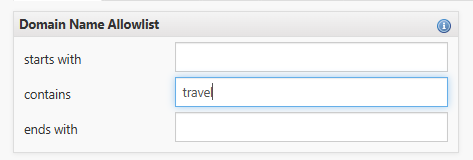
Under Domain Name Allowlist, in contains field i like to put the topic of my website (this way i filter domains with my topic), for example, if i am creating a Travel blog, i put the word Travel there
I tick the 'no Numbers' field under Domain Name Settings as i don't want numbers in my domain name
Under Dictionary Word Domains, if you are creating an English blog, tick the English field.
Under Listing Settings, always tick 'only available Domains'. If you don't tick this field, search results will also show you domains that are already registered.
After putting all your filters, click Apply filters.
Now you will see the search results based on your filters. Another step i like to take before starting to check the domains is click the BL field (Majestic External Backlinks) so that results are filtered from domains with most external backlinks to the lowest. This makes it easier to start checking domains from the top.

2) Check domains on Ahrefs free backlink checker
I do this to check the domain rating, backlinks and linking websites (Refering domains).
Below are the results of the first domain from my search results. Domain rating is looking good, backlinks number looks good, but the number of linking websites is low and all the backlinks Ahrefs is showing me are Korean/Chinese links

This is where i decide to check domain's history in Wayback machine.
3) Check domain's history in Wayback machine (web.archive.org)
You need to check domain's history to see if it was used for spam, turned into a casino or sport betting site, or it was serving Adult content. If you see that the domain was used for any of these or turned into a Chinese spam site, you need to avoid registering that domain as most probably Google has blacklisted it and your new blog would never rank.
Immediately after putting the website in Wayback machine, i can see the website is in Chinese and translating it to English makes it clear that domain was turned into a Sports betting website.

That's a clear sign to not go for this domain so i stop focusing on this domain and go back to Expireddomains search results and start looking at the next domain.
You need to be 100% sure that domain has a clear history and was used in the same niche (Travel in this case) before purchasing.
Also just a quick tip, when you filter the results with BL filter (Majestic External Backlinks), the top results will most probably have been used for spam, casino or adult content as these are the domains with the most backlinks and people have already created scripts/automation that checks on Expireddomains daily for these domains.
So for you to find a good clean domain you will have to go deep in checking all domains one by one and this takes time. Since the domain name is one of the most important things for your blog, it makes this time totally worth it if you are able to find a good domain in the end.
4) Check domain on Moz domain analysis free tool to check DA, Spam score and top linking domains
Another step i like to do after finding a good domain with good DR and clean history is to check DA, spam score and top linking domains in Moz

I don't really care much about DA (Domain Authority) here as i already checked DR (Domain Rating) in Ahrefs which i trust more but i like to check the Spam Score and Top linking domains.
If spam score is low (under 10%), i usually go for those domains as their link profile is not spammy. I sometimes go for domains with higher spam score if the DR is high and domain has clean history so don't put too much focus on this.
What i really like about Moz domain analysis tool is the top linking domains section.
Moz ranks the backlinks to the domain based on DA. Here you can actually check if the domain's top backlinks are relevant to your niche or not. For example, if i was checking a domain for my Travel blog, i would check if the top linking domains are relevant to Travel niche or not. If you find relevant linking domains, that's a clear sign that this domain is a very good pick for your new blog.
5) Check domain availability in Namesilo.com
You can use any domain registrar for this step but i like to use Namesilo as it never failed me. If it says its available for purchase, it is always available. For example, once in the past namecheap showed me the domain was available but when trying to purchase it, Namecheap refunded me saying that domain was already registered. This never happened to me with Namesilo.
If the domain is available in Namesilo, go forward and register the domain in your preferred registrar.
Remember: You won't find an expired domain that is really strong with a very strong link profile this way as there are people who created scripts for Expireddomains.net to look for these domains and they purchase these domains as soon as they are available. This is just a guide to find a strong enough domain for your new blog so you can pass Google's sandbox period which you would face if purchasing a brand new domain.
Remember: Not all domains you find will fit your new blog. If we take Travel niche as an example, if you find a strong domain but the domain is WorkAndTravel.com, that domain doesn't fit a Travel blog at all and is not a good fit for you even tho it has a good link profile. In this case, it's so much better to start with a fresh relevant domain that go for this domain for your Travel blog.
Since i already showed you a bad example for a domain in Wayback machine, here is a good example on how a Travel blog should look:

This shows you that domain was used for a Travel blog before and if the domain had a good DR and strong link profile, this would be the perfect domain for you to purchase.
Please make sure to go through each step before deciding to purchase an expired domain. If you find a domain with strong profile but the domain was used for spam/adult/casino and you think you will go for it anyway, i guarantee you that you will waste both your time and efforts as your new blog will never rank on Google since Google has already blacklisted the domain.
Regards,
Beklink
I decided to share a simple guide on finding expired domains if you are planning on creating a new blog. This guide is just to help you find a good enough expired domain so that you don't have to start your new blog from 0.
This is what i actually do myself when i want to make a new Blog and i don't want to spend any money on expired domains.
What you need:
expireddomains.net account
namesilo.com -> to check domain availability
ahrefs.com/backlink-checker -> Ahref's free backlink checker to check DR and backlinks
web.archive.org -> Wayback machine to check domain's history
moz.com/domain-analysis -> Moz Free Domain Authority Checker to check DA, Spam score and top linking domains
1) Head over to expireddomains.net and create a free account
After creating the account, you will land in this page:
Click on Deleted .com to see all .com domains (I always go for .com domains for my blogs, if you want other TLDs you can also check .net .org .info, etc)
When you click Deleted .com, you will see all .com domains in their database. You will need to filter these results first. To do that, please click on Show FIlter
What i like to do:
Under Domain Name Allowlist, in contains field i like to put the topic of my website (this way i filter domains with my topic), for example, if i am creating a Travel blog, i put the word Travel there
I tick the 'no Numbers' field under Domain Name Settings as i don't want numbers in my domain name
Under Dictionary Word Domains, if you are creating an English blog, tick the English field.
Under Listing Settings, always tick 'only available Domains'. If you don't tick this field, search results will also show you domains that are already registered.
After putting all your filters, click Apply filters.
Now you will see the search results based on your filters. Another step i like to take before starting to check the domains is click the BL field (Majestic External Backlinks) so that results are filtered from domains with most external backlinks to the lowest. This makes it easier to start checking domains from the top.
2) Check domains on Ahrefs free backlink checker
I do this to check the domain rating, backlinks and linking websites (Refering domains).
Below are the results of the first domain from my search results. Domain rating is looking good, backlinks number looks good, but the number of linking websites is low and all the backlinks Ahrefs is showing me are Korean/Chinese links
This is where i decide to check domain's history in Wayback machine.
3) Check domain's history in Wayback machine (web.archive.org)
You need to check domain's history to see if it was used for spam, turned into a casino or sport betting site, or it was serving Adult content. If you see that the domain was used for any of these or turned into a Chinese spam site, you need to avoid registering that domain as most probably Google has blacklisted it and your new blog would never rank.
Immediately after putting the website in Wayback machine, i can see the website is in Chinese and translating it to English makes it clear that domain was turned into a Sports betting website.
That's a clear sign to not go for this domain so i stop focusing on this domain and go back to Expireddomains search results and start looking at the next domain.
You need to be 100% sure that domain has a clear history and was used in the same niche (Travel in this case) before purchasing.
Also just a quick tip, when you filter the results with BL filter (Majestic External Backlinks), the top results will most probably have been used for spam, casino or adult content as these are the domains with the most backlinks and people have already created scripts/automation that checks on Expireddomains daily for these domains.
So for you to find a good clean domain you will have to go deep in checking all domains one by one and this takes time. Since the domain name is one of the most important things for your blog, it makes this time totally worth it if you are able to find a good domain in the end.
4) Check domain on Moz domain analysis free tool to check DA, Spam score and top linking domains
Another step i like to do after finding a good domain with good DR and clean history is to check DA, spam score and top linking domains in Moz
I don't really care much about DA (Domain Authority) here as i already checked DR (Domain Rating) in Ahrefs which i trust more but i like to check the Spam Score and Top linking domains.
If spam score is low (under 10%), i usually go for those domains as their link profile is not spammy. I sometimes go for domains with higher spam score if the DR is high and domain has clean history so don't put too much focus on this.
What i really like about Moz domain analysis tool is the top linking domains section.
Moz ranks the backlinks to the domain based on DA. Here you can actually check if the domain's top backlinks are relevant to your niche or not. For example, if i was checking a domain for my Travel blog, i would check if the top linking domains are relevant to Travel niche or not. If you find relevant linking domains, that's a clear sign that this domain is a very good pick for your new blog.
5) Check domain availability in Namesilo.com
You can use any domain registrar for this step but i like to use Namesilo as it never failed me. If it says its available for purchase, it is always available. For example, once in the past namecheap showed me the domain was available but when trying to purchase it, Namecheap refunded me saying that domain was already registered. This never happened to me with Namesilo.
If the domain is available in Namesilo, go forward and register the domain in your preferred registrar.
Remember: You won't find an expired domain that is really strong with a very strong link profile this way as there are people who created scripts for Expireddomains.net to look for these domains and they purchase these domains as soon as they are available. This is just a guide to find a strong enough domain for your new blog so you can pass Google's sandbox period which you would face if purchasing a brand new domain.
Remember: Not all domains you find will fit your new blog. If we take Travel niche as an example, if you find a strong domain but the domain is WorkAndTravel.com, that domain doesn't fit a Travel blog at all and is not a good fit for you even tho it has a good link profile. In this case, it's so much better to start with a fresh relevant domain that go for this domain for your Travel blog.
Since i already showed you a bad example for a domain in Wayback machine, here is a good example on how a Travel blog should look:
This shows you that domain was used for a Travel blog before and if the domain had a good DR and strong link profile, this would be the perfect domain for you to purchase.
Please make sure to go through each step before deciding to purchase an expired domain. If you find a domain with strong profile but the domain was used for spam/adult/casino and you think you will go for it anyway, i guarantee you that you will waste both your time and efforts as your new blog will never rank on Google since Google has already blacklisted the domain.
Regards,
Beklink


