Zwielicht
Elite Member
- Aug 31, 2013
- 21,128
- 40,594
A few months ago, while checking my Google Analytics data, I noticed that my site had been receiving some referrer spam from "trafficmonetize.com", so I searched for more information about one of the referrer spammers in Google. After I searched for the referrer spammer's URL, I noticed that the exact URL only had 1 website ranking for it, a website that was apparently new and contained instructions on removing the referrer spam for that URL. Realising that I had just found a low competition keyword, I quickly wrote a 600 word article for one keyword on my local business site and left it alone for a week to see if I ranked for the term. Lo and behold, a week later, I was receiving an extra 100 visitors a day from that new article I posted, so I started searching for more referrer spam sites and I created articles for them. Some of these articles brought in an extra 100 visitors a day like the initial article, and others brought in up to 300 visitors per day as my rankings continued going up. As I no longer wish to use this method for any of my own sites (the reason for which I'll go over in the "Why Did You Reveal This Method?" section of the FAQ section), I'm going to go over the exact method I used to find and rank these keywords as well as how to format the articles you write.
Now, you'll need the following in order to make this method work:
Finding Referrer Spammers
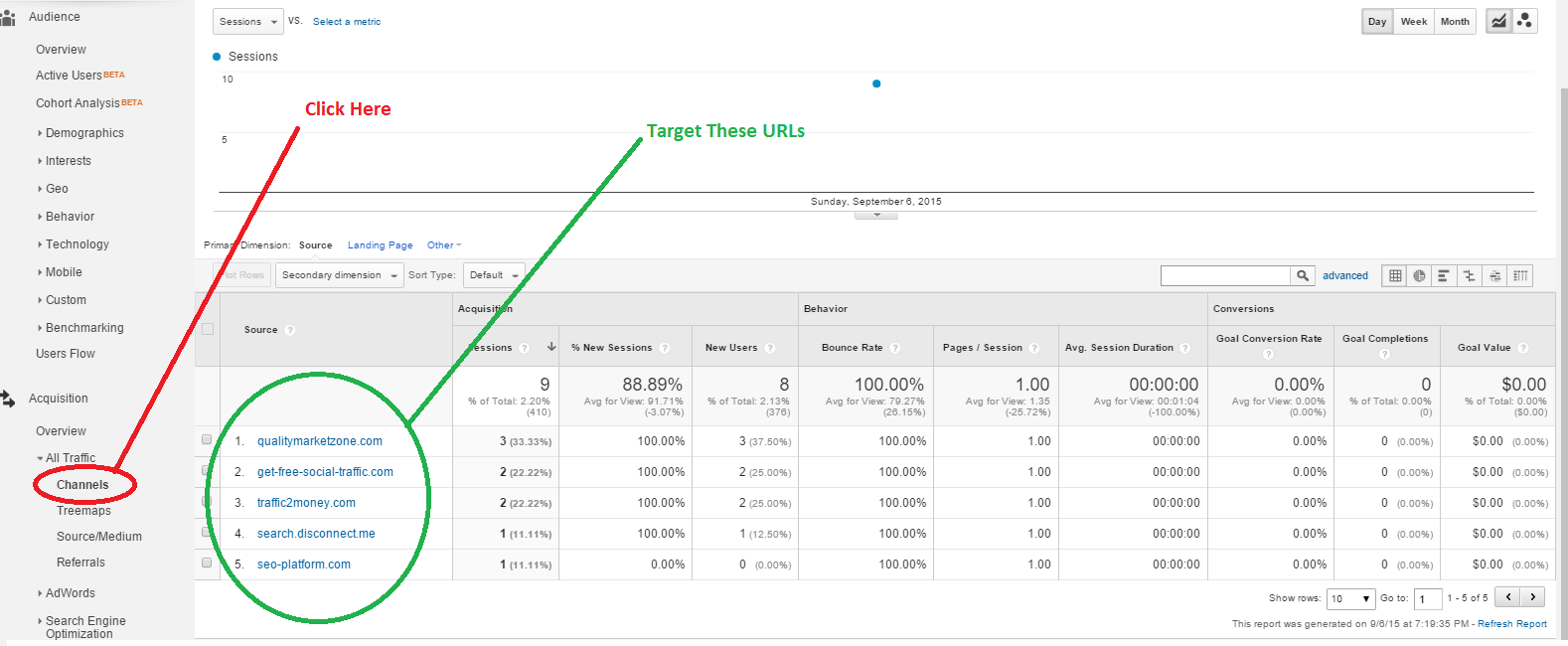
This is where you'll need to access an established Google Analytics account. What you're going to do for this step is visit your Google Analytics account and access the "Channels" tab under "Acquisition". From here, click on "referral" and take note of the referrer spammer URLs you see (if you have never filtered referrer spammers out of your Google Analytics data, there are going to be many more URLs in this section). Remember, not every referrer is a spammer, so use your best judgement when choosing your URLs by researching the URLs to avoid writing an article about an innocent search engine or other site. This is all you have to do to find referrer spammers and it's the fastest way to find new referrer spammers before anyone else who targets these keywords does.
Creating An Article Template
Now that you have a list of fresh referrer spammers, you're going to need to create articles for your site. The goal of these articles is to help your visitor filter out the referrer spam and understand why it occurs. Below, I've created 2 example template for you to use to create your articles.
Note: The article template you choose to create should be tailored to fit your own writing tone.
Template 1: Formatting
Oh boy, here we go again! It looks like we have a new referrer spammer, and this time it's [insert referrer URL]. If you don't know what ghost referrer spam is, then it's spam that targets your Google Analytics accounts without visiting your website. The goal of this spam is to get people to notice it that way they visit the URLs out of curiosity. These sites are usually benign, although they can muddy your Google Analytics data, which is why you would want to get rid of them. So, just how do you filter sites like [insert referrer URL] out of your Google Analytics data?
Just sign into your Google Analytics account by visiting this link. Once you're there, go to the affected website and click on 'Admin' in the upper right-hand corner.
Step 2: Go To "Filters"
Under the 'View' column, click on "Filters".
Step 3: Create A New Filter
Next, you're going to want to create a new filter by clicking on the big red button that says "+New Filter", so click on it. Now, your'e going to enter the following information:
Just click the 'save' button and you're all done! Give your Google Analytics account some time to update your data and you should be free from referrer spam in the future, at least from the URLs that you blocked.
Conclusion
So there you have it, an easy way to block referrer spam URLs from sites like [insert referrer URL]! These referrer spammers usually come up with new domains and abandon the old ones once everyone realises they are spammers, so it's important to update your filters with the new URLs in order to keep your Google Analytics data clean and free from spam.
Once you have created your example template, all you have to do when you discover a new referrer spammer is create a new article and replace the URLs with the new referrer spammer URLs in the template as well as title the articles, "How To Stop [Insert Referrer URL] Referrer Spam". Be sure to mix up the titles and spin your own article to avoid sounding repetitive across your website.
FAQ
Why Did You Reveal This Method?
The issue with these keywords is that you have to constantly keep checking Google Analytics for new keywords as the referrer spammers abandon their old domains to use new ones fairly quickly. This is not worth my time, although for those of you who do not mind having to constantly search or these keywords just to maintain traffic, these keywords can be great to target.
Do You Still Rank For Any Of The Referrer Spam Keywords You Targeted?
Surprisingly, yes! You can actually search for some of the referrer spam sites in Google and see that my own site still ranks for these keywords in positions 2-4 (I won't post my site's name here, but it's not hard to figure out which site is mine).
Can I Use Your Example Article
I don't care if you use the example article, but if I check the 2nd and 3rd page SERPs for any referrer spammer URLs in the future and see "Oh boy, here we go again!" in every article, I'm going to screenshot it and post here on Black Hat World for everyone to see.
Do I Need To Build Backlinks To My Articles?
I never built any backlinks to my articles that I created for these keywords; I just used the same method I went over in my thread here on Black Hat World titled, "The Ultimate Guide To Ranking A Website Without Building Backlinks".
"What About Duplicate Content.... How Can You Rank Without Backlinks... How Much Traffic Did You Get..."?
Read this thread or this thread for the answers. I will not answer any questions where the answer can easily be found by reading either one of these threads.
The Method
Before I go over the method, I just want to let you know that targeting the exact keyword I previously mentioned is going to be a problem for you as that keyword hardly receives any searches these days; in other words, you might as well be targeting "fvsfdbuhweuy4478tgnv" as you won't receive any traffic. Instead, I developed a method for finding, targeting, and ranking for fresh referrer spam-related keywords that even the worst search engine optimiser should have no problem understanding. Now, you'll need the following in order to make this method work:
- A Google Analytics Account - preferably one that's been active long enough to receive referrer spam).
- A Website - preferably one that's in the SEO or Internet marketing niche.
- An Article Template - I provided one below in the section "Creating An Article Template".
Finding Referrer Spammers
This is where you'll need to access an established Google Analytics account. What you're going to do for this step is visit your Google Analytics account and access the "Channels" tab under "Acquisition". From here, click on "referral" and take note of the referrer spammer URLs you see (if you have never filtered referrer spammers out of your Google Analytics data, there are going to be many more URLs in this section). Remember, not every referrer is a spammer, so use your best judgement when choosing your URLs by researching the URLs to avoid writing an article about an innocent search engine or other site. This is all you have to do to find referrer spammers and it's the fastest way to find new referrer spammers before anyone else who targets these keywords does.
Creating An Article Template
Now that you have a list of fresh referrer spammers, you're going to need to create articles for your site. The goal of these articles is to help your visitor filter out the referrer spam and understand why it occurs. Below, I've created 2 example template for you to use to create your articles.
Note: The article template you choose to create should be tailored to fit your own writing tone.
Template 1: Formatting
(H2-Introduction)
(H2-Steps)
(H3-Step 1: Go To Google Analytics)
(H3-Step 2: Go To "Filters")
(H3-Step 3: Create Filter)
(H3-Step 4: Save)
(Conclusion)
Template 2: Complete Example(H2-Steps)
(H3-Step 1: Go To Google Analytics)
(H3-Step 2: Go To "Filters")
(H3-Step 3: Create Filter)
(H3-Step 4: Save)
(Conclusion)
Oh boy, here we go again! It looks like we have a new referrer spammer, and this time it's [insert referrer URL]. If you don't know what ghost referrer spam is, then it's spam that targets your Google Analytics accounts without visiting your website. The goal of this spam is to get people to notice it that way they visit the URLs out of curiosity. These sites are usually benign, although they can muddy your Google Analytics data, which is why you would want to get rid of them. So, just how do you filter sites like [insert referrer URL] out of your Google Analytics data?
How To Stop [Insert Referrer Url Without .Com, .Net, Etcetera] Referrer Spam
Step 1: Log Into Your Google Analytics Account
Just sign into your Google Analytics account by visiting this link. Once you're there, go to the affected website and click on 'Admin' in the upper right-hand corner.
Step 2: Go To "Filters"
Under the 'View' column, click on "Filters".
Step 3: Create A New Filter
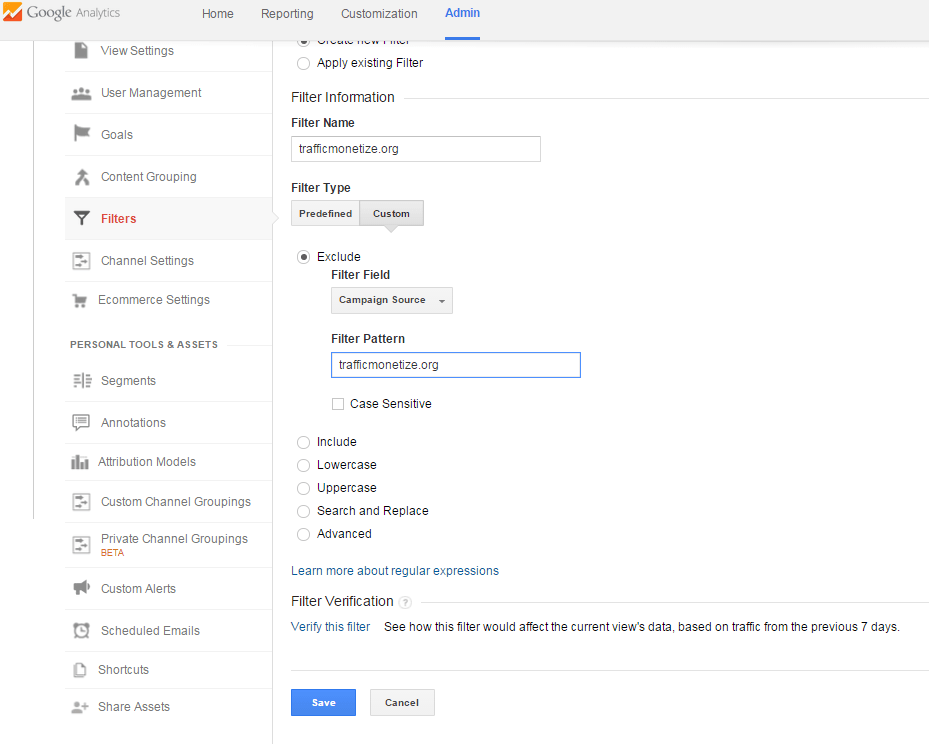
Next, you're going to want to create a new filter by clicking on the big red button that says "+New Filter", so click on it. Now, your'e going to enter the following information:
- Under ‘Filter Information‘, click on ‘Custom‘
- Click the "Exclude‘ button
- Under ‘Filter Field‘, select ‘Campaign Source‘ from the drop-down list.
- Under Filter Pattern, enter ‘[insert referrer URL]‘
Just click the 'save' button and you're all done! Give your Google Analytics account some time to update your data and you should be free from referrer spam in the future, at least from the URLs that you blocked.
Conclusion
So there you have it, an easy way to block referrer spam URLs from sites like [insert referrer URL]! These referrer spammers usually come up with new domains and abandon the old ones once everyone realises they are spammers, so it's important to update your filters with the new URLs in order to keep your Google Analytics data clean and free from spam.
Once you have created your example template, all you have to do when you discover a new referrer spammer is create a new article and replace the URLs with the new referrer spammer URLs in the template as well as title the articles, "How To Stop [Insert Referrer URL] Referrer Spam". Be sure to mix up the titles and spin your own article to avoid sounding repetitive across your website.
FAQ
Why Did You Reveal This Method?
The issue with these keywords is that you have to constantly keep checking Google Analytics for new keywords as the referrer spammers abandon their old domains to use new ones fairly quickly. This is not worth my time, although for those of you who do not mind having to constantly search or these keywords just to maintain traffic, these keywords can be great to target.
Do You Still Rank For Any Of The Referrer Spam Keywords You Targeted?
Surprisingly, yes! You can actually search for some of the referrer spam sites in Google and see that my own site still ranks for these keywords in positions 2-4 (I won't post my site's name here, but it's not hard to figure out which site is mine).
Can I Use Your Example Article
I don't care if you use the example article, but if I check the 2nd and 3rd page SERPs for any referrer spammer URLs in the future and see "Oh boy, here we go again!" in every article, I'm going to screenshot it and post here on Black Hat World for everyone to see.
Do I Need To Build Backlinks To My Articles?
I never built any backlinks to my articles that I created for these keywords; I just used the same method I went over in my thread here on Black Hat World titled, "The Ultimate Guide To Ranking A Website Without Building Backlinks".
"What About Duplicate Content.... How Can You Rank Without Backlinks... How Much Traffic Did You Get..."?
Read this thread or this thread for the answers. I will not answer any questions where the answer can easily be found by reading either one of these threads.
Last edited: