[FREE DR99 Backlink] - Guide - Google Official Website

Zakhej

Elite Member
Jr. VIP
Joined
Dec 2, 2015
Messages
6,328
Reaction score
2,972
Getting backlinks from the Chrome Web Store is a surprisingly straightforward process. This link is a true heavy hitter too, since it comes directly from Google. It's a fantastic way to add serious authority to your website's profile.

I'll walk you through exactly how to get one. Some of you already know this, so you can skip it. :)

Your First Task: Create a Simple Extension​


A Chrome extension is just a small program that runs in the browser, built with basic web technologies like HTML, CSS, and JavaScript.

Don't worry if you are not a developer.

You have options. You can hire someone to build a very simple extension. Or, you can use a tool like ChatGPT or Gemini to help you generate the code for a basic "Hello World" style extension. The goal here is not to build a complex product. You just need a valid extension file to submit.


Getting Your Extension Published​


Once you have your extension code zipped into a single file, you are ready for the easy part.

  1. First, go to the Chrome Developer Dashboard.

  2. You will need to sign into your developer account. If this is your first time, you will have to accept the developer agreement. This usually involves a small, one-time registration fee. ($5 and you can publish up to 20 extensions. :)

    1763233834508.png
  3. Inside the dashboard, look for and click the "New Item" button.

  4. A dialog will ask you to upload your file. Click "Browse Files," find your ZIP file, and upload it.
If your extension's manifest file and ZIP are valid, the page will load successfully. You will land right on the page where you edit the store listing.


The Payoff: Placing Your Backlink​


This is the final and most important step. You now have to provide all the store listing details.

This includes a description, screenshots, and maybe a video if you have one. As you fill out this information, look for the Homepage URL section.

This field is your target.

Put your website's URL right in that Homepage URL box. This is the backlink you are here for.

After you complete all the required fields, submit your extension for review. Once it's approved, your extension and your new, high-authority backlink will be live on a top-tier Google domain.

The Final Step: Paying and Publishing​


Before you can make your extension live, you will need to pay the one-time developer signup fee. This is a small registration cost that Google requires to verify developer accounts.

Once your payment is processed and you have filled out all the store listing details, you are ready to submit your extension.

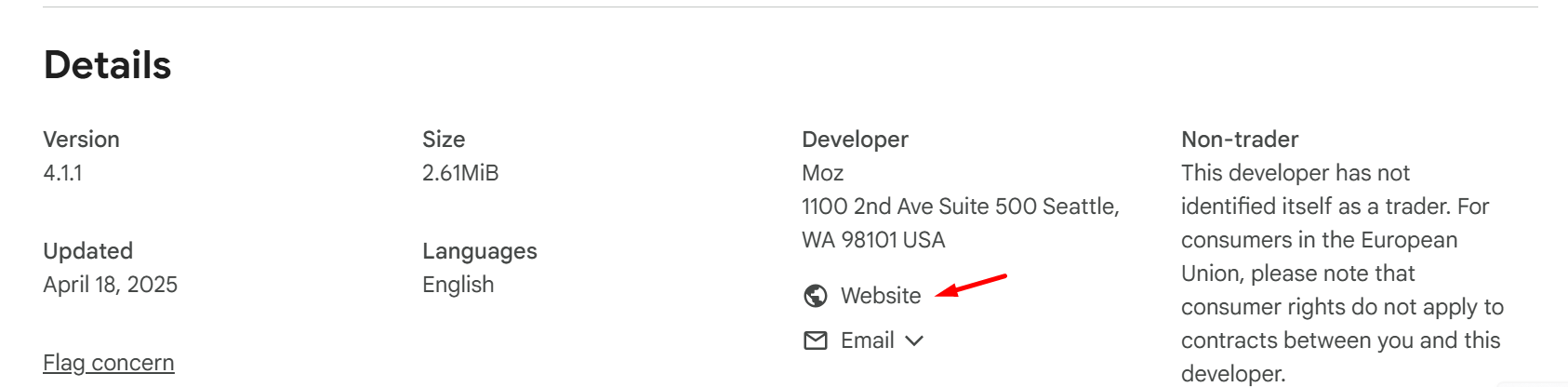
Now, here is the best part. This method does not get you just one link. It actually gets you two.

Example Link 1

1763233471479.png


Example Link 2

1763233502089.png


Enjoy :)
 
Getting backlinks from the Chrome Web Store is a surprisingly straightforward process. This link is a true heavy hitter too, since it comes directly from Google. It's a fantastic way to add serious authority to your website's profile.

I'll walk you through exactly how to get one. Some of you already know this, so you can skip it. :)

Your First Task: Create a Simple Extension​


A Chrome extension is just a small program that runs in the browser, built with basic web technologies like HTML, CSS, and JavaScript.

Don't worry if you are not a developer.

You have options. You can hire someone to build a very simple extension. Or, you can use a tool like ChatGPT or Gemini to help you generate the code for a basic "Hello World" style extension. The goal here is not to build a complex product. You just need a valid extension file to submit.


Getting Your Extension Published​


Once you have your extension code zipped into a single file, you are ready for the easy part.

  1. First, go to the Chrome Developer Dashboard.

  2. You will need to sign into your developer account. If this is your first time, you will have to accept the developer agreement. This usually involves a small, one-time registration fee. ($5 and you can publish up to 20 extensions. :)

    View attachment 487666
  3. Inside the dashboard, look for and click the "New Item" button.

  4. A dialog will ask you to upload your file. Click "Browse Files," find your ZIP file, and upload it.
If your extension's manifest file and ZIP are valid, the page will load successfully. You will land right on the page where you edit the store listing.


The Payoff: Placing Your Backlink​


This is the final and most important step. You now have to provide all the store listing details.

This includes a description, screenshots, and maybe a video if you have one. As you fill out this information, look for the Homepage URL section.

This field is your target.

Put your website's URL right in that Homepage URL box. This is the backlink you are here for.

After you complete all the required fields, submit your extension for review. Once it's approved, your extension and your new, high-authority backlink will be live on a top-tier Google domain.

The Final Step: Paying and Publishing​


Before you can make your extension live, you will need to pay the one-time developer signup fee. This is a small registration cost that Google requires to verify developer accounts.

Once your payment is processed and you have filled out all the store listing details, you are ready to submit your extension.

Now, here is the best part. This method does not get you just one link. It actually gets you two.

Example Link 1

View attachment 487664

Example Link 2

View attachment 487665

Enjoy :)
This is not exactly new. I was expecting you'll include how to quickly create an extension.
 
This is not exactly new. I was expecting you'll include how to quickly create an extension.

1763236240816.png

1763236025592.png


1763236137533.png


See its easy now i am waiting for a review... Need to submit some polices but chatgpt help me fill those :)
 
View attachment 487671
View attachment 487669

View attachment 487670

See its easy now i am waiting for a review... Need to submit some polices but chatgpt help me fill those :)
Here is the live link; they just published it. Now just to submit it on the indexer, and that's it. :)

https://chromewebstore.google.com/detail/page-word-counter/ibgpblnhnmomhndpkbpkigjjlhjmimml


You will need to setup on your gmail account 2 step verification, ask chatgpt or gemini for help for policy what to put and you are good to go.

If anyone has questions or struggles, you can post on this thread. :)
 
Thanks dude, I made an extension this morning after looking at your thread that is kind of helpful even to me using GPT - waiting for it to get approved - even though the method is known it was a good reminder!
 
Would this realisticly help rankings though? and also when you say submit on the indexer what is that?
 
Would this realisticly help rankings though? and also when you say submit on the indexer what is that?
Don't expect miracles from 1 link. indexer service so it gets indexed on Google search... ;)
 
Thanks for this find!
I made an extension to my browser game. It´s a simple thing that just adds an extension, and when I press it will show a pop-up asking if I want to play the game, and it opens the game on the website.

I did have to pay that 5€, but it was a nice experience, and maybe in the future I will make some other extensions.
Which would possibly be a little more difficult and could be used more anyway.
 
Thanks for this find!
I made an extension to my browser game. It´s a simple thing that just adds an extension, and when I press it will show a pop-up asking if I want to play the game, and it opens the game on the website.

I did have to pay that 5€, but it was a nice experience, and maybe in the future I will make some other extensions.
Which would possibly be a little more difficult and could be used more anyway.
That is even better :)
 
What about Mozilla add-on? Does it provide similar backlink compared to Chrome? As they are very similar in build, it would be wise to modify the extension a bit and add it to both.
 
What about Mozilla add-on? Does it provide similar backlink compared to Chrome? As they are very similar in build, it would be wise to modify the extension a bit and add it to both.
Yes you can include it there as well. :)

Didnt try it but with chatgpt it should be easy. ;)
 
From a SEO safety point of view this won’t effect my domain will it?
I am using those indexer just for backlinks so its safe, for money site you can use manual ones from bhw marketplace if you want to index your money site…
 
  • Like
Reactions: otc
Getting backlinks from the Chrome Web Store is a surprisingly straightforward process. This link is a true heavy hitter too, since it comes directly from Google. It's a fantastic way to add serious authority to your website's profile.

I'll walk you through exactly how to get one. Some of you already know this, so you can skip it. :)

Your First Task: Create a Simple Extension​


A Chrome extension is just a small program that runs in the browser, built with basic web technologies like HTML, CSS, and JavaScript.

Don't worry if you are not a developer.

You have options. You can hire someone to build a very simple extension. Or, you can use a tool like ChatGPT or Gemini to help you generate the code for a basic "Hello World" style extension. The goal here is not to build a complex product. You just need a valid extension file to submit.


Getting Your Extension Published​


Once you have your extension code zipped into a single file, you are ready for the easy part.

  1. First, go to the Chrome Developer Dashboard.

  2. You will need to sign into your developer account. If this is your first time, you will have to accept the developer agreement. This usually involves a small, one-time registration fee. ($5 and you can publish up to 20 extensions. :)

    View attachment 487666
  3. Inside the dashboard, look for and click the "New Item" button.

  4. A dialog will ask you to upload your file. Click "Browse Files," find your ZIP file, and upload it.
If your extension's manifest file and ZIP are valid, the page will load successfully. You will land right on the page where you edit the store listing.


The Payoff: Placing Your Backlink​


This is the final and most important step. You now have to provide all the store listing details.

This includes a description, screenshots, and maybe a video if you have one. As you fill out this information, look for the Homepage URL section.

This field is your target.

Put your website's URL right in that Homepage URL box. This is the backlink you are here for.

After you complete all the required fields, submit your extension for review. Once it's approved, your extension and your new, high-authority backlink will be live on a top-tier Google domain.

The Final Step: Paying and Publishing​


Before you can make your extension live, you will need to pay the one-time developer signup fee. This is a small registration cost that Google requires to verify developer accounts.

Once your payment is processed and you have filled out all the store listing details, you are ready to submit your extension.

Now, here is the best part. This method does not get you just one link. It actually gets you two.

Example Link 1

View attachment 487664

Example Link 2

View attachment 487665

Enjoy :)

guy put in a lot of effort and only got 2 likes .
 
Back
Top