

SOLEXI
Registered Member
- Sep 23, 2023
- 84
- 31
The first and previous Megadrop on Binance was Bouncebit which gave everyone that participated $BB worth $17 at launch which now worth about $40 for those that Hodl.
Starting today, Another Megadrop is on the way set to launch on 20th of June, and to participate you need to carryout a Web3 task which will cost you just $7 that you can withdraw back after completing the task.
This on going megadrop promises to be even bigger than the previous one.
Lista DAO is a big project with lot of potential, I'm here to direct you on how to gain from the megadrop so i won't talk much about the project.
Without further ado let go step by step.
Liquid staking BNB into slisBNB
Step 1: Funding your wallet with BNB
Log in to your Binance app and click on the “Wallets” section. Go to “Web3”.
To fund your wallet, click on “receive”. If you are transferring funds from your binance account, click on “transfer in”.
Select the Coin to transfer, which will be BNB in this case, and choose the BNB smart chain (BEP-20) network to transfer your funds through.
Select the amount of BNB that you would like to transfer into your Binance Web3 wallet, and click withdraw. Note: To qualify for Lista DAO’s “The Drop” campaign, a minimum of 0.01 BNB is required to be liquid staked into slisBNB.
You can also copy your $BNB wallet address from the web3 wallet and deposit at least $0.012 worth of $BNB from any wallet.
Step 2: Liquid staking BNB into slisBNB on Lista DAO
Once your wallet has been funded with BNB, the next step is to liquid stake your BNB into slisBNB on Lista DAO.
Head over to the “Discover” section.
Search for “Lista DAO” in the search bar, and click on Lista DAO.
You will be redirected to Lista DAO’s landing page in the app. Connect your Binance Web3 wallet, and click on “Stake”.
Input the amount of BNB you would like to liquid stake on Lista. Remember to leave some BNB behind for gas!
Confirm the transaction, and a notification will appear once your BNB has been liquid staked on Lista DAO.

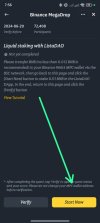
When you are done, go back to your normal Binance exchange account On the homepage, select more, scroll down, find Megadrop and click on it, Then click on ListaDAO, scroll down and click on start quest, close the megadrop page and reopen it after like a minute and reopen the listaDAO page and click on verify.
Step 3: Withdrawing/Unstaking BNB on Lista DAO
To unstake BNB on Lista DAO, navigate to the Lista DAO page by following the instructions given in step 2. (from instruction 1 to 4).
Connect your Binance Web3 Wallet and click on “Stake BNB”.
Head over to the unstaking section by clicking on the “unstake”, and input the amount of BNB you would like to withdraw/unstake, and confirm the transaction. Take note: There will be a 7-15 days unstaking period.
Once the withdrawal transaction has been confirmed, you can monitor the status of your withdrawal under the “withdrawal section” here.
Once the transaction has been confirmed, you are done!
If you lost, just let me know from the comment!.
Starting today, Another Megadrop is on the way set to launch on 20th of June, and to participate you need to carryout a Web3 task which will cost you just $7 that you can withdraw back after completing the task.
This on going megadrop promises to be even bigger than the previous one.
Lista DAO is a big project with lot of potential, I'm here to direct you on how to gain from the megadrop so i won't talk much about the project.
Without further ado let go step by step.
Liquid staking BNB into slisBNB
Step 1: Funding your wallet with BNB
Log in to your Binance app and click on the “Wallets” section. Go to “Web3”.
To fund your wallet, click on “receive”. If you are transferring funds from your binance account, click on “transfer in”.
Select the Coin to transfer, which will be BNB in this case, and choose the BNB smart chain (BEP-20) network to transfer your funds through.
Select the amount of BNB that you would like to transfer into your Binance Web3 wallet, and click withdraw. Note: To qualify for Lista DAO’s “The Drop” campaign, a minimum of 0.01 BNB is required to be liquid staked into slisBNB.
You can also copy your $BNB wallet address from the web3 wallet and deposit at least $0.012 worth of $BNB from any wallet.
Step 2: Liquid staking BNB into slisBNB on Lista DAO
Once your wallet has been funded with BNB, the next step is to liquid stake your BNB into slisBNB on Lista DAO.
Head over to the “Discover” section.
Search for “Lista DAO” in the search bar, and click on Lista DAO.
You will be redirected to Lista DAO’s landing page in the app. Connect your Binance Web3 wallet, and click on “Stake”.
Input the amount of BNB you would like to liquid stake on Lista. Remember to leave some BNB behind for gas!
Confirm the transaction, and a notification will appear once your BNB has been liquid staked on Lista DAO.
When you are done, go back to your normal Binance exchange account On the homepage, select more, scroll down, find Megadrop and click on it, Then click on ListaDAO, scroll down and click on start quest, close the megadrop page and reopen it after like a minute and reopen the listaDAO page and click on verify.
Step 3: Withdrawing/Unstaking BNB on Lista DAO
To unstake BNB on Lista DAO, navigate to the Lista DAO page by following the instructions given in step 2. (from instruction 1 to 4).
Connect your Binance Web3 Wallet and click on “Stake BNB”.
Head over to the unstaking section by clicking on the “unstake”, and input the amount of BNB you would like to withdraw/unstake, and confirm the transaction. Take note: There will be a 7-15 days unstaking period.
Once the withdrawal transaction has been confirmed, you can monitor the status of your withdrawal under the “withdrawal section” here.
Once the transaction has been confirmed, you are done!
If you lost, just let me know from the comment!.


