
You are using an out of date browser. It may not display this or other websites correctly.
You should upgrade or use an alternative browser.
You should upgrade or use an alternative browser.
Permanently Closed Marketplace Sales Thread
- Thread starter TMONEX
- Start date
- Status
- Not open for further replies.
Reserve EarlyBird discount
To everyone who reserved EARLYBIRD. The discount codes has reached limit!
GOOD NEWS!
GOOD NEWS!
 Lift this limit with 50% Discount code by using the code halloween50
Lift this limit with 50% Discount code by using the code halloween50Don't miss this batch of discounts, grab lifetime access at 50% off now

HERE IS YOU SPECIAL LINK TO DIRECTLY BUY INSTANTLY
https://autoblogger.thinkific.com/enroll/2597243
Instant Access 
Chris - FB Apps
Registered Member
- Sep 10, 2016
- 84
- 32
I was happy to buy it at discount, and the seller helped me to adapt the plugin to my host.
Thank you again.
Thank you again.
You are welcomeI was happy to buy it at discount, and the seller helped me to adapt the plugin to my host.
Thank you again.
I also offer personal prompt configuration and support for every member. Just Reach out after purchase.
here is my review :
Bought the product early for discounted price, but I wouldn't mind pay original price at $197.00.
I'm kind of beginner in this autoblog and which I need help... and TMONEX goes extra mile to support.
He explained in detail thru "anydesk" session for demonstration.
And as for the article itself, it's very good quality and cannot ask for more.
Definitely recommend for anyone in autoblogging.
Bought the product early for discounted price, but I wouldn't mind pay original price at $197.00.
I'm kind of beginner in this autoblog and which I need help... and TMONEX goes extra mile to support.
He explained in detail thru "anydesk" session for demonstration.
And as for the article itself, it's very good quality and cannot ask for more.
Definitely recommend for anyone in autoblogging.
Thanks for you review.here is my review :
Bought the product early for discounted price, but I wouldn't mind pay original price at $197.00.
I'm kind of beginner in this autoblog and which I need help... and TMONEX goes extra mile to support.
He explained in detail thru "anydesk" session for demonstration.
And as for the article itself, it's very good quality and cannot ask for more.
Definitely recommend for anyone in autoblogging.
The possibility of the product is endless once you get a hang of it. So far the best long form articles bulk generation method hands down.

HollywoodToday
Regular Member
- Jun 29, 2011
- 427
- 166
1. How many articles per day can it create for 1 site?
2. Can it write articles and save to wp draft? This way I can auto post them later? I like to write 1000 articles then save to draft.
3. If i want to write 1000 articles that have 5k words each, in 1 day, does my hosting server need to be large? Such as 2gb ram 40gb ssd?
4. Is this app updated?
5. Are the blog images hosted on my server or embeds? I assume videos are embeds.
6. Can the plugin create categories then place pages under each coinciding category?
7. I see the featured image, but can the app also add images throughout the article?
8. Do you still have any discounts?
Thank you
2. Can it write articles and save to wp draft? This way I can auto post them later? I like to write 1000 articles then save to draft.
3. If i want to write 1000 articles that have 5k words each, in 1 day, does my hosting server need to be large? Such as 2gb ram 40gb ssd?
4. Is this app updated?
5. Are the blog images hosted on my server or embeds? I assume videos are embeds.
6. Can the plugin create categories then place pages under each coinciding category?
7. I see the featured image, but can the app also add images throughout the article?
8. Do you still have any discounts?
Thank you
Answers to your questions with pictures.1. How many articles per day can it create for 1 site?
2. Can it write articles and save to wp draft? This way I can auto post them later? I like to write 1000 articles then save to draft.
3. If i want to write 1000 articles that have 5k words each, in 1 day, does my hosting server need to be large? Such as 2gb ram 40gb ssd?
4. Is this app updated?
5. Are the blog images hosted on my server or embeds? I assume videos are embeds.
6. Can the plugin create categories then place pages under each coinciding category?
7. I see the featured image, but can the app also add images throughout the article?
8. Do you still have any discounts?
Thank you
1. As much as 1000 to 10,000 if you have a big enough vps server and your API key can afford it. This is a method that lets you be as flexibile as you want and i will even answer your questions with images from the course and the plugin itself. Just watch the course ots only 25mins and if you are already experienced with wordpress you will get it in 15mins

2. All of this functions are present, draft, scheduling with date. All of this i explained in the course
3. If you want to do that in a day, it is possible of course becuse 100 articles will finish in 35minutes on a 2gb cpu, 2gb ram. so it will take 350minutes for 1k. My advice, however is to go in batches of 100 articles every 35 minutes.
4. Yes plugin is up to date and it is been updated everytime
5.The articles are generated inside your wordpress website and images are downloaded, please take lesson one of my course. videos are embeded of course
6. In your publishing settings, you can create categories, tags and even a menu for each article group.

7. Yes you can add images through out the article, you will have to adjust my default settings to do that. If you watch my course you will understand that the same method for inserting a video anywhere on the article is the same method to add images anywhere on the article.
*****Kindly take the course for more understanding.*****
8. If you need a discount please place a reserve on the thread. I will dm you
Try using discount code halloween50

digi robot
Senior Member
- Dec 17, 2018
- 880
- 393
Any roadmap for the future? Im very interested in buying this
It does almost everything you need for ai autoblogging seamlessly. Paste topics, generate Bulk articles, adjustable prompts, using your own API.Any roadmap for the future? Im very interested in buying this
And it's intended to be as basic as possible ensuring regular updates for compatibilty with wordpress is the only plan.
If you have future request you can suggest.
Blaksheimakw11
Newbie
- May 29, 2023
- 36
- 7
purchased for testing! starting lesson now
Blaksheimakw11
Newbie
- May 29, 2023
- 36
- 7
btw how many sites can I use this plugin for?

Blaksheimakw11
Newbie
- May 29, 2023
- 36
- 7
sorry for the multiple replies...
after setting the keyword and topic and I tried using "generate" but it says "No Group ID was specified." can you help?
after setting the keyword and topic and I tried using "generate" but it says "No Group ID was specified." can you help?
Unlimited websites, its stated in sales threadbtw how many sites can I use this plugin for?
CLICK GENERATE CONTENTsorry for the multiple replies...
after setting the keyword and topic and I tried using "generate" but it says "No Group ID was specified." can you help?
in the video course, i did it severally
https://greenpanreview.com/any sample site
sorry for the multiple replies...
after setting the keyword and topic and I tried using "generate" but it says "No Group ID was specified." can you help?

Blaksheimakw11
Newbie
- May 29, 2023
- 36
- 7
thanks... and generating now, it's stuck on this page for 5 minutes, is it working?
Hey yes, check your drafts or schedule, the finished posts are there.thanks... and generating now, it's stuck on this page for 5 minutes, is it working?View attachment 288510
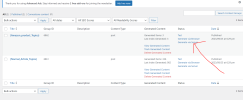
But you are generating via browser, not recommended internet connection will affect or if you close browser,.
You need to go to Generate content and click on generate via server SEE BELOW
Blaksheimakw11
Newbie
- May 29, 2023
- 36
- 7
great thanks its working now. the tags "Use u003ch2u003e tags" are not always showing correct in generated article, but other than that its working well
- Status
- Not open for further replies.