Difficulty with the use of the Scrapebox program

gabrielevinci

Newbie
Joined
Feb 19, 2023
Messages
7
Reaction score
1
Hi everyone.

I've been using the scrapebox program for a few months to do seo and look for leads for my clients' businesses.

Just today I tried for the first time to use the google search engine to find websites (before I used yahoo)

I realized that google always gives me 100 links, no matter how many I ask (200, 300, 400, 1000)

I understand this problem is since google can't find the "forward" button to go to the other page and then load other results

so it always gives me the first 100 results on the first page

How can I put the right script inside the "forward" section?

I then attach the "harvester engine configuration" screen, where you can see that for google, it has always been 100 results ("page inc") and I should change the "Marker for "next page"":
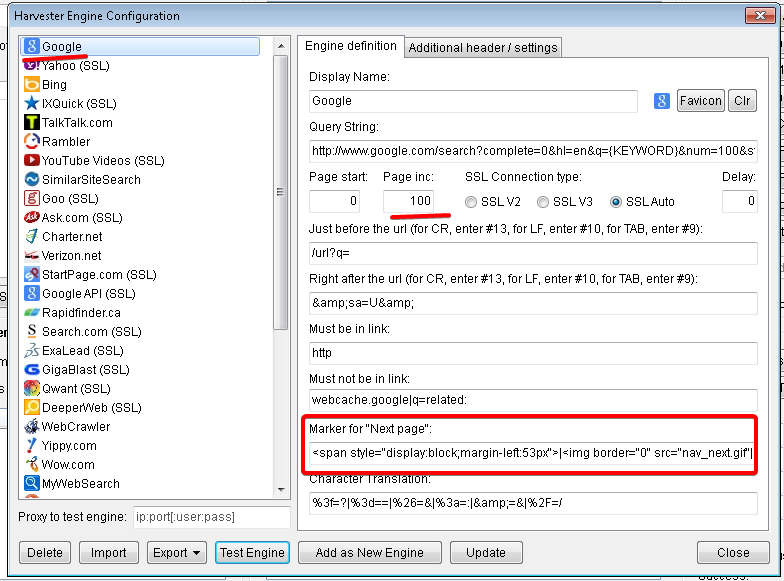
1681078687852.png
 
When I look at the code it doesn't have "img boarder" in it.

Code:
<span style="display:block;margin-left:53px">Next</span>
 
When I look at the code it doesn't have "img boarder" in it.

Code:
<span style="display:block;margin-left:53px">Next</span>

Hi, thanks for the reply

I just tried but unfortunately it doesn't work

While trying everything I did a video in which I show the execution, you can see it on Imgur

 
Hi everyone.

I've been using the scrapebox program for a few months to do seo and look for leads for my clients' businesses.

Just today I tried for the first time to use the google search engine to find websites (before I used yahoo)

I realized that google always gives me 100 links, no matter how many I ask (200, 300, 400, 1000)

I understand this problem is since google can't find the "forward" button to go to the other page and then load other results

so it always gives me the first 100 results on the first page

How can I put the right script inside the "forward" section?

I then attach the "harvester engine configuration" screen, where you can see that for google, it has always been 100 results ("page inc") and I should change the "Marker for "next page"":
View attachment 250084
try going to settings >> harvester engine configuration >> import >> download default engines.

then try it, does it work?
 
@loopline I subscribed to your AA list but didn't get any confirmation email. Sent you PM also and no response either. However, I see you are online?
 
I am happy to announce that I managed to find the "Next Page" button in Scrapebox but the problem persists. Once again, if I want to extract 300 results, Google provides me only the first 100, sometimes even less. I made a video in which I show everything. I also share the settings I have on Scrapebox

PS: I am also trying to contact Scrapebox's assistance in the hope of solving this problem and sharing it with anyone in the same situation as my own

demonstration video:

NVIDIA_Share_MJ787KlC3C.jpg
NVIDIA_Share_wOyyNYnOLZ.jpg
NVIDIA_Share_e3UwxzDuEI.jpg
NVIDIA_Share_BrOxcM00ar.jpg
 
@loopline I subscribed to your AA list but didn't get any confirmation email. Sent you PM also and no response either. However, I see you are online?
thats odd, the email may have went to spam though. Ill go hunting thru the inbox for your pm and get back to you.
 
I am happy to announce that I managed to find the "Next Page" button in Scrapebox but the problem persists. Once again, if I want to extract 300 results, Google provides me only the first 100, sometimes even less. I made a video in which I show everything. I also share the settings I have on Scrapebox

PS: I am also trying to contact Scrapebox's assistance in the hope of solving this problem and sharing it with anyone in the same situation as my own

demonstration video:

View attachment 250290View attachment 250291View attachment 250292View attachment 250293
It won't let me edit this last post here, sorry for the double post.

at any rate, go back and do the test again, where it finds the next page marker, then click on the "go to next page" and see if it actually loads the next page of results. Because if the next page marker is messed up in the code then it may say Found but not pull more results. So if it does not pull the next page of results in the test, then the next page marker is not correct.

Means you could put the next page marker as the letter

a

and then if there is an A on the page then next page marker will be "found" but of course thats not actually going to load the next page.
 
It won't let me edit this last post here, sorry for the double post.

at any rate, go back and do the test again, where it finds the next page marker, then click on the "go to next page" and see if it actually loads the next page of results. Because if the next page marker is messed up in the code then it may say Found but not pull more results. So if it does not pull the next page of results in the test, then the next page marker is not correct.

Means you could put the next page marker as the letter

a

and then if there is an A on the page then next page marker will be "found" but of course thats not actually going to load the next page.
Hi, thanks for the reply. I just did what you said, the page is loaded but once again I find the same problem, I don't give me all the results I want

demonstration video:
 
Hi, thanks for the reply. I just did what you said, the page is loaded but once again I find the same problem, I don't give me all the results I want

demonstration video:
Try it with the use proxies box unchecked, what does it do?

Also you can go to settings >> harvester engine configuration >> more harvester options >> proxy retries - and set this to the max.

but when your doing the test in the harvester engine config, that is without proxies. os it seems without proxies its fine. which would suggest the issue lies in the proxies.
 
Hi mate did you find a solution, I have the same problem I only get 100 result max no matter what keyword I use, even with "cats". But for me it says it didnt find the Next page marker, how can I correct this?

DSC1515.jpg

DSC3737.jpg
 
For some reasons I can't edit my previous post.
Anyway I looked at the source code to find the Next button code, and I got this:
<span style="display:block;margin-left:53px">Suivant</span>
But when I put it in SB engine it says No links could be retrieved.
 
Google made code changes. So scrapebox had to write new code entirely to work with google. So use the beta scraper, it has the new code.

Basically google serves up different code to different people, so if you pop open firefox and safari and other browsers and try google results from tons of different ips around teh world and compare it the actual code google uses will vary somtimes based on some factors.

Anyway the beta harvester works when the custom harvester doesn't.

I just tried it and got 203 results for the word car, which is the right amount, as google soft caps at like 200 results these days.


So just make sure are you using the latest version of scrapebox .44 and then go to settings >> harvester engine configuration >> import >> download default engines

and then the beta harvester will work. I have a video on youtube as well.
 
Back
Top