Permanently Closed Marketplace Sales Thread

Status
Not open for further replies.
Yes that is correct !

I never left it to finish because after 1 hour it was still on "retry" so i did not know how much it takes...

Bandwidth Left 2.9896 GB
I could only post like 50 comments and then it died... for ever...

Is this because of bonanza or because of sb that has "overloaded" those proxy with tasks.

Hard to say for sure about pbonanza.

For a test - try a similar comment run using the sbox harvested proxies. Harvest some new URL's, and try posting to them using the harvested proxies. That should help identify the source of the problem. It doesn't even have to be a very big run, just will be interesting to see what results you get with the harvested proxies.
 
Thank you guys for the answers , but if I dont modify anything my comment will go trough anyway? Also SB become a lot slower commenting.
 
How can I remove harvested proxies with high ping? I don't see an option to do this in proxy manager.
 
Hard to say for sure about pbonanza.

For a test - try a similar comment run using the sbox harvested proxies. Harvest some new URL's, and try posting to them using the harvested proxies. That should help identify the source of the problem. It doesn't even have to be a very big run, just will be interesting to see what results you get with the harvested proxies.

After a test this is what happens :

I get few Failed, 404 errors until i get to a certain % ; then the program keeps retrying all proxy but the % remains the same for like 4ever... i just tried that with harvested proxy and i get the same result.

The program works when i do not use proxy... Is it because of AVG ?? Can the antivirus be a problem ? ... anyone experienced the same problem or is just me and the result is : " you can not use proxy "
 
After a test this is what happens :

I get few Failed, 404 errors until i get to a certain % ; then the program keeps retrying all proxy but the % remains the same for like 4ever... i just tried that with harvested proxy and i get the same result.

When I use private proxies ONLY for posting, I wontt get that ... it seems only when I use free ones that I see that happening...

I'm making another run in a few minutes, I'll try it again and check


Jaybird
 
Sweetfunny,

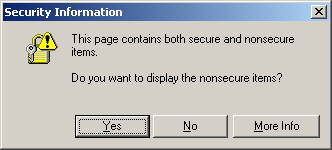
The new version ROCKS. But sometimes I'm getting this popup and it seems to get stuck here:

display-nonsecure-items.gif


Also, occasionally sites want me to log into API.Twitter.com and you get a Windows Security login popup. Any way of avoiding these two so that they don't hang up the posting process?

Thanks!!! Lovin the new version!
 
When I use private proxies ONLY for posting, I wontt get that ... it seems only when I use free ones that I see that happening...

I'm making another run in a few minutes, I'll try it again and check


Jaybird

Where did you get those private proxy?
 
Sweetfunny,

The new version ROCKS. But sometimes I'm getting this popup and it seems to get stuck here:

display-nonsecure-items.gif


Also, occasionally sites want me to log into API.Twitter.com and you get a Windows Security login popup. Any way of avoiding these two so that they don't hang up the posting process?

Thanks!!! Lovin the new version!

On the first issue - that looks like the old IE 6.x mixed-mode security warning, a lot of sites (including some of guh-oogle's services and some of M$FT themselves lol) will throw those. If you have IE 6.x installed, upgrade to 7 or 8 and you _should_ stop getting those. If you already have IE7 or 8 I don't know why the frack you're getting those.

Second issue - I've never gotten twitter login prompts, are you trying to post to twitter? Every so often I get the windows security login, it's something set on the site you're trying to post to, just click cancel and move on. It's not an accessible target if its got that on it.
 
hi sweetfunny , i have just updated the software today for the first time in a couple of months ... wow lots of changes. where can i go for a full overview of the new features etc and how i can use them to full effect? :) nice work!!
 
i get some small bug on the domain page rank checking when it reach 97% it will automatically stop and pop up a dialog "abort by user" can it be solve?
 
Hey everyone, I apologize if this has been asked before but i don't have time to read through 60 pages of this thread, been skimming over them though. :p

Anyways I just wanted to know if you guys ping the websites you scrape after you post to them with the pinger in SB, because so far I haven't been.

Ive done alot of commenting over the past few days but have only seen a few links pop up each day. Is this normal or am I doing something wrong because i'm not pinging sites afterward? is it bad if you don't ping??

I bought the software and love it so far though, has great potential in skilled hands. I did manage to up my Ezine article views from 100 - 350, gotta love that! :D
 
i get some small bug on the domain page rank checking when it reach 97% it will automatically stop and pop up a dialog "abort by user" can it be solve?

You need to click again on check. Then it rechecks the one were no result could be obtained. If every url is rightfully checked for pr you wont get this message again...
If only some urls are left I uncheck the use of proxies and check it with my own ip. That normally leads to the point that all prs are found.
 
3 weeks ago I did a 5000+SB run, got 24 links in 24 hours and over the last 2 weeks it has gone up to 784, then down to 500+-, now to over 800!

This probably will go down again. The high number probably comes from these blogs that show recent comments at each page of the blog. So building one comment will lead to your link shown at every single blogsite. As long as your one of the last comments. If you arent anymore the linkcount will go down again to the real number.
 
Hey everyone, I apologize if this has been asked before but i don't have time to read through 60 pages of this thread, been skimming over them though. :p

Anyways I just wanted to know if you guys ping the websites you scrape after you post to them with the pinger in SB, because so far I haven't been.

Ive done alot of commenting over the past few days but have only seen a few links pop up each day. Is this normal or am I doing something wrong because i'm not pinging sites afterward? is it bad if you don't ping??

I bought the software and love it so far though, has great potential in skilled hands. I did manage to up my Ezine article views from 100 - 350, gotta love that! :D


Enable Slow commenter after the fast one for better success rate.

How do you monetize Ezine Articles?

Do you use proxy?
 
hi sweetfunny , i have just updated the software today for the first time in a couple of months ... wow lots of changes. where can i go for a full overview of the new features etc and how i can use them to full effect? :) nice work!!

The changelog for last version. Didnt check if it works for all later versions too this way:

Code:
http://www.scrapebox.com/changelog-for-v1-12-5
 
Enable Slow commenter after the fast one for better success rate.

How do you monetize Ezine Articles?

Do you use proxy?

Ezine articles? Put a link to your money site or LP in the article. lol?

Yes I use proxies, the free ones I scrape, usually try to get anywhere from 150-230 proxies since most of them have a 800-22000 ms. :eek:

As for the slow commenter... I don't have my decaptcha account thing set up yet so most of the time slow commenter fails to post?

But my question was / still is... do you guys always ping those sites you scrape after you post to them or doesn't it matter?
 
But my question was / still is... do you guys always ping those sites you scrape after you post to them or doesn't it matter?

I don't normally ping after commenting. I prefer to let the backlinks seem organic in their growth.

Same thing as far as how soon backlinks show up. With moderated blogs, takes time for the mods to move comments out of pending queue. And the SE's take their time indexing blog comments, which is fine with me - again, more organic in appearance.
 
On the first issue - that looks like the old IE 6.x mixed-mode security warning, a lot of sites (including some of guh-oogle's services and some of M$FT themselves lol) will throw those. If you have IE 6.x installed, upgrade to 7 or 8 and you _should_ stop getting those. If you already have IE7 or 8 I don't know why the frack you're getting those.

Second issue - I've never gotten twitter login prompts, are you trying to post to twitter? Every so often I get the windows security login, it's something set on the site you're trying to post to, just click cancel and move on. It's not an accessible target if its got that on it.

Thanks Greg. I'm not sure why - I did just recently upgrade to IE7! I could change security settings but it doesn't bother me. I'm still getting a great success rate.

v1.12.5 FTW
 
Status
Not open for further replies.
Back
Top