How to make your site load like a Rocket

Hi,

I am not a Wordpress developer or expert, just a fellow black hatter trying to speed up my site. With the new Google Page Experience update coming its more and more important for the site to be ultra fast.

This is how I achieved this

View attachment 170641

Pagespeed Insights

Desktop

View attachment 170642 View attachment 170643

Mobile

View attachment 170644 View attachment 170645

This is for my home page which has lots of images and elementor stuff and also elementor epic news elements. There are few more things I can optimise to improve it even further, but I am ok with having a slowish site then have a bad user experience.

This is my own experience and trying to get the speed up without being too technical and how I achieved that step by step

Stop using Shared Hosting

With new and easy cloud hosting solutions, stop using shared hosting for your sites. You will have some issues adapting to new interfaces but if it means faster site, so be it.

This site is hosted on Vultr $5 droplet with Runcloud, if you want more support can go with cloudways, if you have multiple sites can look at gridplane for good support. I have only used runcloud, its plan with unlimited servers is around $15 pm.

These are the steps in short what I did to achieve such speeds

1. Cloudflare DNS (I only use DNS and not their CDN)
2. Runcloud + Vultr $5 Droplet (you can use high frequency droplet with NVMe for even higher speeds at $6)
3. NGINX Native + FastCGI - don't worry about technical terms its just click and go with Runcloud, its Runcloud hub plugin automatically does cache
4. Redis Object Cache - Do this only if you have heavy DB frontend like woo commerce or your backend is slow and you want to speed it up
5. WP Rocket - This plugin is great, I have used Lighspeed cache plugin earlier, which was also good, but it doesn't cache on NGINX. If you have litespeed server try litespeed cache instead of WP Rocket
6. Statically.io Free CDN - This website does not use this CDN, but I have used it on another site and it increases your score, especially if you have worldwide audience. Its really simple to integrate and have easy to use plugin with few options

Thats it. other than that you know general guidelines for having a fast website i.e.

1. Use Fast Theme - Currently using Kadence, Astra is also fine, I am also digging Neve as it doesn't require jquery
2. Use Minimum Plugins - Self explanatory, I am using elementor and pro and few block plugins on this site

Other Plugins for Optimising
1. Perfmatters

Additional Service Required
1. Mxroute - For emails. I use $45 per annum plan to handle all emails or all domains
2. Rackspace Email or any other email provider if you are ok with paying per email

I hops this is helpful
I'm having issues improving the speed of one of my sites. This might come in handy. I think a change of theme should be of help. Thanks
 
Very true,

If I can add, guys should stop testing their homepage rather than test individual pages. The homepage might perform better but the pages worse.

I use Digital ocean, Newspaper theme (heavy) with Adsense.

I optimize with Wp-rocket and this is my results

gtmetrix.png

Gtmetrix

Mobile.png

Pagespeed Insights Mobile

Desktop.png

Pagespeed Insights Desktop
 
Install Shortpixel/Imagify and optimize all images, remove nitropack and install WP Rocket from the forum and do all basic settings (Minify CSS/JS, dns/fonts pre-fetch).
As a side note, on your dedicated server what webserver do you use?

NameCheap dedicated server.

I installed WP Rocket, my pagespeed dropped from 97 to 66. My metrix improved a lot tho
 
Few things to note:

1. Don't focus on the score, its important but like all metrics, its just that. Focus on actual loading time for users or how the site is opening for you on different ip or location. User experience is more important than any speed score, don't sacrifice that for score.

2. Score depends on your location. Page speed insights tests the site nearest from your location, so if your website is hosted in USA, serves USA clients, then try to test on PageSpeedInsights using USA proxy. GTmetrix test from canada as default. In webpagetest.org you can change location.

3. Your CDN location can skew your results. Say your CDN have a hub in chicago and you test using chicago IP on PageSpeedInsights then you will get higher score, but same may not be actual user experience.

check your site speed across world here https://tools.keycdn.com/performance


@ranga can you help me with this?, my site have a good result on desktop but not on mobile, what could be the reasons?

i've tried everything, right now im using WProcket + Imagify
1.JPG


2.JPG

Your desktop score is high but your LCP is slow at 2.5 seconds even in desktop. What that means is you have optimised everything you can and google can give you no more things to optimise, still your website is slow. So it comes down to your hosting and your website size and plugins.

Get your desktop LCP to around 1 and mobile will improve accordingly.

So, someone help me out here.

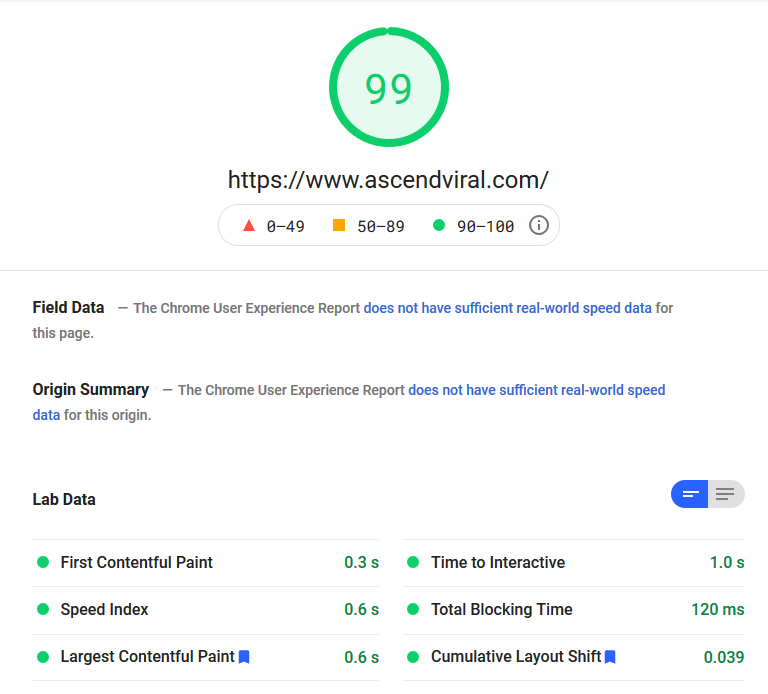
My Pagespeed score is phenomenal.

227983f47fd434f72a52572657b2d118.png


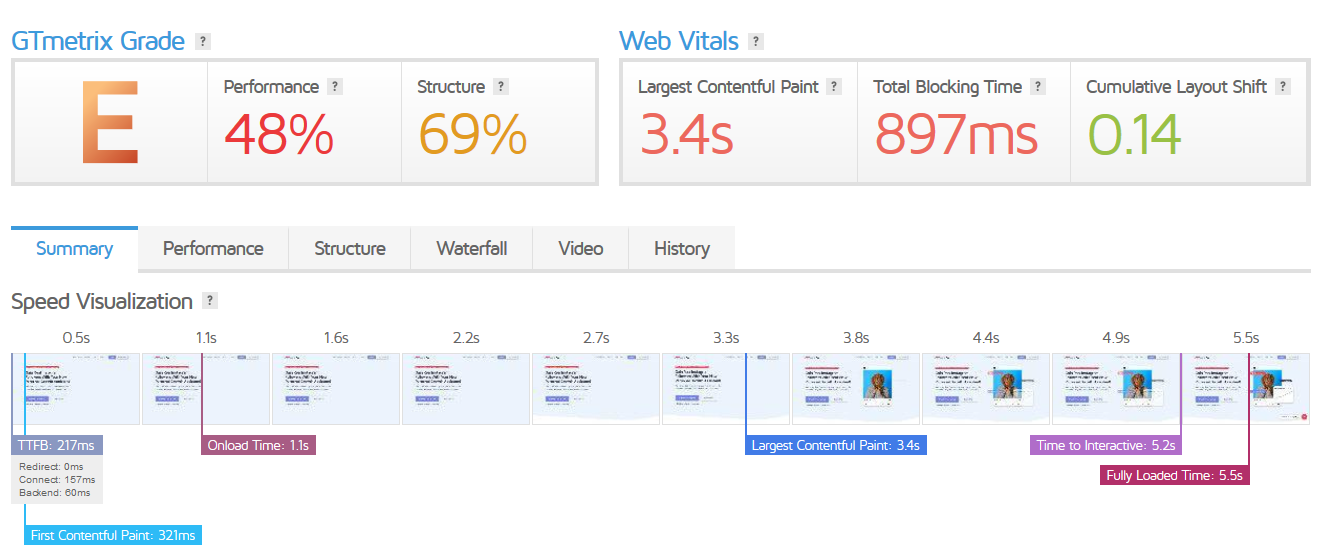
Yet my Gmetrix score is garbage.

59dc6ea8baf4c330dcbcc0c0bfb592a0.png


I have a super heavy plugin site. Woocommerce, Memberpress, AffiliateWP, Elementor Pro... almost 40 plugins in total, and I use all of them.

Currently have bunny.net for a CDN and NitroPack as an optimization plugin. I don't have serverside caching just because of the dynamic nature of all the plugins on my site. Everything runs on my dedicated server.

If there's an optimization expert out there that can throw some ideas my way on how to increase my Gmetrix loading time/score considering all of this, please let me know.

First, please be extra careful when sharing screenshots, you have leaked your domain in it.

This is again case of going after metrics. See in a browser in incognito mode how your website performs.

PageSpeedInsights and gtmetrix can consider what is LCP differently. Even in gtmetrix the on load time is 1.1 seconds and LCP 3.4 seconds and not much difference visually between them.

But from a user point of view the page actually makes sense from around 4 seconds onwards, optimise for that.
 
First, please be extra careful when sharing screenshots, you have leaked your domain in it.

I mean, it's my company and I sell things here on Black Hat World with that exact domain, I'm not overly concerned about people knowing that's the site I'm playing around with.

I appreciate all the tips! I will take this all into consideration. Cheers!
 
Hi there, awesome post!

May I ask what was the droplet you went with?First time using vultr
 
What theme? What is your wp-rocket setup?
im using Generatepress, i almost activate everything on WP Rocket, i follow this

Your desktop score is high but your LCP is slow at 2.5 seconds even in desktop. What that means is you have optimised everything you can and google can give you no more things to optimise, still your website is slow. So it comes down to your hosting and your website size and plugins.
i use Vultr VPS and im pretty sure hosting is not my problem, if you see the image actually my LCP score is 0.6s from Lab Data on the Desktop, Aren't the scores from the lab data the most recent?.

this is mobile score.

11.JPG
 
I've heard people said, fast loading theme and hosting service may help improve the speed, I've tested it and see a lot of improvements!
 
im using Generatepress, i almost activate everything on WP Rocket, i follow this


i use Vultr VPS and im pretty sure hosting is not my problem, if you see the image actually my LCP score is 0.6s from Lab Data on the Desktop, Aren't the scores from the lab data the most recent?.

this is mobile score.

View attachment 170854
I think there is something which is blocking your site after lcp, try to troubleshoot it using webpagetest.org which gives complete waterfall
 
Here are the details of my site:

Google Page speed - Mobile

Mobile.PNG


Google page speed - Desktop

Desktop.PNG


GT Metrix
GT Metrix.PNG


Webpagetest
webtest.PNG


The site uses Generatepress, WP rocket, WP Compress Image optimizer.

The site is hosted in Cloudways Vultr High Frequuency. The site has around 60 articles with each article having 3-4 images.
 
Just say NO to WordPress.

I would consider using website builders or Jamstack (JavaScript, Apps and Markup) applications. The idea is to move most stuff off your server and on to the client's browser or some other fast server. WordPress is going to be less than ideal for that.

I'm using (free) GRAV which is pretty fast. It uses the markdown language - the language of Reddit. "Markdown" is one of many markup languages. The pages get cached which makes it fast. There is no database.

In order to get GRAV, just download a skeleton and put it in an empty website folder. Unzip it and you're good to go. A skeleton is an example website that is ready to go. Note that you'll likely have to update one or more things once you're in the admin area if using a skeleton.

Skeletons | Grav CMS
https : //getgrav . org/downloads/skeletons

The downside is that there is a learning curve. You'll have to play around with it for a day or two.

Why GRAV? I wanted a CMS that uses a flatfile database system and was kind of popular. Also, not too hard to use. I tried Hugo but the learning curve was steeper.

Website builders may be a better way to go for some people.
 
Last edited:
Just so you dont have to do all of that.

Contact the onwer of https://www.dns-01.com

They have the fastest hosting servers on the planet connected directly into the internet backbone. The servers are on a direct 100Gbps/100Gpbs dedicated link.
 
Good info. I want to contribute this https://www.matthewwoodward.co.uk/seo/on-page/perfect-google-pagespeed-score/
 
Install on this website wp super cache and w3 total cache. Setup all options. And share 2 more screens with results.
I write it because I do it and tested wp rocket vs w3 vs wp super cache - on the same site, same dedicated server.... and wp super cache works better.... and its free.
 
Do you have advice on how to speed up WordPress website on shared hosting? G page speed tool score desktop at 90 but mobile at 68. It is Astra free with elementor.
 
Install on this website wp super cache and w3 total cache. Setup all options. And share 2 more screens with results.
I write it because I do it and tested wp rocket vs w3 vs wp super cache - on the same site, same dedicated server.... and wp super cache works better.... and it's free.

Which one is better for website speed, wp super cache, or WP rocket?
 
I am feeling covid symptoms, so my replies may be late

Contact the onwer of https://www.dns-01.com

They have the fastest hosting servers on the planet connected directly into the internet backbone. The servers are on a direct 100Gbps/100Gpbs dedicated link.

What is the source of this info?

Do you have advice on how to speed up WordPress website on shared hosting? G page speed tool score desktop at 90 but mobile at 68. It is Astra free with elementor.

Again score is not important, make sure mobile site loads up below 2.5 seconds. Generally page speed insights mobile score is low as they use 3g speed to test a site. If you really want to make it fast put your head down and implement AMP. If your cache plugin create separate critical css for mobile site it will help. But best is to take it off shared hosting.

Which one is better for website speed, wp super cache, or WP rocket?

Server cache is the best so Litespeed cache of NGINX Fast CGI is best. IMHO WP Rocket is better than WP Super Cache, its easier to configure its css and js magnification is good. On litespeed sever only use litespeed cache plugin
 
Back
Top