How to make your site load like a Rocket

I have to add,

Pagespeed insights only looks at above the fold, so you may get a mismatch with the page experience section in GSC because page experience looks at below the fold, something that page insights doesn't measure.

Thus you can get "100" on both mobile and desktop on page speed insights, and still give users a bad page experience.


lately i realized this as well. so basically, you can have a page with no image above the fold, and get pretty good scores? correct?
 
i hardly ever see anyone sharing any advice/insights on drupal themes here. maybe you should switch to wordpress. much easier to share lessons learned

Yeah, the stupid thing is that the site doesn't need to run on Drupal and I knew nothing about it originally going into it while being semi-ok with Wordpress. It's a local business service site and I went with Drupal just to be different than competitors running Wordpress, and more basic stuff like SquareSpace, Godaddy Tonight, etc. Bad mistake but I have so many keywords with decent rankings that I'm afraid to redo it in Wordpress.

Attached is my desktop PageSpeed insights, which is a score 79. However, my mobile is currently in the 30s, 40s max and I've struggled to get it higher. I've had my dev: eliminate render blocking resources, properly size images, minify CSS, minify javascript, remove unused CSS, encode images, switch to next-gen image formats (WebP), enable text compression, preload key requests, preload the LCP image, and cleanup of other scripting.

There's been a lot of fixing one thing in code, which reverts something else back to being off. It seems like a never-ending battle.

Edited to say: I thought the page speed update was coming sooner than it was, so this has been trying to get all green for 6-8 months, but 3 out of those 6 green is the best I have achieved.
 

Attachments

  • desktop.png
    desktop.png
    22.5 KB · Views: 127
Last edited:
lately i realized this as well. so basically, you can have a page with no image above the fold, and get pretty good scores? correct?

Basically yeah, so people are trying to optimize for page speed insights when in actual fact this score doesn't really matter much. It's the page experience scores in GSC which matter, for both users and the new algorithm update.
 
Basically yeah, so people are trying to optimize for page speed insights when in actual fact this score doesn't really matter much. It's the page experience scores in GSC which matter, for both users and the new algorithm update.
Is that the "Good", "Needs Improvement", "Poor" rating in GSC or am I overlooking something?
 
@ranga can you help me with this?, my site have a good result on desktop but not on mobile, what could be the reasons?

i've tried everything, right now im using WProcket + Imagify
1.JPG


2.JPG
 
So, someone help me out here.

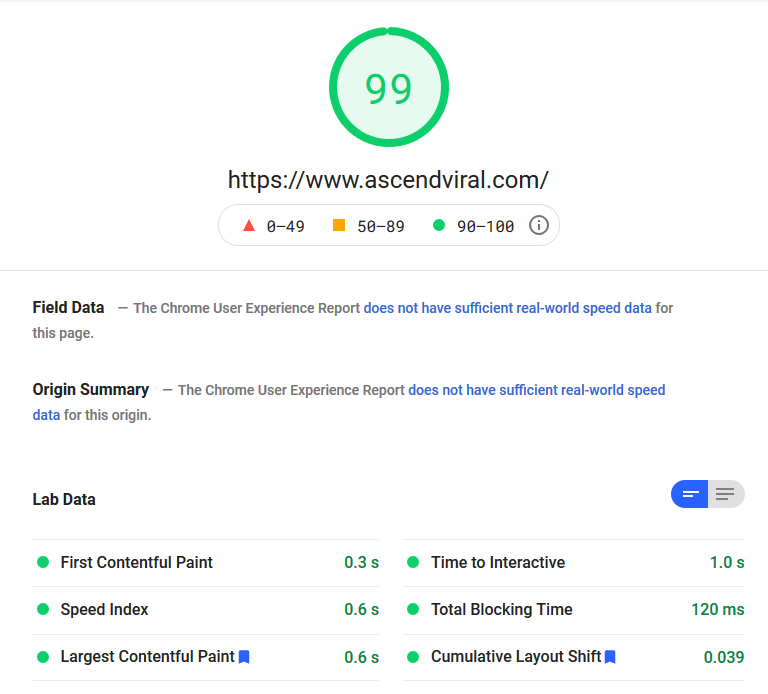
My Pagespeed score is phenomenal.

227983f47fd434f72a52572657b2d118.png


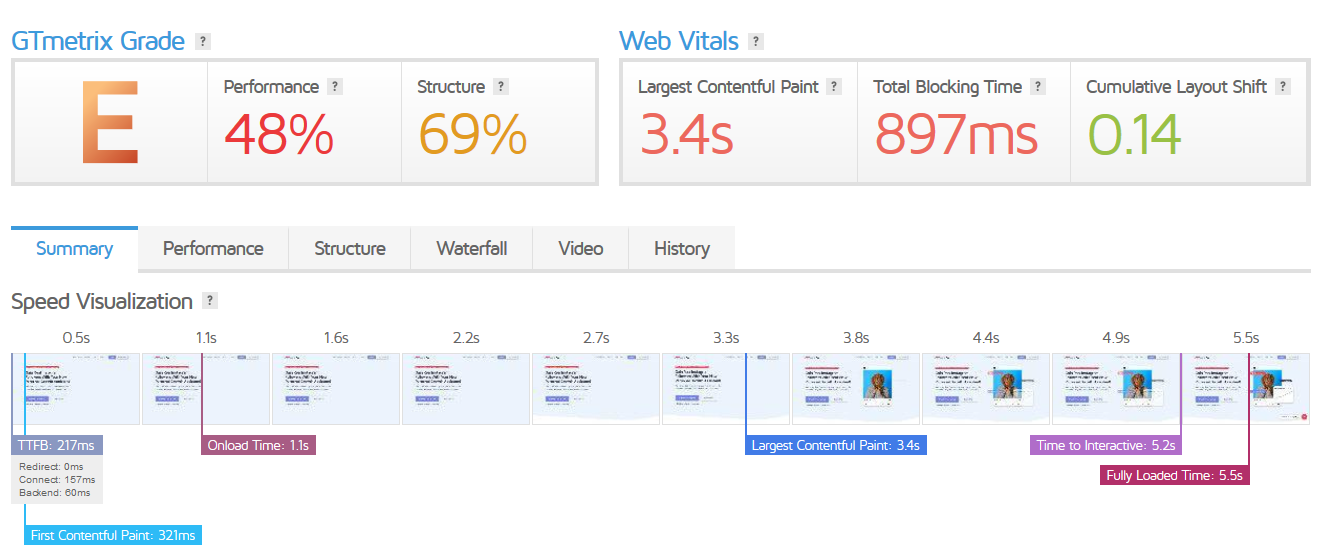
Yet my Gmetrix score is garbage.

59dc6ea8baf4c330dcbcc0c0bfb592a0.png


I have a super heavy plugin site. Woocommerce, Memberpress, AffiliateWP, Elementor Pro... almost 40 plugins in total, and I use all of them.

Currently have bunny.net for a CDN and NitroPack as an optimization plugin. I don't have serverside caching just because of the dynamic nature of all the plugins on my site. Everything runs on my dedicated server.

If there's an optimization expert out there that can throw some ideas my way on how to increase my Gmetrix loading time/score considering all of this, please let me know.
 
thanks for the post, although I've already been doing and using most of what you mentioned (never thought of mxroute for email though) I have issues with CLS, I'm mostly using generate press and considering moving to a new theme. Any thoughts?
 
So, someone help me out here.

My Pagespeed score is phenomenal.

227983f47fd434f72a52572657b2d118.png


Yet my Gmetrix score is garbage.

59dc6ea8baf4c330dcbcc0c0bfb592a0.png


I have a super heavy plugin site. Woocommerce, Memberpress, AffiliateWP, Elementor Pro... almost 40 plugins in total, and I use all of them.

Currently have bunny.net for a CDN and NitroPack as an optimization plugin. I don't have serverside caching just because of the dynamic nature of all the plugins on my site. Everything runs on my dedicated server.

If there's an optimization expert out there that can throw some ideas my way on how to increase my Gmetrix loading time/score considering all of this, please let me know.
Reduce the amount of plugins :D. Another thing you can do is to optimize your images, this can give you small boost. Your site also has a lot of bloat (unnecessary code). If you can reduce that, it will help with the score.
 
Reduce the amount of plugins :D. Another thing you can do is to optimize your images, this can give you small boost. Your site also has a lot of bloat (unnecessary code). If you can reduce that, it will help with the score.

The plugins are mostly non-negotiable, unfortunately. Not sure how I can get rid of the bloat, I'm no developer.
 
The plugins are mostly non-negotiable, unfortunately. Not sure how I can get rid of the bloat, I'm no developer.
Well, you can still optimize the images. One of them is almost 1mb. Just upload them here https://squoosh.app/ and then download the optimized version.
 
Install Shortpixel/Imagify and optimize all images, remove nitropack and install WP Rocket from the forum and do all basic settings (Minify CSS/JS, dns/fonts pre-fetch).
As a side note, on your dedicated server what webserver do you use?
 
Hi,

I am not a Wordpress developer or expert, just a fellow black hatter trying to speed up my site. With the new Google Page Experience update coming its more and more important for the site to be ultra fast.

This is how I achieved this

View attachment 170641

Pagespeed Insights

Desktop

View attachment 170642 View attachment 170643

Mobile

View attachment 170644 View attachment 170645

This is for my home page which has lots of images and elementor stuff and also elementor epic news elements. There are few more things I can optimise to improve it even further, but I am ok with having a slowish site then have a bad user experience.

This is my own experience and trying to get the speed up without being too technical and how I achieved that step by step

Stop using Shared Hosting

With new and easy cloud hosting solutions, stop using shared hosting for your sites. You will have some issues adapting to new interfaces but if it means faster site, so be it.

This site is hosted on Vultr $5 droplet with Runcloud, if you want more support can go with cloudways, if you have multiple sites can look at gridplane for good support. I have only used runcloud, its plan with unlimited servers is around $15 pm.

These are the steps in short what I did to achieve such speeds

1. Cloudflare DNS (I only use DNS and not their CDN)
2. Runcloud + Vultr $5 Droplet (you can use high frequency droplet with NVMe for even higher speeds at $6)
3. NGINX Native + FastCGI - don't worry about technical terms its just click and go with Runcloud, its Runcloud hub plugin automatically does cache
4. Redis Object Cache - Do this only if you have heavy DB frontend like woo commerce or your backend is slow and you want to speed it up
5. WP Rocket - This plugin is great, I have used Lighspeed cache plugin earlier, which was also good, but it doesn't cache on NGINX. If you have litespeed server try litespeed cache instead of WP Rocket
6. Statically.io Free CDN - This website does not use this CDN, but I have used it on another site and it increases your score, especially if you have worldwide audience. Its really simple to integrate and have easy to use plugin with few options

Thats it. other than that you know general guidelines for having a fast website i.e.

1. Use Fast Theme - Currently using Kadence, Astra is also fine, I am also digging Neve as it doesn't require jquery
2. Use Minimum Plugins - Self explanatory, I am using elementor and pro and few block plugins on this site

Other Plugins for Optimising
1. Perfmatters

Additional Service Required
1. Mxroute - For emails. I use $45 per annum plan to handle all emails or all domains
2. Rackspace Email or any other email provider if you are ok with paying per email

I hops this is helpful

But sir, real life rockets start very slow, then they speed up. I don't want my site to start up slowly sir
 
Back
Top