

SEO Grand Room
Junior Member
- Jul 2, 2020
- 189
- 74
Before digging into the steps to improve the CTR. Many budding marketers are not aware of the CTR much. Let's see from basic
What Is Organic CTR?
Organic click-through rate (CTR) is denoted as the ratio of searchers who click on an organic result in the google search engine pages divided by the total number of searches (impressions) for that query.
Organic clicks ÷ impressions = Organic CTR
Why Does Organic CTR Matter?
Even though if you are ranking on 1st page in google page, the CTR is most important to the more Organic traffic.
1. Review Your Current CTR
Before starts to improve your CTR, it’s better to know your current CTR. Google provides you the FREE Tool Google Search Console for website owners.
This screen shows you which search queries bring people to your site.
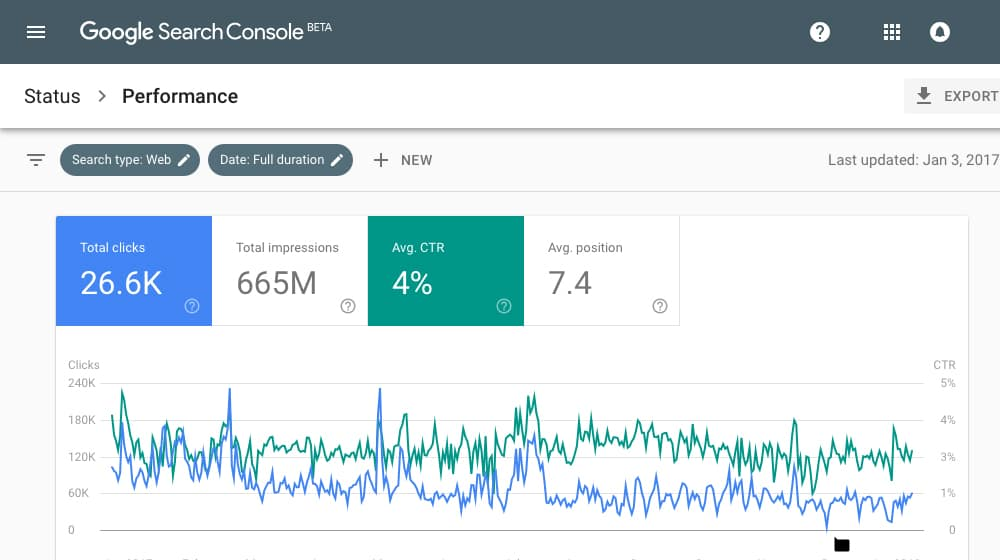
Only 4% CTR -> The above image really gives the impact of website owners.
2. Create the Cache Titles along with your targeting Keyword
Create options in titles:
The major step is to create many options in headlines to choose from that. Don't just go with the first title you create. The title should be actionable, & creative. Also, you can't leave your targeting keyword. That is your #1st ranking material. So you must clear with creating the title.
Touch the Users Emotions on your title:
If you create the curiosity or touch the user's emotions for the searchers, definitely, your CTR will increase dramatically.
The numbers are really increasing the user's curiosity: 8 Tips to Improve your Websites' Organic CTR - SEE How it Works
Format Properly your Titles
Google Search Engine will typically display the first 50–60 characters of a title tag. So you must write the title within that range. If you important keypoints is placed in after the character limit, you'll lose the clicks.
3. Make Your Descriptions More Creative with the targeting keywords
This is the most super option for you to demonstrate yourself.
In the meta descriptions, you can convey to potential visitors more about what to expect from the page. It also makes up the majority of the search result.
Meta Description also has a limited length. Google Search Engine will typically display the first 155–160 characters of a description. So you must write the description within that range. If you keep your key points before the length, definitely, it will give a boost for you!
4. Make Your URLs Descriptive
The next part of what people see on the search page is your URL. It should be more authentic.
Create SSL for your website
Create the URL more catchy with your keyword
5. Set up Schema.org Structured Data
Use Structured data, to add links to your website, product reviews, product types, & more. This is a simple one to create the structured data for your website. There are many plugins for creating structured data.
6. Improve your Website Speed
The final portion is to improve your website speed. Your website should load in seconds. Nowadays, visitors don't have time & the patience to wait until loading your webpages. If your website loads beyond minutes, they will definitely click the back button and try another site.
So, keep it simple on your webpage. Check your website load page on google page speed checker.
Track your Result.
Finally, after doing all these, try measuring your result on Google Search Console & your traffic on Google Analytics. You'll definitely need to do A/B testing for these.
I guess, it is everyone knows. Just to aware of the readers who are new to these marketing platforms.
What Is Organic CTR?
Organic click-through rate (CTR) is denoted as the ratio of searchers who click on an organic result in the google search engine pages divided by the total number of searches (impressions) for that query.
Organic clicks ÷ impressions = Organic CTR
Why Does Organic CTR Matter?
Even though if you are ranking on 1st page in google page, the CTR is most important to the more Organic traffic.
1. Review Your Current CTR
Before starts to improve your CTR, it’s better to know your current CTR. Google provides you the FREE Tool Google Search Console for website owners.
This screen shows you which search queries bring people to your site.
Only 4% CTR -> The above image really gives the impact of website owners.
2. Create the Cache Titles along with your targeting Keyword
Create options in titles:
The major step is to create many options in headlines to choose from that. Don't just go with the first title you create. The title should be actionable, & creative. Also, you can't leave your targeting keyword. That is your #1st ranking material. So you must clear with creating the title.
Touch the Users Emotions on your title:
If you create the curiosity or touch the user's emotions for the searchers, definitely, your CTR will increase dramatically.
The numbers are really increasing the user's curiosity: 8 Tips to Improve your Websites' Organic CTR - SEE How it Works
Format Properly your Titles
Google Search Engine will typically display the first 50–60 characters of a title tag. So you must write the title within that range. If you important keypoints is placed in after the character limit, you'll lose the clicks.
3. Make Your Descriptions More Creative with the targeting keywords
This is the most super option for you to demonstrate yourself.
In the meta descriptions, you can convey to potential visitors more about what to expect from the page. It also makes up the majority of the search result.
Meta Description also has a limited length. Google Search Engine will typically display the first 155–160 characters of a description. So you must write the description within that range. If you keep your key points before the length, definitely, it will give a boost for you!
4. Make Your URLs Descriptive
The next part of what people see on the search page is your URL. It should be more authentic.
Create SSL for your website
Create the URL more catchy with your keyword
5. Set up Schema.org Structured Data
Use Structured data, to add links to your website, product reviews, product types, & more. This is a simple one to create the structured data for your website. There are many plugins for creating structured data.
6. Improve your Website Speed
The final portion is to improve your website speed. Your website should load in seconds. Nowadays, visitors don't have time & the patience to wait until loading your webpages. If your website loads beyond minutes, they will definitely click the back button and try another site.
So, keep it simple on your webpage. Check your website load page on google page speed checker.
Track your Result.
Finally, after doing all these, try measuring your result on Google Search Console & your traffic on Google Analytics. You'll definitely need to do A/B testing for these.
- Review Your Current CTR
- Create the Cache Titles along with your targeting Keyword
- Make Your Descriptions More Creative with the targeting keywords
- Make Your URLs Descriptive
- Set up Schema.org Structured Data
- Improve your Website Speed
I guess, it is everyone knows. Just to aware of the readers who are new to these marketing platforms.
