Wordpress Loss traffic or drop traffic after migration? need help...

arvinzx20

Regular Member
Joined
Jun 16, 2016
Messages
217
Reaction score
21
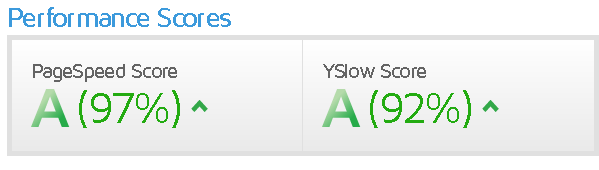
Hello guys I need help my sites recently migrating to new hosting site(Namecheap stellar plus) now I'm fix the gtmetrix result.
JypDhf7


But after that the traffic still low I only receive 2 to 5 traffic daily the date of migration start from december 9 and done on 10.

I used the all in one wp migration to migrate my website to new hosting account(Namecheap stellar plus). What I did after migration is to add more plugins w3 total cache, ewww image optmize and flush php opcache this is what namecheap recommend to fix gtmetrix problems.

I just follow the guide from name cheap from here https://namecheap.com/support/knowl...-to-speed-up-and-optimize-a-wordpress-website.

Now after that my website in gtmetrix is this
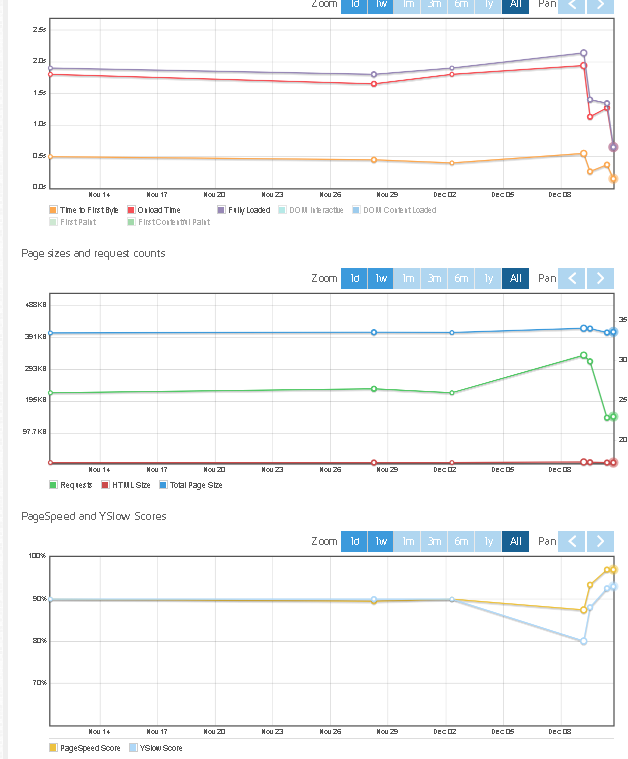
P9Siakl

Sorry for adding the image just to make sure that I added all my action to fix my traffic loss or traffic drop.

My recent hosting is from google cloud with instance bitnami wordpress. the instance still alive and I can access the ip through web browser.
I just recently copy the robot.txt because https://web.dev/measure/ detects that I don't have a robot.txt so I just copy the robot.txt to old hosting and paste it to my website in namcheap then save. But the traffic still the same even the jetpack site stats only few clicks that I get.

Need help please to those who experience this.
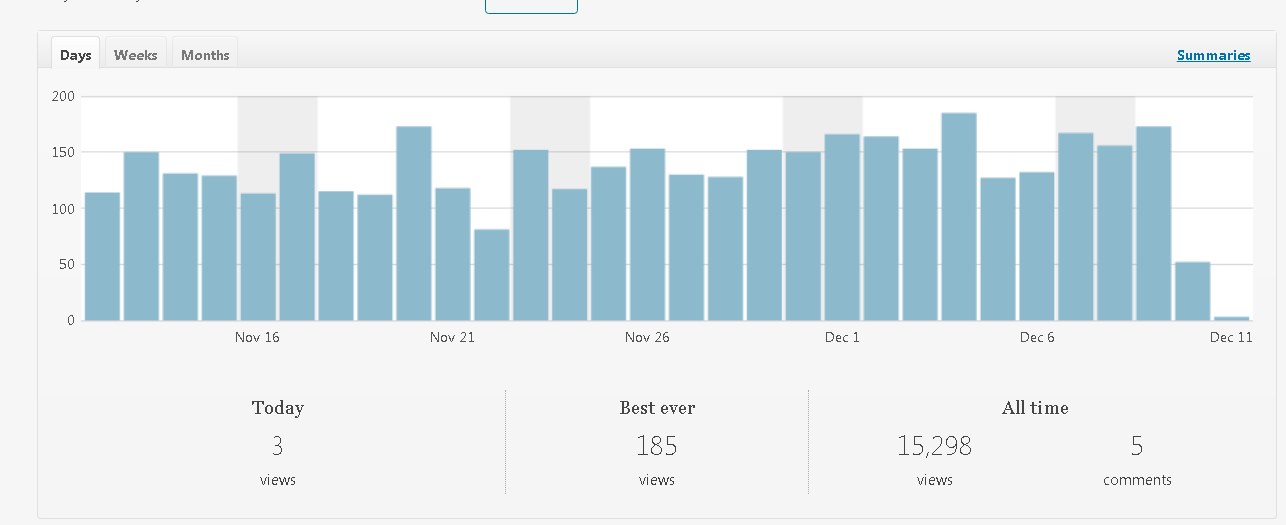
 
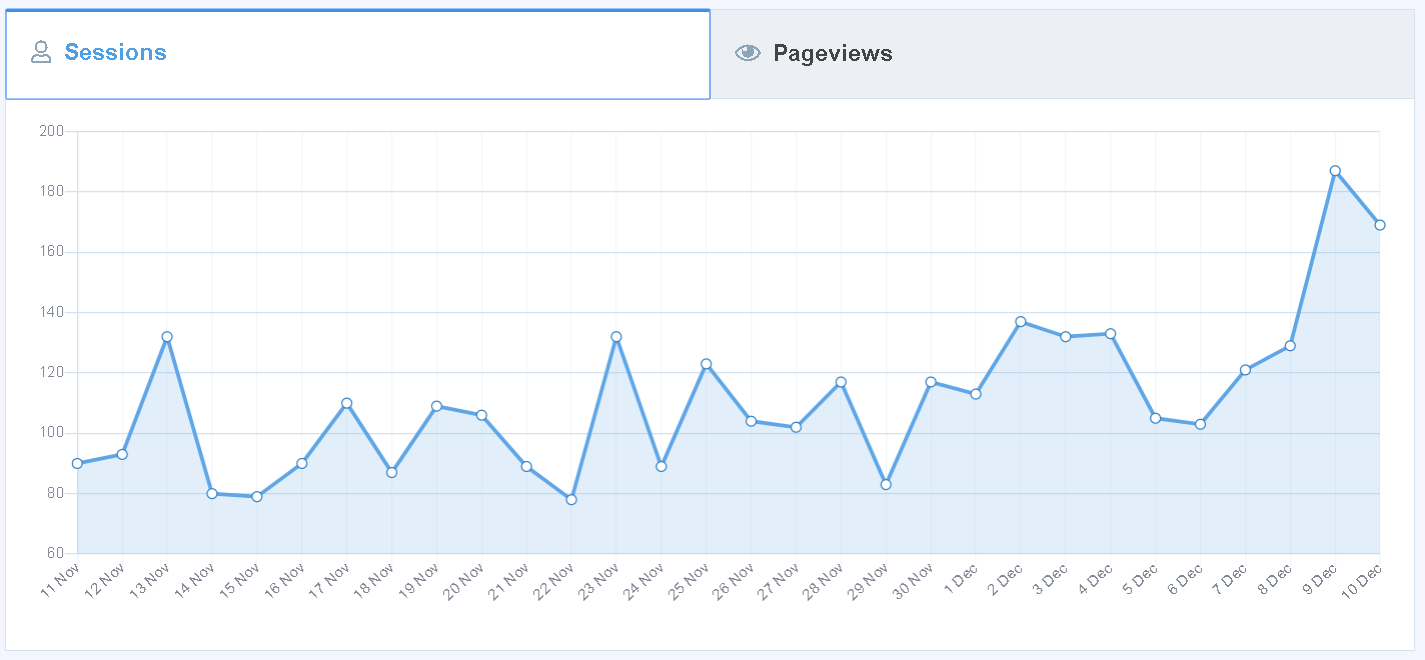
Just want to add this as my stats in my jetpack after migration.
Mn927Hi


And this is my analytics in mosterinsight.
C36VjEL


It looks like I have traffic in monster insight than on site stats in jetpack stats.
 
Did you use ssl ? before migration please check the url of you post its working fine
 
Did you use ssl ? before migration please check the url of you post its working fine
Before I use the cloudflare https/ssl now since I switch to namecheap stellar plus I use their ssl from their cpanel.
I tried to check the url under general settings and it shows my https://mywebsite.com.
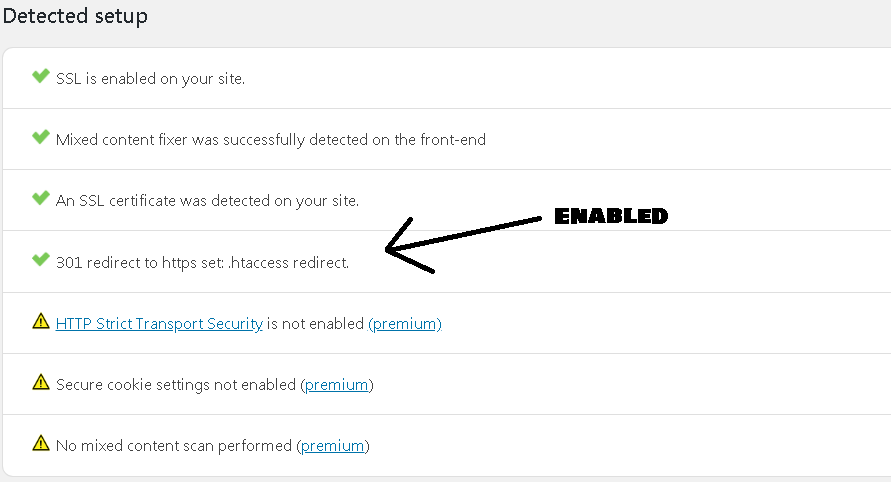
It seems fine I just recently enabled the 301 redirect from simple ssl.
uaEKtM2


Forget Jetpack, check on your Google analytics instead, for traffic.
I tried to check the google analytics but it only shows my clicks old clicks december 7 the present clicks still not showing. it is under acquisition>search console>queries.
Here's the image below:
nfvAoFU


I also redirect all my post and pages from my old google cloud ip to my website just now. I hope it also help.
 
Last edited:
Before I use the cloudflare https/ssl now since I switch to namecheap stellar plus I use their ssl from their cpanel.
I tried to check the url under general settings and it shows my https://mywebsite.com.
It seems fine I just recently enabled the 301 redirect from simple ssl.
uaEKtM2


I tried to check the google analytics but it only shows my clicks old clicks december 7 the present clicks still not showing. it is under acquisition>search console>queries.
Here's the image below:
nfvAoFU


I also redirect all my post and pages from my old google cloud ip to my website just now. I hope it also help.

Redirection issues can also cause a huge traffic drop, check your URLs for any 404 errors. If i may ask? I do you migrate from Google cloud in the first place?
 
Check with these:
The underlying technology of the site (e.g. moving from a search engine crawlable technology like PHP to a more challenging technology like node.js or Angular, usually for development and technical debt reasons).
URL structures (and implementing redirects).
Update internal links.
Broken links can result in a bad user experience. But that’s not all. You can also lose link juice, that’s vital for having a good ranking in the search results.
 
Scary story as I am going to do the same thing, literally...
 
Did you make any change to the title tags or key SEO signals?

Your old host is Google Cloud which is very fast. Are you sure the new host Namecheap is as fast as GC? Where is your audience? Global or local? Maybe it takes longer for some to access your website if they are far from the location of the host.

Also what do you mean by this? If your site was already SSL then you don't need to use Simple SSL plugin. It is helpful only if you migrate from http to https.

Before I use the cloudflare https/ssl now since I switch to namecheap stellar plus I use their ssl from their cpanel.
I tried to check the url under general settings and it shows my https://mywebsite.com.
It seems fine I just recently enabled the 301 redirect from simple ssl.

I also redirect all my post and pages from my old google cloud ip to my website just now. I hope it also help.
 
Redirection issues can also cause a huge traffic drop, check your URLs for any 404 errors. If i may ask? I do you migrate from Google cloud in the first place?

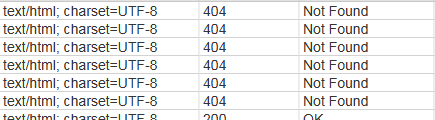
I tried to scan it with screaming frog and I found some image 404 check below.

UGwsC4H


But those image is what gtmetrix needs to rescale and already replace it with new one the same name and the same extension. Do you think it is because of hotlink protection I enabled it recently to make sure no external images and it will only loads in my own server?

All internal links are result 200 except for those images which is already replaced the old with optmized images.


Also, I just noticed that I receiving some traffic from real time overview in analytics. It seem the problem is under jetpack site stats.
 
Did you make any change to the title tags or key SEO signals?

Your old host is Google Cloud which is very fast. Are you sure the new host Namecheap is as fast as GC? Where is your audience? Global or local? Maybe it takes longer for some to access your website if they are far from the location of the host.

Also what do you mean by this? If your site was already SSL then you don't need to use Simple SSL plugin. It is helpful only if you migrate from http to https.
Yeah Google cloud is very fast but I only use their free trial of $300 and it will going to be expired soon. So I don't want to spend too much for my small blog starter with low traffic yet and no earnings yet from my website I just keep learning first in SEO to make a traffic before I add adsense or any sponsored link in the future if I get enough traffic.

I didn't make any optimize on my website when it was in Google cloud unlike these days after I switch to namecheap stellar plus I see more improvements after I follow namecheap guide for optimizing wordpress the site loading is more faster than the speed of my old google cloud. So I think it should help my website to rank more higher but the reason seems bad after migrating it to new hosting.

I just use the simple SSL just to migrate it from http to https before when it was new now after transfer and migrate it to new hosting it shows some caution I just enabled the caution 301 redirect as the image above just to fix the caution.

All my traffics are global but most of the traffic comes from US and india.


I just want to add this I have one of the page that sometimes getting "Internal Server Error" or 500 error how can I fix this?
 
Last edited:
Yeah Google cloud is very fast but I only use their free trial of $300 and it will going to be expired soon. So I don't want to spend too much for my small blog starter with low traffic yet and no earnings yet from my website I just keep learning first in SEO to make a traffic before I add adsense or any sponsored link in the future if I get enough traffic.

I didn't make any optimize on my website when it was in Google cloud unlike these days after I switch to namecheap stellar plus I see more improvements after I follow namecheap guide for optimizing wordpress the site loading is more faster than the speed of my old google cloud. So I think it should help my website to rank more higher but the reason seems bad after migrating it to new hosting.

I just use the simple SSL just to migrate it from http to https before when it was new now after transfer and migrate it to new hosting it shows some caution I just enabled the caution 301 redirect as the image above just to fix the caution.

All my traffics are global but most of the traffic comes from US and india.


I just want to add this I have one of the page that sometimes getting "Internal Server Error" or 500 error how can I fix this?


just contact Name cheap support they will help you and analyze
 
Just want to add this image below:

twkuAJV

I got this from checking the site health under worldpress.
It seems there is problem in tracking?
What should I do?
 
Just want to add this image below:

twkuAJV

I got this from checking the site health under worldpress.
It seems there is problem in tracking?
What should I do?

Deactivate the all tracking plugin include Yoast SEO then delete it and reinstalled and activate
 
Deactivate the all tracking plugin include Yoast SEO then delete it and reinstalled and activate
Now it fix after I remove the analytics that i manually paste under headers both jetpack and monster insight fixed.
Let's see if I already solve my traffic.
 
Yeah Google cloud is very fast but I only use their free trial of $300 and it will going to be expired soon. So I don't want to spend too much for my small blog starter with low traffic yet and no earnings yet from my website I just keep learning first in SEO to make a traffic before I add adsense or any sponsored link in the future if I get enough traffic.

I didn't make any optimize on my website when it was in Google cloud unlike these days after I switch to namecheap stellar plus I see more improvements after I follow namecheap guide for optimizing wordpress the site loading is more faster than the speed of my old google cloud. So I think it should help my website to rank more higher but the reason seems bad after migrating it to new hosting.

I just use the simple SSL just to migrate it from http to https before when it was new now after transfer and migrate it to new hosting it shows some caution I just enabled the caution 301 redirect as the image above just to fix the caution.

All my traffics are global but most of the traffic comes from US and india.


I just want to add this I have one of the page that sometimes getting "Internal Server Error" or 500 error how can I fix this?


The 'Internal Server Error' error tells you that your server has problems. If you encounter this problem so do your users.

I was asking if you make any SEO change related to post titles and other SEO signals not site speed. If you change your post titles, content, etc., your traffic may also drops.

If you use Jetpack for analytics only I suggest you to use Google Analytics instead.

Use the Pingdom tool to test your site speed with different locations.
 
I tried to check the website right now the bounce rate increase base on monster insight it seems that my post rank to other keyword which is not relevant to the topic.
The jetpack still getting traffic but it is not the same as before the site can only get few clicks but I notice that in monster insight the sessions and pageviews increase. So I think I'm getting traffic but the problem they can't access my site? It might be they are getting 500 internal error that is why my bounce rate increase? What do you think?
 
Back
Top