Account hacked with two-factor auth

Lord surh

Regular Member
Joined
Jun 15, 2017
Messages
412
Reaction score
93
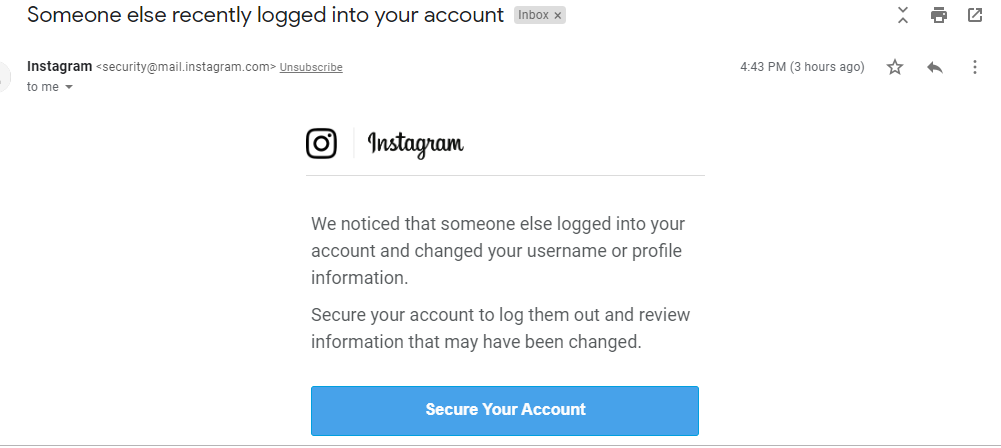
I recently had two-factor authentication put on this account and someone still accessed it without receiving a code. How is this possible? This is the second time this is happening in just a week, the first I was able to get the account back by clicking the "Secure my Account" button, then Instagram disabled the account until I contacted them and they gave me back access. I'm really confused at how this is possible. I need help on the best possible steps to take to prevent this from happening again.

Thanks.
upload_2019-4-12_20-26-29.png
 

Attachments

  • upload_2019-4-12_20-24-8.png
    upload_2019-4-12_20-24-8.png
    56.6 KB · Views: 202
I'm not that good with instagram security but hey why don't you change the password and log yourself out from every device you are logged in
 
Check your devices for malware, then change all your passwords, not just Instagram.

Assuming this email is legitimate and the hacker really was able to bypass 2FA, two of the most likely cases would be that the hacker has your email password as well and can bypass the verification, or there's malware on one of your devices that allows them to get your login cookie and/or 2FA code directly.
 
The email from says " Instagram <[email protected]>"

Geez mate you cannot be that naive, just google this email and you have the answer

Also the text on this email is so ridiculous that this isn't even worth to waste Google's resources :D
 
Check your devices for malware, then change all your passwords, not just Instagram.

Assuming this email is legitimate and the hacker really was able to bypass 2FA, two of the most likely cases would be that the hacker has your email password as well and can bypass the verification, or there's malware on one of your devices that allows them to get your login cookie and/or 2FA code directly.

To login the code is sent to my mobile device sim card. The most likely is the login cookie you mentioned. I use a bot to schedule contents on both accounts. I think it is compromised and I need to stop using it. Is there a way to prevent this from happening again through the same method, does changing of password breaks access with the login cookie
 
The email from says " Instagram <[email protected]>"
That means nothing, anyone can set any 'from' email address. You can see the real sender by clicking More (three dots icon on the upper right), then Show Original.

Also, the link can be set to display 'instagram.com', but invisibly redirect you to 'leeth4x0rz.tar.gz'. What is the actual link shown when using Inspect Element?
To login the code is sent to my mobile device sim card. The most likely is the login cookie you mentioned. I use a bot to schedule contents on both accounts. I think it is compromised and I need to stop using it. Is there a way to prevent this from happening again through the same method, does changing of password breaks access with the login cookie
Changing the password should log out other sessions, but a backdoored bot will just hand over your new login instantly. Even if you don't actively use it, it could have something running in the background.
 
That means nothing, anyone can set any 'from' email address. You can see the real sender by clicking More (three dots icon on the upper right), then Show Original.

Also, the link can be set to display 'instagram.com', but invisibly redirect you to 'leeth4x0rz.tar.gz'. What is the actual link shown when using Inspect Element?

Changing the password should log out other sessions, but a backdoored bot will just hand over your new login instantly. Even if you don't actively use it, it could have something running in the background.

href="https://instagram.com/accounts/disa...e=xxxxxxxxxxxxxxxxxxxxxxxxxxxxxxxxxxxxxxxxxxx
 
2factor auth is week now that you have phishing platforms like evilginx2 which is designed to bypass 2factor auth.
 
update: Account restored.
 

Attachments

  • IGRENABLED.PNG
    IGRENABLED.PNG
    20.8 KB · Views: 261
lol you deserve to get your account stolen if you fell for the phishing email
 
lol you deserve to get your account stolen if you fell for the phishing email

After regaining the account, I added a new auth via the app and I got an email about it from Instagram, same email that sent the initial one. I doubt its phishing
 

Attachments

  • auth.png
    auth.png
    16.2 KB · Views: 232
After regaining the account, I added a new auth via the app and I got an email about it from Instagram, same email that sent the initial one. I doubt its phishing
It's trivial to spoof the 'From' address, many email programs specifically include it as a feature. The only way to really determine that an address is legitimate or spoofed is to look at the headers, under 'Show original'.
 
Guys, yes there is fishing, but this is not. It is real.

OP, there is absolutely nothing you can do to prevent this, short of light a fire under Zuck's chair.

The only thing you can do is keep an eye on your backup devices (email, phone), and when Instagram reports unknown login, change your password. This will log all sessions out, also the hacker's. If you receive something about email or phone change, immediately klick on revert.

And to answer your question "How is this possible?". The answer lies in the session cookie. These hackers don't target your account specifically, they just run through different codes until they catch a life session. They don't need to find your password or get a 2FA verification code. They're straight in.

You can of course help them, e.g. by using your account on public networks or public computers without proper logging out afterwards. But most cases I hear of are accidental victims that haven't done anything wrong.
 
Assuming you are not the security hole, I assume it is an "app" you are using or a nasty proxy provider (or public proxies). Either way, stop it :). With a 2-factor auth setup, your account can only be stolen when someone hijacks your session information. That, on the other hand, can happen in many ways.
 
Back
Top