

Saly Verona
Power Member
- Jun 5, 2015
- 744
- 236
In around September – October 2018 Instagram released an update which made a posting of content via common data center proxy very difficult. But I have to admit a lot of people still using ipv4 or even ipv6 data center proxy without issues at all. Say hello to IG algo…
At the moment, the realities are as follows – in order to be able to publish content without any problems, it is necessary to use quality proxies – mobile or residential. But even using a good proxy it’s still possible to face issues while posting. In other words, proxy quality matters, but it’s not enough to avoid issues with the posting.
But let’s get everything in order:
When posting of the content possible next issues: account got phone verification request or email verification request, account got banned, the post has been published but has no caption or post been published but a second later has been disappeared and so on. It’s a complex of issues, but the reason is only one: account trust level.
Instagram is a very popular social network and in order to remain a good quality product – they have to fight with spam in every possible way.
That’s why when Instagram restricts actions of account like follows, likes or posting that exactly means it identify these actions as spam, cuz account has low trust level. Not always of course, and there are tons of other factors, but in general it is.
For example, if to take a low-quality account and try to make a post with the caption via official mobile app – the caption most likely will be disappeared. And if to try to edit the caption – there will be a notification like: “this action is not allowed, we restrict actions such as that to keep our community safe”. This is not a literal quote, but the main idea should be clear.
That’s why to avoid issues like that it’s necessary to use a good proxy and good accounts (accounts with high trust level).
For the test, we created 5 Instagram accounts using a low-quality ipv6 proxy via a desktop browser.
This information is important cuz these actions identify accounts as low-quality accounts. Then we imported accounts into Jarvee and run the posting campaign instantly. The result we got – was absolutely expected – all of the accounts got the issues, like disappeared post or action required status. That’s why we warmed accounts to get higher trust level and to avoid issues such as that.
To show how it works in real time, we made a short video

If to say simply the steps were the next:
Accounts got actions required status.
Posting failed.
Start posting again.
The posts have been published, but the caption of some of them is gone
Repeat the posting.
Success. All posts have been published and the captions were not disappeared
Why its working and what exactly has been done:
We created accounts via a desktop browser with a low-quality proxy – it means accounts had no trust level at all. To get it or to increase it we warmed accounts with the story, follow and like tools. To show Instagram that accounts are not just random bot accounts, that accounts are real, which are running with human looking actions. Actions as real people do.
One of the most important factors is the way the account was created. In general, if the account was created via mobile application it has a good trust level. If it was created via the desktop browser or software which emulates mobile application it has lower trust score (not always, depends on the software). The lower trust score the more issues u will get or the more time is needed to increase a trust level.
For example, when u buy an account from some shop – u never know the way it was created. That’s why when u import account + proxy into the software and start the tools – it’s possible to get the issues.
But there is one more reason for possible issues:
When the account is imported into the software, the software generates device ID and a user agent for this specific Instagram account. These generated technical data would be different from the data which been used earlier with this account. For Instagram, it may look suspicious and that’s why it may restrict the actions. And it’s again because of the account’s trust level. To increase it is necessary to create trust between account’s technical data, the proxy associated with the account, actions, and network itself. The same way it works when the account’s proxy is changed. The account gets a verification request – it’s obvious, but after it’s done its necessary to create a trust between new proxy and account.
One of the most annoying things is:
When an account with a good trust level which been working for a long time, which never had any issues before gets posting problems. Usually, it happens when something goes wrong. Someone reports the account, actions are made too fast or IG decides to point account as suspicious. It’s a very long story why it’s possible and what is the reason and requires much deeper analysis, so for now just dwell on the facts.
To repeat the issue we made the next:
Took a few of our white hat accounts with good engagement and decide to destroy its trust level via super aggressive settings. We set these accounts to follow, like, unfollow 1000 users daily per 1 tool. (3000 actions it totals). 5 days later the trust level was absolutely destroyed. It was impossible to post any photo or even a video – it was instantly removed after publishing.
The restore (rewarming) process was the next:
The whole restore process took us 7-10 days.
One more thing:
We notice that accounts with posting issues got a phone confirmation request. It’s not a common verification request when Instagram requires to verify the account via phone number. It’s just a popup notification from the mobile app.
It looks like:
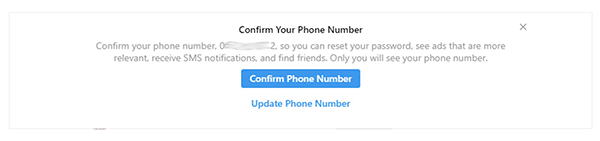
The funny thing is, the account is already been phone verified and phone confirmed:
 (click to expand)
But for the next 3 days when we logged into the account via embed browser in software – account got a popup notification with “an offer” to confirm phone number. Hard to say how its all related to the issues with posting. But maybe IG trying to identify the account as an account of the real owner by repeating phone confirmation requests to be sure the account is not bot’s account which been phone verified with a one-time phone number.
And the last important factors:
Photos:
Usually, we use small image alternative level. it’s not necessary to change it to hard or crop images or add watermarks to make images unique or so on. But If you intend to use the same pics over and over again, for spam, CPA or some other black hat actions – it’s possible to use XnView software, which allows editing photos in bulk by simple converting images from .jpg to .bmp and vise versa. For more info – pls check google, cuz its a very long thread
Caption:
It’s the most important factor. The caption must be unique. It’s impossible to use the same caption over and over again. If this rule is skipped – IG soon or later will point the caption as spam, the trust level of account would be downgraded and it would be impossible to post at all.
Of course, owners of shops or local business would like to use the same caption or/as a signature, cuz in the caption they post contacts or some FAQ or info how to buy the product/service and etc. In this case – the “body” of the caption for every new single post must be unique, while the signature may stay the same.
Hashtags:
The rule is the same as for the caption. Do not use the same hashtags over and over again.
Of course, there are possible situations when an account gets in the top by specific hashtags and gets a huge volume of traffic (new followers) and engagement. Removing these hashtags would be unreasonable. In this case, just randomize the hashtags. In other words, use the main hashtags + additional, where main always stay the same and additional are always random.
Also, do not use 30 hashtags per post. It’s allowed by Instagram and its true, but try to avoid it. Just take a look at how many hashtags use real people. Owners of good accounts with good engagement: 1-3-5, very rarely up to 10.
Conclusion:
The main idea of the right setup is to get identification of account by Instagram as a common good account of the real user without suspicious actions with good trust level. Once it’s done – there will be no more posting issues.
P.s. All info on above is based on own experience. If someone of u guys wants to add something or to point something is wrong - feel free to do that.
Have a good day and hope this short "guide" could help someone!
At the moment, the realities are as follows – in order to be able to publish content without any problems, it is necessary to use quality proxies – mobile or residential. But even using a good proxy it’s still possible to face issues while posting. In other words, proxy quality matters, but it’s not enough to avoid issues with the posting.
But let’s get everything in order:
When posting of the content possible next issues: account got phone verification request or email verification request, account got banned, the post has been published but has no caption or post been published but a second later has been disappeared and so on. It’s a complex of issues, but the reason is only one: account trust level.
Instagram is a very popular social network and in order to remain a good quality product – they have to fight with spam in every possible way.
That’s why when Instagram restricts actions of account like follows, likes or posting that exactly means it identify these actions as spam, cuz account has low trust level. Not always of course, and there are tons of other factors, but in general it is.
For example, if to take a low-quality account and try to make a post with the caption via official mobile app – the caption most likely will be disappeared. And if to try to edit the caption – there will be a notification like: “this action is not allowed, we restrict actions such as that to keep our community safe”. This is not a literal quote, but the main idea should be clear.
That’s why to avoid issues like that it’s necessary to use a good proxy and good accounts (accounts with high trust level).
For the test, we created 5 Instagram accounts using a low-quality ipv6 proxy via a desktop browser.
This information is important cuz these actions identify accounts as low-quality accounts. Then we imported accounts into Jarvee and run the posting campaign instantly. The result we got – was absolutely expected – all of the accounts got the issues, like disappeared post or action required status. That’s why we warmed accounts to get higher trust level and to avoid issues such as that.
To show how it works in real time, we made a short video
- Day 1
Accounts got actions required status.
Posting failed.
- Day 2
Start posting again.
The posts have been published, but the caption of some of them is gone
- Day 3
Repeat the posting.
Success. All posts have been published and the captions were not disappeared
Why its working and what exactly has been done:
We created accounts via a desktop browser with a low-quality proxy – it means accounts had no trust level at all. To get it or to increase it we warmed accounts with the story, follow and like tools. To show Instagram that accounts are not just random bot accounts, that accounts are real, which are running with human looking actions. Actions as real people do.
One of the most important factors is the way the account was created. In general, if the account was created via mobile application it has a good trust level. If it was created via the desktop browser or software which emulates mobile application it has lower trust score (not always, depends on the software). The lower trust score the more issues u will get or the more time is needed to increase a trust level.
For example, when u buy an account from some shop – u never know the way it was created. That’s why when u import account + proxy into the software and start the tools – it’s possible to get the issues.
But there is one more reason for possible issues:
When the account is imported into the software, the software generates device ID and a user agent for this specific Instagram account. These generated technical data would be different from the data which been used earlier with this account. For Instagram, it may look suspicious and that’s why it may restrict the actions. And it’s again because of the account’s trust level. To increase it is necessary to create trust between account’s technical data, the proxy associated with the account, actions, and network itself. The same way it works when the account’s proxy is changed. The account gets a verification request – it’s obvious, but after it’s done its necessary to create a trust between new proxy and account.
One of the most annoying things is:
When an account with a good trust level which been working for a long time, which never had any issues before gets posting problems. Usually, it happens when something goes wrong. Someone reports the account, actions are made too fast or IG decides to point account as suspicious. It’s a very long story why it’s possible and what is the reason and requires much deeper analysis, so for now just dwell on the facts.
To repeat the issue we made the next:
Took a few of our white hat accounts with good engagement and decide to destroy its trust level via super aggressive settings. We set these accounts to follow, like, unfollow 1000 users daily per 1 tool. (3000 actions it totals). 5 days later the trust level was absolutely destroyed. It was impossible to post any photo or even a video – it was instantly removed after publishing.
The restore (rewarming) process was the next:
- Reset device ID, verify an account, rest it for 24 hours
- Run the story tool with super slow settings
- A few days later run like and follow tools with a slow setting too
- Couple more days later start posting videos (while this time we tried to post photos. For one of the accounts it was already working fine while for another one still not )
- 7 days later started posting photos for both of accounts successfully
- Setup software to slowly increase the number of actions each new day
The whole restore process took us 7-10 days.
One more thing:
We notice that accounts with posting issues got a phone confirmation request. It’s not a common verification request when Instagram requires to verify the account via phone number. It’s just a popup notification from the mobile app.
It looks like:
The funny thing is, the account is already been phone verified and phone confirmed:
But for the next 3 days when we logged into the account via embed browser in software – account got a popup notification with “an offer” to confirm phone number. Hard to say how its all related to the issues with posting. But maybe IG trying to identify the account as an account of the real owner by repeating phone confirmation requests to be sure the account is not bot’s account which been phone verified with a one-time phone number.
And the last important factors:
Photos:
Usually, we use small image alternative level. it’s not necessary to change it to hard or crop images or add watermarks to make images unique or so on. But If you intend to use the same pics over and over again, for spam, CPA or some other black hat actions – it’s possible to use XnView software, which allows editing photos in bulk by simple converting images from .jpg to .bmp and vise versa. For more info – pls check google, cuz its a very long thread
Caption:
It’s the most important factor. The caption must be unique. It’s impossible to use the same caption over and over again. If this rule is skipped – IG soon or later will point the caption as spam, the trust level of account would be downgraded and it would be impossible to post at all.
Of course, owners of shops or local business would like to use the same caption or/as a signature, cuz in the caption they post contacts or some FAQ or info how to buy the product/service and etc. In this case – the “body” of the caption for every new single post must be unique, while the signature may stay the same.
Hashtags:
The rule is the same as for the caption. Do not use the same hashtags over and over again.
Of course, there are possible situations when an account gets in the top by specific hashtags and gets a huge volume of traffic (new followers) and engagement. Removing these hashtags would be unreasonable. In this case, just randomize the hashtags. In other words, use the main hashtags + additional, where main always stay the same and additional are always random.
Also, do not use 30 hashtags per post. It’s allowed by Instagram and its true, but try to avoid it. Just take a look at how many hashtags use real people. Owners of good accounts with good engagement: 1-3-5, very rarely up to 10.
Conclusion:
The main idea of the right setup is to get identification of account by Instagram as a common good account of the real user without suspicious actions with good trust level. Once it’s done – there will be no more posting issues.
P.s. All info on above is based on own experience. If someone of u guys wants to add something or to point something is wrong - feel free to do that.
Have a good day and hope this short "guide" could help someone!


 And it's confirmed that proxies are matters, but settings matter much more


