Script to auto Install : Apache,MySQL,Php,PhpMyAdmin,Kubuntu-Desktop, Wordpress,SSL on Ubuntu Server

You are Welcome :)

did you mean , what are the benefits of VPS/Cloud/Dedi hosting over shared hosting?

cpanel comes with a price/month (through cPanel alternative : webmin,centos-webpanel are free)

Shared hosting often comes with restriction such as:
limited number of Domains ,limited number of MySQL database,etc

in vps you can install any packages

in vps you could choose OS

vps usually comes with greater disk-space & bandwidth

resource(ram,cpu) are not shared

Now, it is obvious, if you are planning to to open a reseller hosting, then one should go with cPanel/WHM or DirectAdmin
But if some one just want to host few websites or want to start a wordpress hosting site for business, then panel is not necessary

Cool yeah I've got a VPS with CentOS and cPanel but I can see how your way with Ubuntu can be cheaper. Can you add on IPs to your VPS droplet for additional domains?
 
Cool yeah I've got a VPS with CentOS and cPanel but I can see how your way with Ubuntu can be cheaper. Can you add on IPs to your VPS droplet for additional domains?

Generally most VPS provider have option to add extra IP address(IPv4) as addon.

But you don't require to assign each domain name with a separate IP address. Unless you want to hide the fact through DNS lookup, that you are the owner of multiple domains.

1 IP address could be used for any number of domains.
Read my 1st 2 replies in page 1. I already provide some info about it.
And this script already support multi domain hosting on a single IP address.

Read this -> http://httpd.apache.org/docs/2.2/vhosts/name-based.html
Above doc from apache server,showed how to host multi domains on a single IP via name-based vhost feature.

Regards
 
Yes, I aw your last reply , where you said, you bought a windows VPS.

Script would only work on Linux OS : Ubuntu 16.04 or 18.04
And iff you have root access or su
Okay. So i've been checking tutorials to learn more about. And it looks like i need to install putty on my laptop or windows vps and then put in the Linux ip i got from vultr when i purchased. Right? And also, do i need to check IPv6 and Private Network when purchasing to get the script to work properly?
 
@kasumi009

Putty would be required to connect ssh
if IPv4 is there then IPv6 would not be required.
I think you want to make a public site , so "Private Network" would not be required; that option is for developer I guess.

iff you are able to connect a IPv6 through Putty , only then go with IPv6.
Here is a tutorial, how to connect putty with IPv6
https://www.vps.me/kb/free-vps/how-to-connect-from-ipv4-network-to-ipv6-free-vps

Since you are new, use youtube search, there are some good tutorials for beginners

Regards
 
@kasumi009

Putty would be required to connect ssh
if IPv4 is there then IPv6 would not be required.
I think you want to make a public site , so "Private Network" would not be required; that option is for developer I guess.

iff you are able to connect a IPv6 through Putty , only then go with IPv6.
Here is a tutorial, how to connect putty with IPv6
https://www.vps.me/kb/free-vps/how-to-connect-from-ipv4-network-to-ipv6-free-vps

Since you are new, use youtube search, there are some good tutorials for beginners

Regards

Finally an error. lol.
LNtKAE8
 
Finally an error. lol.
LNtKAE8


4MU4dg9


Working perfect

Code:
wget https://raw.githubusercontent.com/mediabots/ubuntu_-_lamp-kubuntu_desktop-wordpress-ssl/master/mediabots_ui.sh

Actually that command instructs to download the script. Very basic thing that every server should support.

Looks like you have some issue in your network or your network blocking github.com

see if your VPS is able to download something else through a direct link, for example python
Code:
https://www.python.org/ftp/python/3.7.2/python-3.7.2.exe
 
4MU4dg9


Working perfect

Code:
wget https://raw.githubusercontent.com/mediabots/ubuntu_-_lamp-kubuntu_desktop-wordpress-ssl/master/mediabots_ui.sh

Actually that command instructs to download the script. Very basic thing that every server should support.

Looks like you have some issue in your network or your network blocking github.com

see if your VPS is able to download something else through a direct link, for example python
Code:
https://www.python.org/ftp/python/3.7.2/python-3.7.2.exe
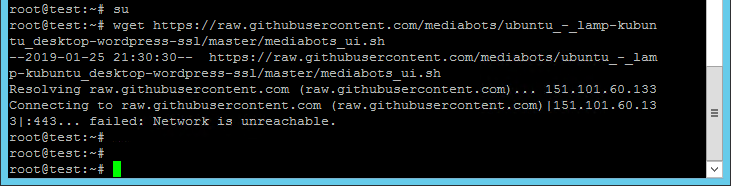
I know that it works my friend. When i said "finally an error" i was referring to me as i'm a complete Linux newbie. lol. And i know that the issue is at my end.
Anyway, downloading python worked after it failed for like 3 times but no luck with the github thing. Here's a screenshot.
rC8Rb1H
 
@kasumi009

No friend
its happening not because you are newbie, its happening because that vps is bad
Failed 3 times to download python? LOL!

1st I want to warn, that script & python size only in few KBs or MBs
script has to download lot more bigger files in the process.

Anyway , learn VIM from below Video :

VIM is a file editor in Linux.

just learn how to open a new file
insert & paste into the file
save & exit the file.

then open https://raw.githubusercontent.com/m..._desktop-wordpress-ssl/master/mediabots_ui.sh in your computer browser

And try to copy paste its content in your VPS through 'vim'
So you could have that .sh script file in your VPS without downloading through wget

Regards
 
Last edited:
@kasumi009

No friend
its happening not because you are newbie, its happening because that vps is bad
Failed 3 times to download python? LOL!

1st I want to warn, that script & python size only in few KBs or MBs
script has to download lot more bigger files in the process.

Anyway , learn VIM from below Video :

VIM is a file editor in Linux.

just learn how to open a new file
insert & paste into the file
save & exit the file.

then open https://raw.githubusercontent.com/m..._desktop-wordpress-ssl/master/mediabots_ui.sh in your computer browser

And try to copy paste its content in your VPS through 'vim'
So you could have that .sh script file in your VPS without downloading through wget

Regards
You're just the best buddy, i'm learning this right now. But which vps i' using is bad, Linux or Windows one?
 
obviously the Linux one, which you had connected through putty, and failing to download the script & python.

That VPS might have some serious network issue.
 
obviously the Linux one, which you had connected through putty, and failing to download the script & python.

That VPS might have some serious network issue.
Oh no. I though VULTR were the best. lol.
 
obviously the Linux one, which you had connected through putty, and failing to download the script & python.

That VPS might have some serious network issue.
I contacted their support and this what they said:
0RY9PBt
 
@kasumi009

No friend
its happening not because you are newbie, its happening because that vps is bad
Failed 3 times to download python? LOL!

1st I want to warn, that script & python size only in few KBs or MBs
script has to download lot more bigger files in the process.

Anyway , learn VIM from below Video :

VIM is a file editor in Linux.

just learn how to open a new file
insert & paste into the file
save & exit the file.

then open https://raw.githubusercontent.com/m..._desktop-wordpress-ssl/master/mediabots_ui.sh in your computer browser

And try to copy paste its content in your VPS through 'vim'
So you could have that .sh script file in your VPS without downloading through wget

Regards
Any screenshot of how to do that with vim? I know i'm being super dumb but i've been trying in vain since you posted this to get the hang of how to insert and paste the content into the file.
 
Any screenshot of how to do that with vim? I know i'm being super dumb but i've been trying in vain since you posted this to get the hang of how to insert and paste the content into the file.

At first copy entire text from this page https://raw.githubusercontent.com/m..._desktop-wordpress-ssl/master/mediabots_ui.sh

Below code to open a new file through vim
Code:
vim mediabots_ui.sh

when file opened

press i (to get into INSERT mode)

RIGHT CLICK (to paste)

press :
then press wq
then press Enter button

your file should be saved.

to verify it, write below command :
Code:
cat mediabots_ui.sh

it should print entire file content in the screen

Regards
 
At first copy entire text from this page https://raw.githubusercontent.com/m..._desktop-wordpress-ssl/master/mediabots_ui.sh

Below code to open a new file through vim
Code:
vim mediabots_ui.sh

when file opened

press i (to get into INSERT mode)

RIGHT CLICK (to paste)

press :
then press wq
then press Enter button

your file should be saved.

to verify it, write below command :
Code:
cat mediabots_ui.sh

it should print entire file content in the screen

Regards
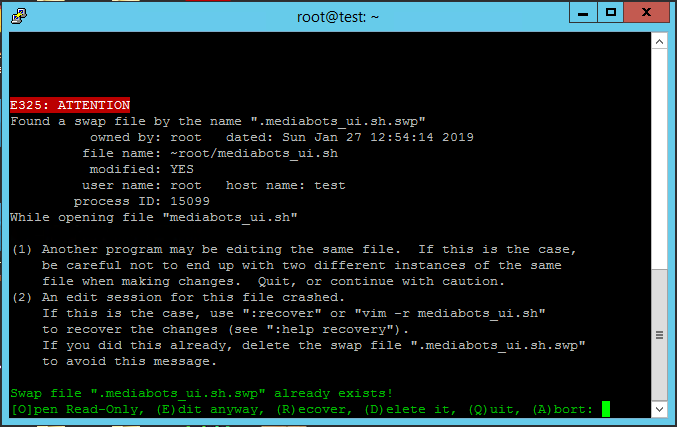
When i type :
Code:
cat mediabots_ui.sh
It says "no such file or directory".
But when i try to create the file again with this:
Code:
vim mediabots_ui.sh
Here's what it shows :
sH3fUlC

I looked up plenty of videos to get the hang of how to save the file an stuff and it seems that to exit mode insert is required before saving whatever file you're trynna create.
 
At first copy entire text from this page https://raw.githubusercontent.com/m..._desktop-wordpress-ssl/master/mediabots_ui.sh

Below code to open a new file through vim
Code:
vim mediabots_ui.sh

when file opened

press i (to get into INSERT mode)

RIGHT CLICK (to paste)

press :
then press wq
then press Enter button

your file should be saved.

to verify it, write below command :
Code:
cat mediabots_ui.sh

it should print entire file content in the screen

Regards
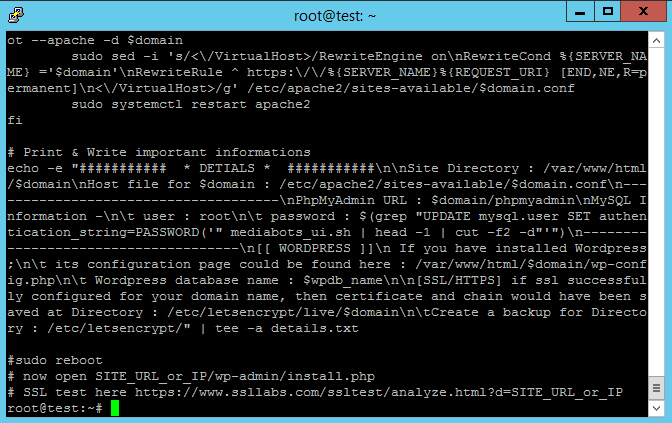
Holly molly. I think it worked. lol.
After checking some tutorials i figured out that i need to exit mode insert by hitting the button "esc" and then save the content by typing :wq and then "enter".
This is what it shows after i type:
Code:
cat mediabots_ui.sh
sOafLQ4
 
Last edited:
1. May I know which putty file should I download as a Mac user?
2. Once I have installed WP on the VPS, how can I add more databases?

Thanks for your share and help to us, mortal ignorants.

.
 
You don't need putty for mac, just terminal.
 
Holly molly. I think it worked. lol.
After checking some tutorials i figured out that i need to exit mode insert by hitting the button "esc" and then save the content by typing :wq and then "enter".
This is what it shows after i type:
Code:
cat mediabots_ui.sh

sorry!
my bad , I skip that line of pressing ESC button. hmmm... I cant believe I missed that :p

anyway good work :)

That 'VIM' command thing was the alternative of downloading the script through 'wget'

since now you have the .sh script in your system, all you have to run another 2 commands : chmod +x mediabots_ui.sh && ./mediabots_ui.sh

see here : https://github.com/mediabots/ubuntu_-_lamp-kubuntu_desktop-wordpress-ssl

also don't forget to watch the Youtube Demo : https://bit.ly/Shell-Ubuntu

it will be helpful once script executed

Regards
 
Back
Top