

skeye
Junior Member
- Dec 17, 2015
- 197
- 166
I recently dumped a file with 2,600 404 links on Wikipedia and another one with 190 Dropped Domains.
Here's how you can find 404 links or drops relevant to your niche.
1. Get a list of authoritative websites from your niche and a list of relevant Wikipedia articles.
2. Download Netpeak Spider web crawler (2 weeks free, no limits, no CC required)
3. Set it to check the first website from your list and find only external outgoing links
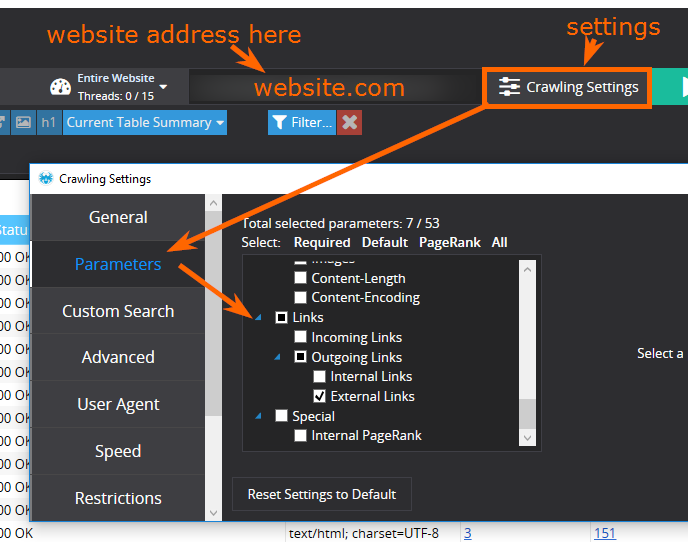
Disable all other parameters to speed up crawling.
4. Once it's done crawling, export the list of external links and repeat for all website you have.
5. From your exported files remove all links that aren't AHREF type (IMG, IMG Ahref and etc)
6. Get all of the external links you scraped from all of your websites and put them into one spreadsheet. When you export the links you will have few columns such as link type and etc, but you only need to keep two columns where links are coming from and where they're pointing at:

7. Copy all links from the To URL column and paste them into Netpeak Spider. You'll have to switch it to crawl the list of URLs instead of an entire website.
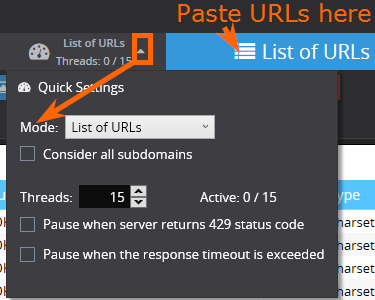
8. Change Spider's settings to check only Status codes of these URLs
9. Once crawling is complete you can sort URLs by status code to get your 404 broken links.
10. Paste these 404 links into your main Sheet with To URL and From URL columns.
11. Use VLOOKUP to see which page links to 404 page.
12. Contact website owners and offer to replace a dead link with a link to your (relevant) page
How to find Dropped domains
Go back to Step 9
10. After you sort URLs by status code you'll see that some URLs don't have any status (not 4xx, not 5xx), it'll say Error.
This means that link from you list points to a non-existent website
11. Get these Zero Status links and check them through Godaddy's Bulk Checker

Alternatively, what I prefer doing.
Download Netpeak Checker (same company, same free trial)
And paste your Zero Status links into the checker. And set it to check the following parameters:
MOZ Domain Authority (You'll have to get a free API key from MOZ)
WHOIS availability
And you'll get similar results:
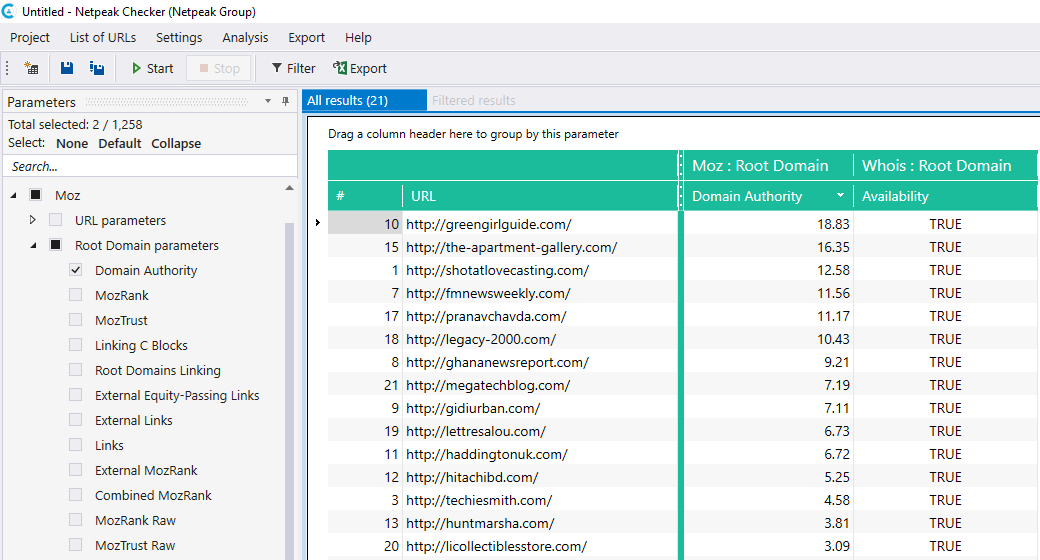
You'll see if domain is available (TRUE) and if it's any good (Domain Authority)
What to do next?
Once you found a drop, check it's backlink profile, with any Backlink tool

This is one of the drops I found while writing this post
If profile looks good buy the domain.
Restore site structure by checking which pages were linked most often.
Set up redirects to your own website.
?????
Profit.
Here's how you can find 404 links or drops relevant to your niche.
1. Get a list of authoritative websites from your niche and a list of relevant Wikipedia articles.
2. Download Netpeak Spider web crawler (2 weeks free, no limits, no CC required)
3. Set it to check the first website from your list and find only external outgoing links
Disable all other parameters to speed up crawling.
4. Once it's done crawling, export the list of external links and repeat for all website you have.
5. From your exported files remove all links that aren't AHREF type (IMG, IMG Ahref and etc)
6. Get all of the external links you scraped from all of your websites and put them into one spreadsheet. When you export the links you will have few columns such as link type and etc, but you only need to keep two columns where links are coming from and where they're pointing at:
7. Copy all links from the To URL column and paste them into Netpeak Spider. You'll have to switch it to crawl the list of URLs instead of an entire website.
8. Change Spider's settings to check only Status codes of these URLs
9. Once crawling is complete you can sort URLs by status code to get your 404 broken links.
10. Paste these 404 links into your main Sheet with To URL and From URL columns.
11. Use VLOOKUP to see which page links to 404 page.
12. Contact website owners and offer to replace a dead link with a link to your (relevant) page
How to find Dropped domains
Go back to Step 9
10. After you sort URLs by status code you'll see that some URLs don't have any status (not 4xx, not 5xx), it'll say Error.
This means that link from you list points to a non-existent website
11. Get these Zero Status links and check them through Godaddy's Bulk Checker
Alternatively, what I prefer doing.
Download Netpeak Checker (same company, same free trial)
And paste your Zero Status links into the checker. And set it to check the following parameters:
MOZ Domain Authority (You'll have to get a free API key from MOZ)
WHOIS availability
And you'll get similar results:
You'll see if domain is available (TRUE) and if it's any good (Domain Authority)
What to do next?
Once you found a drop, check it's backlink profile, with any Backlink tool
This is one of the drops I found while writing this post
If profile looks good buy the domain.
Restore site structure by checking which pages were linked most often.
Set up redirects to your own website.
?????
Profit.


