

- Aug 16, 2014
- 3,089
- 676
Hi mates. this is my old post. but it didn't reach because so many of SMM peoples struggled and maintaining profiles. So I give my method use this but it's never banned because it is a manual method. once you fill this you can use at any time. Use Vpn to choose a place for each account ex: now am select USA Florida for my first acc in VPN. I will make these steps
Step :1
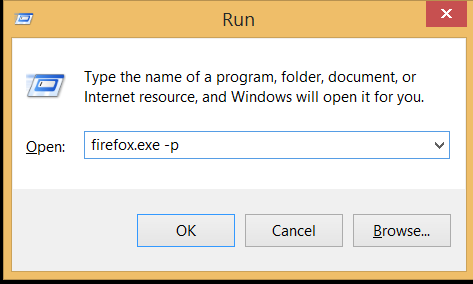
That will enable a new profile set for an account.
Step 2:
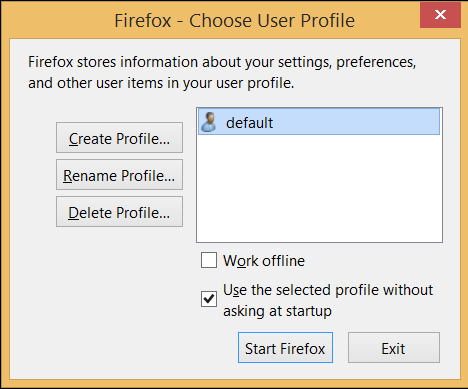
Create profile choose your username.
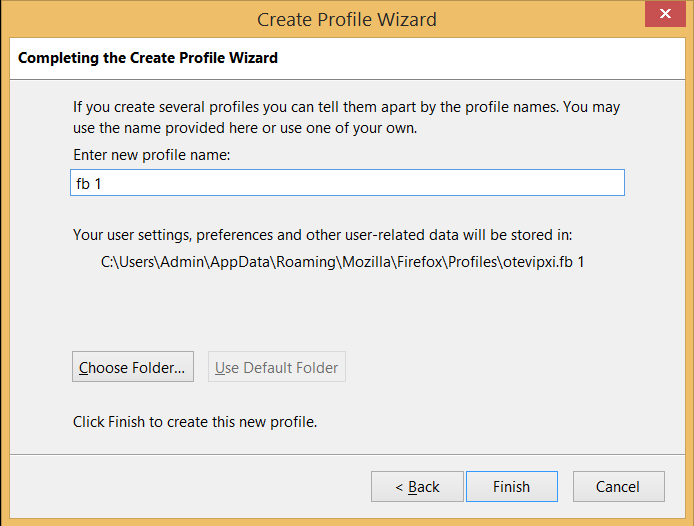
then
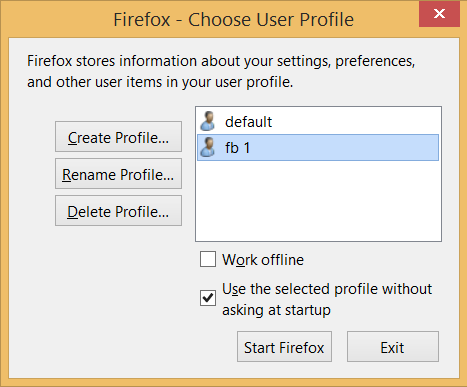
Start Firefox
It will completely new one. Then log in your first acc do your posts and close that using Ctrl+w
You no need to log out this.
same as clear your temp files and Change VPN place any of the desired places. start firefox create another fb profile like fb2
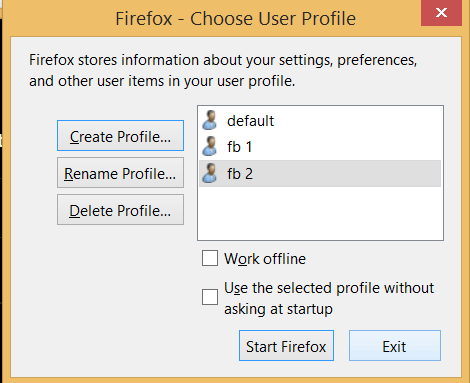
Do the same process. Fix the places for every acc. so you won't get the ban. also, you no need to sign in every time and it will look like a real profile.
(If my method is useful try that)
Step :1
That will enable a new profile set for an account.
Step 2:
Create profile choose your username.
then
Start Firefox
It will completely new one. Then log in your first acc do your posts and close that using Ctrl+w
You no need to log out this.
same as clear your temp files and Change VPN place any of the desired places. start firefox create another fb profile like fb2
Do the same process. Fix the places for every acc. so you won't get the ban. also, you no need to sign in every time and it will look like a real profile.
(If my method is useful try that)


