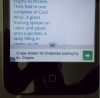
What is this random ad??

EmpireQuality

Elite Member
Joined
Jan 18, 2010
Messages
1,912
Reaction score
386
hey friends.
i have 3 wordpress blogs with adsense on them, 2 ad units per page.
but when i view my blogs on my iphone 4, there is a 3rd ad that displays in the footer.
its not my ad unit, so who's is it?
is apple safari displaying ads?
are my sites hacked or something?
but the 3rd ad is not showing on desktop, which is a good thing.
i dont understand this.
thanks for your help.
- EmpireQuality
 
Did you use a nulled/hacked/downloaded wp theme or plugin?

If so,big chance their is some hidden code in there.
 
Did you use a nulled/hacked/downloaded wp theme or plugin?

If so,big chance their is some hidden code in there.

nope, i bought my wordpress themes from a legit company.
but the ad isn't on my site, it's like a pop up.
so is Apple the one doing this on their safari browser?
 
I highly doubt Apple would inject Ad code to they're browsers... that would be a PR nightmare...

It's more likely a browser HI jack on your machine... or the Theme/plugins, while yes legit... they could still hold rogue code that you need to remove.. possibly place holder code from the programmer?

If its in the Footer... just look through that file in dream weaver or any other editor. You should find the ad code fairly quickly.

Just some thoughts.. Good luck.
 
hey man how are you connecting to internet with your phone?
its possible its your ISP displaying the ad
 
hey friends.
i uploaded a picture of this unknown ad.
please check it out.
randomad.PNG

its my wordpress blog on my iphone 4, with the ad at the bottom.
the ad is like a pop up
thanks a lot
 
Last edited:
Check on somebody else's phone and you will know something more.
 
Thats weird, i dont think the ad is on your site in anyway, it must be an ad on the browser or maybe even an ad thats been put there by another app maybe?
 
Maybe kind of adware in your browser..check if it is shown in other websites also..
 
Its adsense ad ? May be they are showing responsive ad.
 
hey friends.
i uploaded a picture of this unknown ad.
please check it out.
View attachment 63083

its my wordpress blog on my iphone 4, with the ad at the bottom.
the ad is like a pop up
thanks a lot

Looks like Shezboy and Haspel's plugin in play.
 
If its only on that one blog then its not likely to be browser related. Change your theme and see if its still there, if so its probably a dodgy plugin.
 
If its only on that one blog then its not likely to be browser related. Change your theme and see if its still there, if so its probably a dodgy plugin.

i changed my theme and the ad is still there.
the ad is on all 3 of my blogs.
maybe the theme developers are injecting this ad?
how can i get this damn ad removed?
 
now try deactivating each plugin one by one, then enable it and do the same for all of them.
Check the site after each plugin is deactivated. Clear browser history between each check.
 
You can also download these plugins:
Theme Authenticity Checker: checks for malicious code in your themes.
Wordfence: checks for changed code in themes and plugins, and general malicious files.
 
You can also download these plugins:
Theme Authenticity Checker: checks for malicious code in your themes.
Wordfence: checks for changed code in themes and plugins, and general malicious files.

theme authenticity checker found 1 "static link." could that be the problem?
wordfence didn't find anything, and the best features are only for paid members.
i disabled all my plugins, clear my history, and the ad is still there.
so my plugins aren't the problem.
this is driving me crazy!
i don't know what else to do.
thank you everyone for your help.
but how can i find this ad problem?
 
I really dunno. Bumping this thread to allow more to see it. Would be interested in learning what the issue is.
 
theme authenticity checker found 1 "static link." could that be the problem?
Could be, But since you said the ad was still there when you changed themes, I doubt it. I guess the best way to find out what it really is, is change to a clean theme, and disable all plugins. Clean cache and refresh. When its still there, its not on your site so you can look somewhere else. When it its not there, activate plugins one by one and see when it comes back.
 
Last edited:
Back
Top