Want This Old Wordpress Visual Editor Back [New/Edit Post]

theD2

Regular Member
Joined
Oct 26, 2011
Messages
247
Reaction score
55
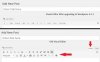
hello , i dont know how it did happen , but i want old wordpress visual editor back. this happend maybe after installing wordpress 4+ versions. currently 4.3.1
please see the picture for more brief.
wordpress visual editor.jpg
1. I tried installing Another Theme.
2. even reinstalled 4.3.1 a fresh one wordpress on another web hosting.
3. tried TinyMCE too
but none of these work.
 
A.
Google this:
wp-editor-tabs corrupt

I think that one of those solutions should help. I also think that one of your plugins is causing the problem, as you have said that you've uninstalled and then reinstalled the WP version, but it has not helped. Therefore I don't see any other code causing the disappearance of those normal tabs.

Can't replicate your problem on one of my test WP installed on localhost to see what could be causing it, hence can't give you an exact and a faster solution.

B.
Disable ALL the Plugins and see if that brings the editor-tabs back. (Visual | Text) buttons. Before disabling all the plugins, note down which plugins are activated so that you can reactivate them after doing the above debug process.
Tip 1:
To copy/save the name of the activated plugins' faster, go to Plugins > Installed Plugins, then click on the Active menu item on top of the plugins list, and then and save screenshots. You'll have all the details of which plugins are in active stage before you deactivate all the plugins to see what's causing the problem... That would help you much better when you're reactivating the plugins.

Tip 2:
When trying the above #(B), you can also change the existing theme to one of the default themes supplied by WP, e.g. twentythirteen or twentyfourteen and then try the above #(B)...

P.S.:
C.
Have you installed any other editor plugin/s on the WP site? Try deactivating it/them or completely removing it before attempting the #(B)
 
Last edited:
** Sorry Zwielicht **
:)

P.S.:
OP, can you replicate the site on your PC under localhost (xampp, for example)?
 
Last edited:
- Is the visual editor enabled for the current user?
- Any code in the theme's functions.php somehow disabling the editor?
 
Have you got the latest free wordpress theme installed but not activated, try activating it then re activating your theme. If you have deleted default themes except yours then download the default theme but dont activate it, this might work
 
You're in "Text" mode, not "Visual" mode. Normally, you would click the "Visual" button to get back to it, but your button is missing.

I read that disabling plugins might help, but you can also try this plugin out: https://wordpress.org/plugins/use-google-libraries/
yes , visual tab is missing . i tried disabling plugins but it is not working.


A.
Google this:
wp-editor-tabs corrupt

I think that one of those solutions should help. I also think that one of your plugins is causing the problem, as you have said that you've uninstalled and then reinstalled the WP version, but it has not helped. Therefore I don't see any other code causing the disappearance of those normal tabs.................
i disabled all plugins but still visual tab is missing .. but i have a another website which have the same version of wordpress 4.3.1 and none plugin installed. and there visual tab is showing fine .


- Is the visual editor enabled for the current user?
- Any code in the theme's functions.php somehow disabling the editor?
yes , it have only one account ADministrator and i really dont know what code affecting theme's functions ..


Have you got the latest free wordpress theme installed but not activated, try activating it then re activating your theme. If you have deleted default themes except yours then download the default theme but dont activate it, this might work
Done . but still no help ..
 
Try this Go to your admin dashboard and scroll to users then follow these steps


1 : Click on Your Profile under users
2 : Look for the Visual editor and make sure it is unchecked where it say " Disable the visual editor when writing "
3 : save.


hope this helps
 
If this site uses a combination of cache plugins and/or cloudflare or other cdn services there are plenty of possible caches competing to be displayed. If you are unable to resolve this error with the feedback that has thus far been provided - it's unlikely you have the right skill set to resolve the challenge, and you should let someone with a better skill set resolve the issue.

It's doing nobody any good to endlessly try 1000 different approaches when somebody such as myself or any other much more experienced wordpress site administrator could easily get in there and resolve the problem directly in under an hour. Just find someone to fix it for you, and tell you what the problem was so you can avoid making the same mistake in the future. Also - mistake might not be the right word as some pretty normal wordpress admin behavior can often lead to problems like this.
 
Try this Go to your admin dashboard and scroll to users then follow these steps


1 : Click on Your Profile under users
2 : Look for the Visual editor and make sure it is unchecked where it say " Disable the visual editor when writing "
3 : save.


hope this helps
it works .. thanks ..:) wordpress visual editor in profile.png
 
Back
Top