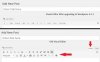
A.
Google this:
wp-editor-tabs corrupt
I think that one of those solutions should help. I also think that one of your plugins is causing the problem, as you have said that you've uninstalled and then reinstalled the WP version, but it has not helped. Therefore I don't see any other code causing the disappearance of those normal tabs.
Can't replicate your problem on one of my test WP installed on localhost to see what could be causing it, hence can't give you an exact and a faster solution.
B.
Disable ALL the Plugins and see if that brings the editor-tabs back. (Visual | Text) buttons. Before disabling all the plugins, note down which plugins are activated so that you can reactivate them after doing the above debug process.
Tip 1:
To copy/save the name of the activated plugins' faster, go to Plugins > Installed Plugins, then click on the Active menu item on top of the plugins list, and then and save screenshots. You'll have all the details of which plugins are in active stage before you deactivate all the plugins to see what's causing the problem... That would help you much better when you're reactivating the plugins.
Tip 2:
When trying the above #(B), you can also change the existing theme to one of the default themes supplied by WP, e.g. twentythirteen or twentyfourteen and then try the above #(B)...
P.S.:
C.
Have you installed any other editor plugin/s on the WP site? Try deactivating it/them or completely removing it before attempting the #(B)