

SpoonFeeder
BANNED
- Mar 19, 2017
- 1,608
- 2,096

Step 1 : Install https://chrome.google.com/webstore/detail/keywords-everywhere-keywo/hbapdpeemoojbophdfndmlgdhppljgmp :
Step 2 : After the extension is installed, navigate to https://keywordseverywhere.com/first-install-addon.html and submit your email address.
Step 3 : You'll receive an email with the API Key. Copy it and paste it http://chrome-extension://hbapdpeemoojbophdfndmlgdhppljgmp/html/options.html.
Now search your favourite keyword in Google to see it's search volume right under the search box.

You can also see the search volume for the related keywords.
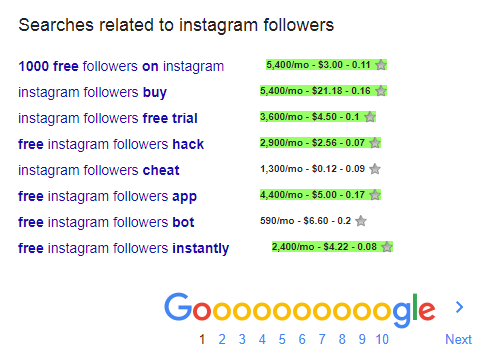
It works on Google Trends as well.

and on Youtube

It works on amazon, bing, ebay, etsy, google keyword planner, keywordshitter, majestic, moz, soovle, ubersuggest, google webmaster tools, etc..,
I'm sure this extension will make your life much easier. All credits goes to Akash who built this awesome extension.


