

- Jul 26, 2016
- 2,267
- 3,646
Thought I would share a HARO hack that would be useful to users who find it hard to find the time to check the emails everyday for opportunities here is what you will need
A Gmail account
A Slack Account
Step 1:
Create a new slack channel for HARO and follow this guide to create an email address for this channel.
Step 2:
List out a bunch of trigger words ie Automotive, Cars, Vehicles
Step 3:
Either create a new gmail account or use an existing account and make sure all your HARO emails and getting sent here.
Step 4:
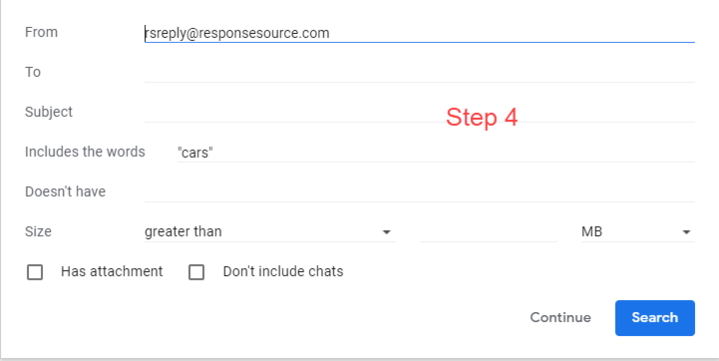
Using your trigger words you should create filters in Gmail. See attached image
Step 5:
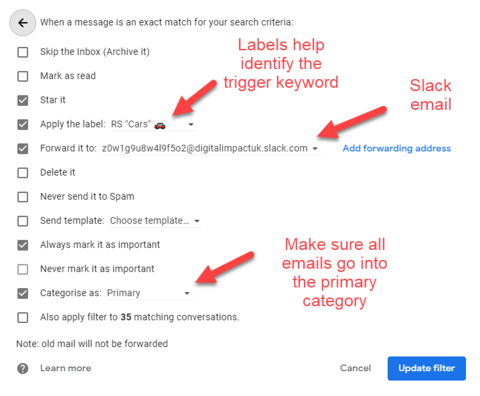
Now using the slack email address forward the email to slack if the trigger word is within the body of the email.
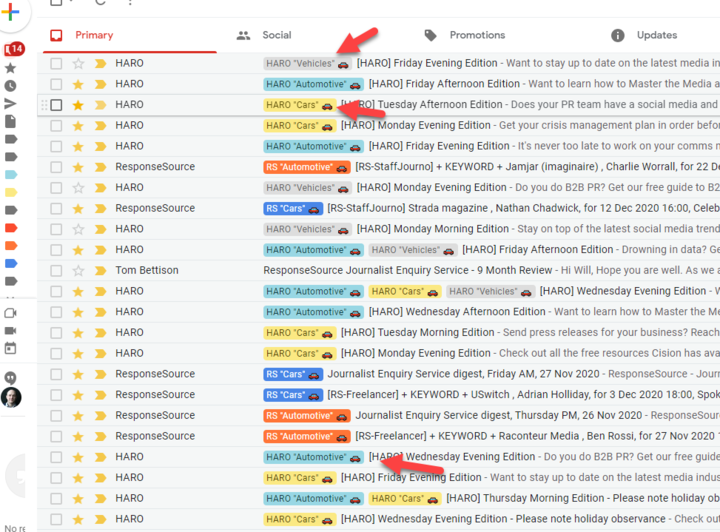
Tips: Add labels using the keyword name to help identify what keyword is within the HARO email.
Make sure the emails go into the primary inbox this way the primary tab only contains opportunities.
Step 6: Repeat this step for all your trigger words
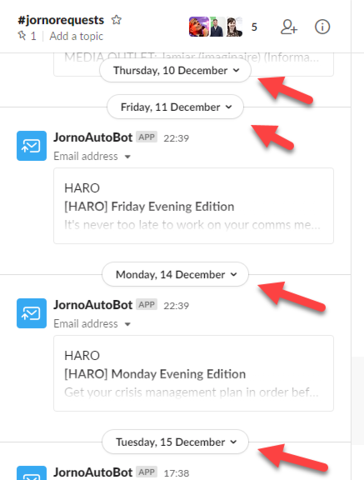
You are all set, each time a HARO gets sent that contains a Keyword you are tracking Slack will get a notification. All you need to do is check the labels on the email and do a quick Control find using the trigger word to find the opportunity.
Other tips:
You can also uses the OR operator if your keyword has multiple versions ie
“Car” OR “Cars”
I think this strategy is best for specialist niche campaigns such as ours which is automotive, I think popular niches might trigger most HARO emails.
Make sure the HARO emails that trigger your keywords land in the primary tab as I think on my setup HARO defaults to the Updates tab. This way all the no-relevant HAROs are hidden out of sight, leaving you with all the goodness to review.
A Gmail account
A Slack Account
Step 1:
Create a new slack channel for HARO and follow this guide to create an email address for this channel.
Step 2:
List out a bunch of trigger words ie Automotive, Cars, Vehicles
Step 3:
Either create a new gmail account or use an existing account and make sure all your HARO emails and getting sent here.
Step 4:
Using your trigger words you should create filters in Gmail. See attached image
Step 5:
Now using the slack email address forward the email to slack if the trigger word is within the body of the email.
Tips: Add labels using the keyword name to help identify what keyword is within the HARO email.
Make sure the emails go into the primary inbox this way the primary tab only contains opportunities.
Step 6: Repeat this step for all your trigger words
You are all set, each time a HARO gets sent that contains a Keyword you are tracking Slack will get a notification. All you need to do is check the labels on the email and do a quick Control find using the trigger word to find the opportunity.
Other tips:
You can also uses the OR operator if your keyword has multiple versions ie
“Car” OR “Cars”
I think this strategy is best for specialist niche campaigns such as ours which is automotive, I think popular niches might trigger most HARO emails.
Make sure the HARO emails that trigger your keywords land in the primary tab as I think on my setup HARO defaults to the Updates tab. This way all the no-relevant HAROs are hidden out of sight, leaving you with all the goodness to review.


