

- Oct 11, 2018
- 1,236
- 1,037
Speeding up Selenium script development involves leveraging tools, best practices, and efficient workflows to minimize coding time while maximizing the effectiveness and reliability of your test scripts.
When making a script you want to be able to complete it as quickly as possible. This will be a quick writeup I made
Wrote about this before, but the webDriver manager is a library that automates the management of browser drivers. Instead of manually downloading, storing, and setting the path for browser drivers like ChromeDriver or geckodriver, WebDriver Manager handles these tasks for you. It automatically detects the version of the browser installed on your machine and downloads the matching driver version.
How to Use:
Benefits:
Use Katalon Recorder to draft test scripts, then refine and expand them as needed in your code editor.
https://katalon.com/katalon-recorder-ide
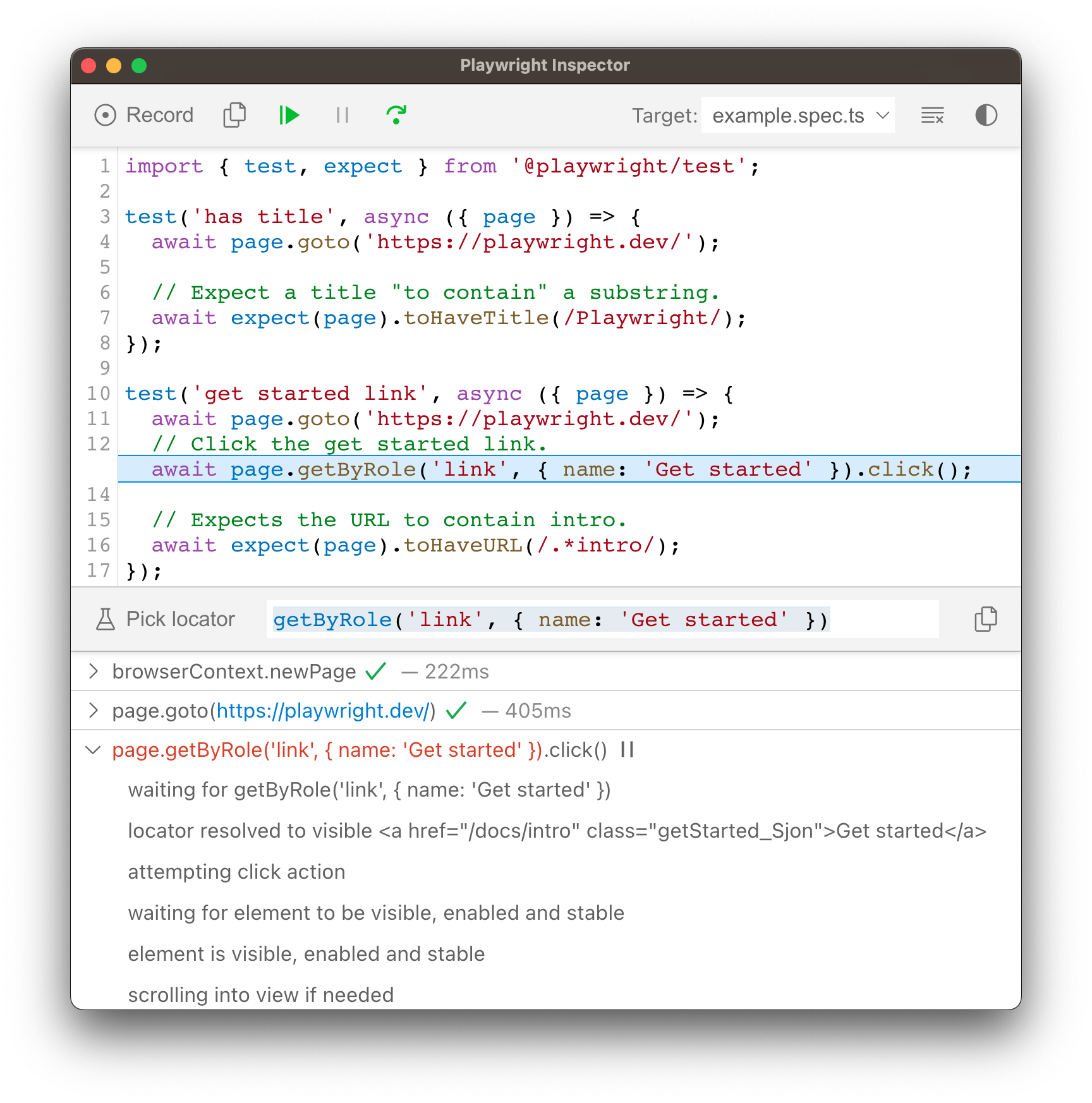
The Playwright Inspector is a GUI tool to help you debug your Playwright tests. It allows you to step through your tests, live edit locators, pick locators and see actionability logs.
Playwright is a selenium alternative that is cross platform. It is more modern and great for quick projects where you want to avoid the detect-ability of selenium and still use something official.
Read more here: https://playwright.dev/python/
Leveraging ChatGPT can significantly speed up the process of writing Selenium scripts. You can ask ChatGPT to generate code templates based on your testing requirements. For instance, if you need to test a login feature, you can ask ChatGPT to provide a Selenium script template for logging into a website.
How to Use:
Exclusive snippet for running selenium on both Linux and Windows:
Another way that can significantly speed up script development is by writing tests.
So if you know what the end result is, like for a account creator, you can write a test that will call the function you have written and then assert that you care on the signup page. this is a lot faster than e.g. calling the function over and over again on its own, which is what I used to do!
5. Use Github or another VCS to store your code
Normally before I would just store all my code on my computer. This wasn't so good as I lost a few scripts!
Instead, now I create a repository on GitHub for projects, this allows me to track the progress and work on it from almost any device.
https://docs.github.com/en/get-started/getting-started-with-git/set-up-git
Regularly review and refactor your test scripts. Optimization can involve removing redundant actions, consolidating similar tests, and ensuring your selectors (XPath, CSS) are efficient and reliable.
My thoughts on this - often when you come back to your script, especially an old one, there is something that you can improve to make it more efficient.
I'd recommend doing this, but also keep in mind the phrase "If it aint broke, don't fix it." So make sure you know what you are doing.
Integrate your Selenium tests with a CI/CD pipeline (e.g., Jenkins, GitLab CI).
This allows you to automatically run tests on code commits, ensuring immediate feedback on the impact of code changes.
I don't do this yet, but for big projects I feel it is a must. Once one of your test fails you can quickly address it and keep the code running smoothly.
Exclusive prompt i use to accelerate development:
When making a script you want to be able to complete it as quickly as possible. This will be a quick writeup I made
1. Use WebDriver Manager
Wrote about this before, but the webDriver manager is a library that automates the management of browser drivers. Instead of manually downloading, storing, and setting the path for browser drivers like ChromeDriver or geckodriver, WebDriver Manager handles these tasks for you. It automatically detects the version of the browser installed on your machine and downloads the matching driver version.
How to Use:
- Python Example:
from selenium import webdriver
from webdriver_manager.chrome import ChromeDriverManager
driver = webdriver.Chrome(ChromeDriverManager().install())
2. Utilize Katalon Recorder
Katalon Recorder is a powerful browser extension that records your actions in the browser to generate Selenium scripts. It's an excellent tool for quickly creating test cases without writing code from scratch.Benefits:
- Fast Prototype: You can quickly generate test scripts by performing actions in the browser.
- Code Export: Katalon Recorder allows you to export recorded actions into various programming languages and frameworks supported by Selenium. Useful extension as it allows you to record actions and get the code.
Use Katalon Recorder to draft test scripts, then refine and expand them as needed in your code editor.
https://katalon.com/katalon-recorder-ide
Playwright Inspector
From the documentationThe Playwright Inspector is a GUI tool to help you debug your Playwright tests. It allows you to step through your tests, live edit locators, pick locators and see actionability logs.
Playwright is a selenium alternative that is cross platform. It is more modern and great for quick projects where you want to avoid the detect-ability of selenium and still use something official.
Read more here: https://playwright.dev/python/
3. Integrate ChatGPT for Template Generation
Leveraging ChatGPT can significantly speed up the process of writing Selenium scripts. You can ask ChatGPT to generate code templates based on your testing requirements. For instance, if you need to test a login feature, you can ask ChatGPT to provide a Selenium script template for logging into a website.
How to Use:
- Provide clear, detailed instructions about the test case.
- Specify the programming language and any frameworks you're using.
- Use the generated template as a starting point, customizing it for your specific test scenarios.
Exclusive snippet for running selenium on both Linux and Windows:
Code:
import os
from selenium import webdriver
from webdriver_manager.firefox import GeckoDriverManager
import platform

# Detect the platform
current_platform = platform.system()

# Set up Firefox WebDriver with WebDriver Manager
opts = webdriver.FirefoxOptions()

if current_platform == "Linux":
    # Set the install directory for Linux
    install_dir = "/snap/firefox/current/usr/lib/firefox"
    driver_loc = os.path.join(install_dir, "geckodriver")
    binary_loc = os.path.join(install_dir, "firefox")

    service = webdriver.FirefoxService(driver_loc)
    opts.binary_location = binary_loc
    driver = webdriver.Firefox(service=service, options=opts)
elif current_platform == "Windows":
    # Use WebDriver Manager for Windows
    driver_loc = GeckoDriverManager().install()
    driver = webdriver.Firefox(executable_path=driver_loc, options=opts)
else:
    raise Exception("Unsupported platform")
4. Write Tests
Another way that can significantly speed up script development is by writing tests.
So if you know what the end result is, like for a account creator, you can write a test that will call the function you have written and then assert that you care on the signup page. this is a lot faster than e.g. calling the function over and over again on its own, which is what I used to do!
5. Use Github or another VCS to store your code
Normally before I would just store all my code on my computer. This wasn't so good as I lost a few scripts!
Instead, now I create a repository on GitHub for projects, this allows me to track the progress and work on it from almost any device.
https://docs.github.com/en/get-started/getting-started-with-git/set-up-git
6. Continuously Refactor and Optimize
Regularly review and refactor your test scripts. Optimization can involve removing redundant actions, consolidating similar tests, and ensuring your selectors (XPath, CSS) are efficient and reliable.
My thoughts on this - often when you come back to your script, especially an old one, there is something that you can improve to make it more efficient.
I'd recommend doing this, but also keep in mind the phrase "If it aint broke, don't fix it." So make sure you know what you are doing.
7. Implement Continuous Integration (CI)
Integrate your Selenium tests with a CI/CD pipeline (e.g., Jenkins, GitLab CI).
This allows you to automatically run tests on code commits, ensuring immediate feedback on the impact of code changes.
I don't do this yet, but for big projects I feel it is a must. Once one of your test fails you can quickly address it and keep the code running smoothly.
Exclusive prompt i use to accelerate development:
Code:
"Can you please provide a clear and complete version of the code without any omissions or placeholders? This will allow me to copy and paste it quickly.”