

- Feb 28, 2019
- 7,462
- 7,938
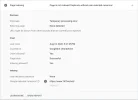
You can use the URL inspection tool on GSC (Google Search Console) to check the crawl/index status of a URL. The report contains a "Google-selected canonical" value that points to the actual webpage that Google chose for the content. Google can & will display some other webpage from the same or an external website in some cases. Sometimes the URL can point to a spammy or dangerous site.
Dan Lauer wrote on BlueSky, "I have never seen Google selected canonical to be a spammy site before like this? This is for a new clients blog and its not indexed yet. I discovered this inspecting it in GSC."
Here is the screenshot from the post:
John Mueller from Google responded:
I have personally faced such a situation multiple times and here is what I noticed:
Dan Lauer wrote on BlueSky, "I have never seen Google selected canonical to be a spammy site before like this? This is for a new clients blog and its not indexed yet. I discovered this inspecting it in GSC."
Here is the screenshot from the post:
John Mueller from Google responded:
These things are impossible to say without more details. Sometimes domains have used the same interstitial / parked page, which can easily lead to this. I'd check back after a few weeks to see how it settles down, otherwise post in the help community with the full details.
I have personally faced such a situation multiple times and here is what I noticed:
- If you have multiple home pages for a website with each pointing to a different language using hreflang attributes, Google may treat all these pages as duplicates of the main home page.
- If an authority site or a parasite copy-pastes the exact same contents of your webpage, Google may treat that as the selected canonical to your webpage and choose to display that webpage in SERPs instead of yours.
- If a document or media from your webpage is uploaded to an authority site (for example, pdf to archive.org or video to youtube), Google will choose the authority site.