
- Mar 22, 2013
- 6,285
- 10,996
I wanted to top up my balance.What did u try to order?

I wanted to top up my balance.What did u try to order?


I wanted to top up my balance.

We do not have a method for adding funds using PayPal. Wechat will be available for deposits in the next few daysJust tried to order.
Paypal not available. Wechat Pay doesn't work.
https://smspva.com/balance.html choose a payment method. If you can't find a convenient way to Deposit money, write to the tech support chatI wanted to top up my balance.
We will add new numbers soon. Please wait a littleThe number for USA Paypal is never available?

If you do not receive a text message or Google does not miss the number, please read the article about Google that we published in this topic. 10 page, subject "how to register Gmail accounts and not experience problems with blocking."Russian numbers don't work for Gmail verification anymore.
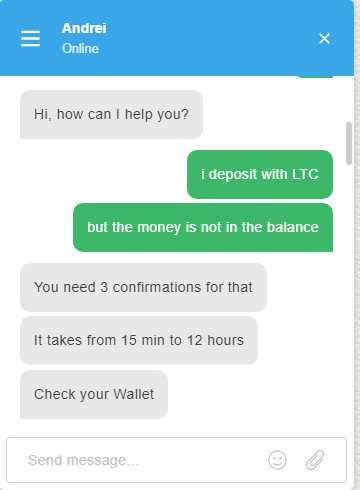
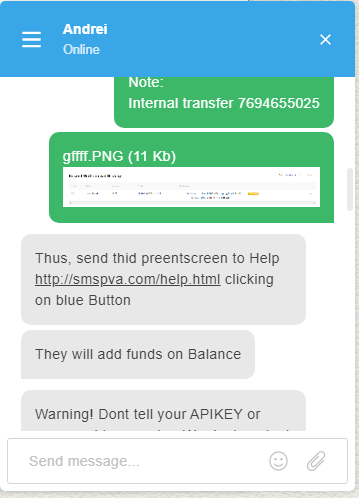
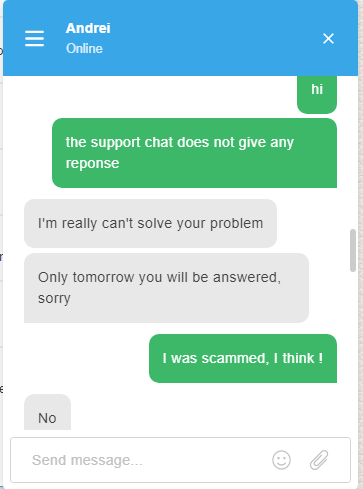
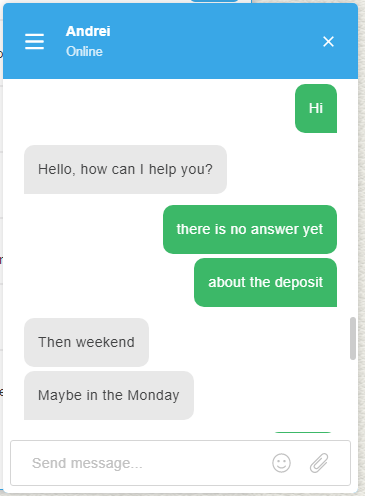
I have a very bad experience with SMSPVA and the messages is shown every thing , i made a deposit with LTC about 3 $ just for testing if it's real service or SCAM .
in the begining all things is ok but after i send the money in the wallet of LTC the funds don't added to the balance . this is the screenshots of the support, i make a ticket but it's dont give any answer !

I was your old user and your main drawback is " you don't have PayPal option for top up"
View attachment 108328
We accept:
- PayPal
- Payeer
- Perfect Money
- Payoneer
- Bitcoin
- etc.
Our prices:
Google price starting at $0.1 for each SMS code
Facebook price starting at $0.1 for each SMS code
Instagram price starting at $0.15 for each SMS code
MS, Bing, Hotmail price starting at $0.1 for each SMS code
Tinder price starting at $0.3 for each SMS code
Twitter price starting at $0.05 for each SMS code
Uber price starting at $0.1 for each SMS code
VK price starting at $0.5 for each SMS code
Yahoo price starting at $0.04 for each SMS code
WhatsApp price starting at $0.1 for each SMS code
etc. all services and prices presented on SMSPVA website
Note: our SMSPVA can change prices and services without user notification.
Contact with us:
- through SMSPVA helpdesk system (link to helpdesk)
- thorough email - sup.smspva( at )gmail.com
Refund policy:
- The requests to refund money for errors or problems in work of our web-service must be created only in the SMSPVA helpdesk system (other requests will not be considered).
- All refunds requests are considered individually and SmsPVA company reserves the right to denied refund under this or that conditions (for example, violation of the terms of the offer).
- A withdraw to your personal wallet is available only to PayPal. Create a ticket in SMSPVA helpdesk system if you want the withdraw your balance.
Crediting the balance using cryptocurrencies requires 3 - 6 confirmations. Sometimes there are delays, so you need to wait for a while. Your balance is probably already topped upI have a very bad experience with SMSPVA and the messages is shown every thing , i made a deposit with LTC about 3 $ just for testing if it's real service or SCAM .
in the begining all things is ok but after i send the money in the wallet of LTC the funds don't added to the balance . this is the screenshots of the support, i make a ticket but it's dont give any answer !
What's going on ? I don't see any problems. Are you having difficulties with something ?I only see Problems with smsvpa recently, what is going on?
I wanted to order but for now i ll wait first
We do not accept PayPal. Choose a different Deposit system. Using cryptocurrency or a card, there are also other ways to top up your accounI was your old user and your main drawback is " you don't have PayPal option for top up"
Why did you listed PayPal then
Then removed it from your thread,you wrote you accept PayPalCrediting the balance using cryptocurrencies requires 3 - 6 confirmations. Sometimes there are delays, so you need to wait for a while. Your balance is probably already topped up
What's going on ? I don't see any problems. Are you having difficulties with something ?
We do not accept PayPal. Choose a different Deposit system. Using cryptocurrency or a card, there are also other ways to top up your accoun
I'm sorry, but the first post can't be edited.Then removed it from your thread,you wrote you accept PayPal
You can ask moderator to edit it otherwise you might get some bad reviewI'm sorry, but the first post can't be edited.

It s hard for the sms Services to get enough numbers to provide everyone, that is why some numbers get reused a bit too often i guessI have a bad experience.
I purchase one spanish number for Uber and the number was already used for Uber
I purchase the second one and was OK.
So i spend money two times for get 1 number. I ask via chat and they say to take a picture... when its imposible now ( 1 day after) and the picture is of a screen without data because you get redirected to the login page if the number was already used.
How to register Gmail accounts and not experience problems with blocking.
During the entire operation of our service, we have identified 2 main problems that users face when registering Gmail accounts.
As usual the user gets a new number and when entering it Google can report an error:
- This phone number has been used too many times;

- This number cannot be used for ID verification;

How do I fix this problem and continue registering new accounts ?
Based on all known methods of anonymization, users can use a proxy and change the ip address for each number. This method of solving the problem is not always effective, but you should pay attention to it if you have not previously used a proxy.
Brief recommendations for using a proxy:
- Choose the proxy of the country for which you take the number.
- Use private proxies (purchased) that were not previously used.
If the user already uses a proxy, but Gmail refuses to accept the number , then we go to the next stage of solving the problem.
If you need to register a new account. but Google does not miss the number, then we will use a clean device, namely, we take out a smartphone and register a new account. If registering an account to a number from a PC, the user gets an error, then entering the number from the phone, Gmail sends the code to the number without any problems, and thus the user creates a new account without any problems
Why does Google not allow you to register many accounts from one device ?
Very often, users who have registered a large number of accounts on one device start thinking that there is a problem with numbers and start blaming online services for selling blocked numbers.
In fact, the problem is on the user's side. Google uses a sophisticated algorithm and knows all your data. And if you have Google Chrome on your computer, there is no point in trying to register even 10 accounts.
You need to understand the main thing:
- If Google wants to send you a forced SMS message during registration, it means You are already under suspicion! Perfect registration of Google accounts occurs without the participation of a phone number.
You can see this when you enter the number from your smartphone and create an account without any problems, since the smartphone is a "clean device" and Gmail issues the account activation code without any problems.
Recommendations for users who want to register Gmail accounts:
- Clear cache, history, cookies;
- Use high-quality proxies (purchased ones);
- Change the device (if possible);
- Try to get numbers from different countries;
If using all the above this, you cannot register, then write to our online technical support and we will try to help you!
This is good an all but i think youtube is standardized to ask for phone verification when trying to create your first account on a vpsGreat guide! I also like to add few things to this.
1 : Using residential proxies or real IP is very important. Using cheap public proxies or VPN will be a waste of a mobile number because the account will get ghosted. Videos won't get indexed.
2 : Always try to make an account when Google asks you to do it. How? On a clean device or browser, open YouTube video from a third-party website or app. Use WhatsApp or Facebook to open a YouTube video. Make sure you you are logged out of any accounts in that browser or YouTube app. Now click on like/subscribe button or try to comment. YouTube will ask you to login to perform the action and that's when you register your account.
YouTube tracks the referring action. You can't just open YouTube and click on sign up button. That's highly suspicious. See, you are a human and you have to outsmart the AI. YouTube algorithm is coded with fixed triggers. You have to act as a natural human. Watch few videos. Let your history and data build up for a day. Then you register.
3 : Don't copy paste your email, name or password when creating an account. Type it manually and take your time on sign up page.
4 : Try to register your account for different services. Like Google Drive. You just need to create an email. Then why use only YouTube?
5 : Don't double verify accounts on the same hour or day. You'll lead your account to ghosting. First create your account. Then try to upload a video longer than 15 minutes or try to change thumbnail. YouTube will ask for verification, that's when you do it.
6 : Act as a human instead of a bot. You are good at being a human, YouTube is goot at being a bot.
If you come across a number that already has an account you need to make a screen and upload it to the support chat or admin chat https://smspva.com/chat.html. We will check and if the problem is on our side then we will make a refundI have a bad experience.
I purchase one spanish number for Uber and the number was already used for Uber
I purchase the second one and was OK.
So i spend money two times for get 1 number. I ask via chat and they say to take a picture... when its imposible now ( 1 day after) and the picture is of a screen without data because you get redirected to the login page if the number was already used.
Lets say i try your service on my vps to create gmail accs and google says "phone number cannot be used"If you come across a number that already has an account you need to make a screen and upload it to the support chat or admin chat https://smspva.com/chat.html. We will check and if the problem is on our side then we will make a refund
You do not pay for the number if you do not receive SMS. If Google does not accept your number, then use the tips that are written on page 10 in this threadLets say i try your service on my vps to create gmail accs and google says "phone number cannot be used"
I then make a Screenshot, send it to you and get refund / new working number?