
Just a little tip for that added impact when approaching a client:
Find some targets on google search: I used "Peterborough car dealer" or something like that
This is what came up so I choose to approach We-Sell-Any-Car

Then I did this within 3 mins & showed them what there ratings could look like

This is effective as it shows the client what they are missing out on.
--------------------------------
How I did this was....
If you copy this code:
To bits you could edit are:
Change the 4.9 to say 5.0 if you want to show perfect ratings, or 4.7 if you want to be realistic
The 70px gives you full 5 stars, you can experiment if you are trying to give low ratings change it to say 30 or something.
What to do with it?
Find your target, right click on 1 Google review and click inspect element:

This should pop up, if so click on the line ABOVE the selected line and then right click and EDIT HTML.

WOLAH!! Now when you clicked edit html you should insert that code mentioned at the top of this thread and it should look something like this:

Now you need to change 1 google review to like 87 or some random high number.
Simple right click on 1 google review, inspect element and then double click on the code were it says 1 Google Review.
Like so..
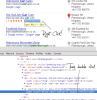
Then simply change the text and WOLAH you are done....
Now show them the end result compared to the first result and bingo.
I am sorry if this is common knowledge but I haven't seen it around, after you have done this a few times it should take literally seconds to make, but then again everything is easy as long as you know how....

Find some targets on google search: I used "Peterborough car dealer" or something like that
This is what came up so I choose to approach We-Sell-Any-Car
Then I did this within 3 mins & showed them what there ratings could look like
This is effective as it shows the client what they are missing out on.
--------------------------------
How I did this was....
If you copy this code:
Code:
<div style="display:inline-block;margin-right:5px"><span class="rtng" style="margin-right:5px">4.9</span><span class="star star-red star-s"><span style="width:70px"></span></span></div>To bits you could edit are:
Code:
<span class="rtng" style="margin-right:5px">4.9</span>
Code:
<span style="width:70px">What to do with it?
Find your target, right click on 1 Google review and click inspect element:
This should pop up, if so click on the line ABOVE the selected line and then right click and EDIT HTML.
WOLAH!! Now when you clicked edit html you should insert that code mentioned at the top of this thread and it should look something like this:
Now you need to change 1 google review to like 87 or some random high number.
Simple right click on 1 google review, inspect element and then double click on the code were it says 1 Google Review.
Like so..
Then simply change the text and WOLAH you are done....
Now show them the end result compared to the first result and bingo.
I am sorry if this is common knowledge but I haven't seen it around, after you have done this a few times it should take literally seconds to make, but then again everything is easy as long as you know how....


