Show people what they COULD look like.

Jordy123

Registered Member
Joined
Nov 6, 2013
Messages
66
Reaction score
39
Just a little tip for that added impact when approaching a client:

Find some targets on google search: I used "Peterborough car dealer" or something like that

This is what came up so I choose to approach We-Sell-Any-Car
original1.png

Then I did this within 3 mins & showed them what there ratings could look like
edited1.png

This is effective as it shows the client what they are missing out on.

--------------------------------

How I did this was....

If you copy this code:
Code:
<div style="display:inline-block;margin-right:5px"><span class="rtng" style="margin-right:5px">4.9</span><span class="star star-red star-s"><span style="width:70px"></span></span></div>

To bits you could edit are:
Code:
<span class="rtng" style="margin-right:5px">4.9</span>
Change the 4.9 to say 5.0 if you want to show perfect ratings, or 4.7 if you want to be realistic

Code:
<span style="width:70px">
The 70px gives you full 5 stars, you can experiment if you are trying to give low ratings change it to say 30 or something.

What to do with it?

Find your target, right click on 1 Google review and click inspect element:
rightclickgooglereview.png

This should pop up, if so click on the line ABOVE the selected line and then right click and EDIT HTML.

thisline.png

WOLAH!! Now when you clicked edit html you should insert that code mentioned at the top of this thread and it should look something like this:

copycode.png

Now you need to change 1 google review to like 87 or some random high number.

Simple right click on 1 google review, inspect element and then double click on the code were it says 1 Google Review.
Like so..
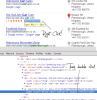
googlereview.png

Then simply change the text and WOLAH you are done....

Now show them the end result compared to the first result and bingo.

I am sorry if this is common knowledge but I haven't seen it around, after you have done this a few times it should take literally seconds to make, but then again everything is easy as long as you know how....

:D
 

Attachments

  • original1.png
    original1.png
    33.9 KB · Views: 49
Great job Jordy123.
Showing customers what they can be is a definitely a powerful way to show them what you can do for them.

I find it even more convincing if you point out that they will be WAY AHEAD of their competitors if they do what you suggest them and START RIGHT NOW.
 
Great job Jordy123.
Showing customers what they can be is a definitely a powerful way to show them what you can do for them.

I find it even more convincing if you point out that they will be WAY AHEAD of their competitors if they do what you suggest them and START RIGHT NOW.

I know the method sounds complicated but its takes like 30 secs to prove what a business could look like.

And yes I agree, I also point out that this is an exclusive offer to them and I will not contact their competitors lol
 
Excellent,will definitely use this for my clients too.
 
Great job Jordy123.
Showing customers what they can be is a definitely a powerful way to show them what you can do for them.

I find it even more convincing if you point out that they will be WAY AHEAD of their competitors if they do what you suggest them and START RIGHT NOW.

Yep, re-arrange the order in photoshop and upsell the SEO!

FPS
 
Definitely see this strategy working!

Indeed, I think its a lot easier than using photoshop to edit the picture, and this you can do it with a press of a button.

Excellent,will definitely use this for my clients too.

Glad I could help! It deffinatly gives a good impact if you print it out 'standard view' VS 'ORM optimized' and just say which one would you click

Yep, re-arrange the order in photoshop and upsell the SEO!

FPS

Yeah that works as well :). I also use this trick to pre-edit paid templates with current clients logo & content ;)
 
Thats very nice, never thinking about doing this:) Thanks!
 
Nice one. Not to often we have newbies sharing like this.
 
Wouldn't it be easier to crop out the 4.9 rating and just use Photoshop to paste this bit over the top of their existing review?

Instead of inspecting element and tracking down the line - you just do a normal screenshot, put it into Photoshop, overlay their existing reviews with your 4.9 star review snippet and then save. I think this would be a lot easier.

Good share :)
 
Nice share..................................Thanks
As they say 'a picture is worth a thousand words'
 
Great idea, another thing you could do as well is find a high rating such as 36 reviews 4.7/5 (probably from a restaurant) then just Photoshop it into their business category.
 
Wouldn't it be easier to crop out the 4.9 rating and just use Photoshop to paste this bit over the top of their existing review?

Instead of inspecting element and tracking down the line - you just do a normal screenshot, put it into Photoshop, overlay their existing reviews with your 4.9 star review snippet and then save. I think this would be a lot easier.

Good share :)

I agree it "could" be easier, but you have to correctly align everything (yes you can use the grid on photoshop) but still. This method takes me like 20secs to do.

I think it takes about 20secs to boot up photoshop :P.

But all seriousness this is just a small fraction of what this can be used for. If I have a small job on and they require a "preview" I use this method to edit live demo's of themes with there current content and simply show them that.

If they don't like it just pick a new theme and do the same :)
 
That is a pretty 'trick' and I like the effectiveness of SHOWING them... I read a comment and your response about 'moving' their listing higher..

You have a similar step by step for doing that for a SEO preview?

Thanks again for your post.. **edit: found thanks on Topify..


Thanks,

--Rich

Posted via Topify using iPhone/iPad
 
Last edited:
That is a pretty 'trick' and I like the effectiveness of SHOWING them... I read a comment and your response about 'moving' their listing higher..

You have a similar step by step for doing that for a SEO preview?

Thanks again for your post.. **edit: found thanks on Topify..


Thanks,

--Rich

Posted via Topify using iPhone/iPad

What would you want to show them for SEO? The website content or ranking on google?
 
I meant to show them their website ranking on first page...
 
Back
Top