[Share] Change VidIQ Vision Basic to Enterprise

Change VidIQ Vision Basic to Enterprise

What is VidIQ?
A Chrome Extension, to see tags, keywords, on a channel.
The goal, so that our channel can be in page one [hopefully].

Then, how?

First:
Make sure you install VidIQ on browser chrome.

If you dont have :
  1. Open https://chrome.google.com/webstore/category/extensions
  2. type : VidIQ
  3. Then choose VidIQ vision for Youtube
  4. Install

Second :
Change Folder Option to Show Hidden Files.

you dont know? oh my god..

For Windows XP, 7, 8 :
  1. Open Control Pannel
  2. Appreance and Personalization
  3. Folder Options > tab View > Show hidden files, folder or drivers
For Windows 10 :
  1. Open windows explorer
  2. Find View
  3. Click Options > tab View > Show hidden files, folder or drivers

Third :
Open Folder Extension.

For Windows XP, 7, 8 :
  1. C > users > microsoft > AppData > Local > Google > Chrome > User Data > Default
  2. Find Folder Extensions
  3. Find Folder VidIQ , look at the latest install date, usually 2-3 after the temp folder (from below)
  4. If the folder is correct, there will be a new folder according to version, when posting in this thread, its version is 2.42.13_0

For Windws 10 :
  1. C > users > windows 10 > AppData > Local > Google > Chrome > User Data > Default
  2. same

Fourth :
Edit JavaScript File.

How :
  1. Find file Bundle
  2. right click, open with notepad (dont notepad+), dont close
  3. Copy (ctrl + a + c)
  4. then open http://jsbeautifier.org/
  5. Paste (ctrl +v)
  6. Then click Beautify JavaScript or HTML
  7. and then Copy (ctrl + a + c)
  8. Paste (Step 2)
  9. then ctrl + f, type
    Code:
    t = e[0]
  10. The code is usually just below the code
    Code:
    var e = ["basic", "pro", "boost_lite", "boost", "boost_plus", "enterprise"],
  11. change number 0 to 5
  12. save

Fifth :
Delete folder metadata (shift + delete).

Sixth :
Copy Folder 2.42.13_0 (read step 3 number 4) paste on another partition (example D).

Seventh :
Re-Install Extension VidIQ.

How? :
  1. type chrome://extensions/
  2. Check Developer Mode
  3. Clik Load Unpacked Extension
  4. Then find new Folder Extension (step Sixth)
  5. OK
  6. Dont forget to Uncheck Developer Mode

Done.
This tutorial is free to rewrite, or in making its tutorial video.
dont care.
haha..
how about linux system sir
 
Follow the directions that were posted about moving the extension to the dekstop... Then remove it from chrome.... then close chrome... reopen chrome and load it as it says. When you go to youtube it'll show the before blurred out areas with the extension, of course your website account won't have the extension benefits, but the stuff they show you as overlays on youtube.com do work , Doesn't help a lot, but it does work. I wouldn't pay for the information they give you, and i chose boost plus... As if i don't know what keywords to use, just because you use keywords and tags, doesn't mean people will find your new videos over others with millions and millions of views.Of course, i am doing this for a legit channel trying to show content. Not pump and dump ranking videos or w/e it is you guys do.
 
Follow the directions that were posted about moving the extension to the dekstop... Then remove it from chrome.... then close chrome... reopen chrome and load it as it says. When you go to youtube it'll show the before blurred out areas with the extension, of course your website account won't have the extension benefits, but the stuff they show you as overlays on youtube.com do work , Doesn't help a lot, but it does work. I wouldn't pay for the information they give you, and i chose boost plus... As if i don't know what keywords to use, just because you use keywords and tags, doesn't mean people will find your new videos over others with millions and millions of views.Of course, i am doing this for a legit channel trying to show content. Not pump and dump ranking videos or w/e it is you guys do.

Thanks! It worked, but it is not as useful as I thought. I really want to grow my channel with over 2K subs, but I think this is not going to help me.
 
Yeah i agree, it wasn't as useful as i thought, however. I wasn't using any tags because i watched a video saying they didn't matter. I added tags till 4am last night to my videos and i'm seeing some traction. Nothing groundbreaking but, at least a few views...While others nothing. I bought a botted monetized account, so i a little worried about getting traction and then losing it, but hey... live in learn right?
 
Yeah i agree, it wasn't as useful as i thought, however. I wasn't using any tags because i watched a video saying they didn't matter. I added tags till 4am last night to my videos and i'm seeing some traction. Nothing groundbreaking but, at least a few views...While others nothing. I bought a botted monetized account, so i a little worried about getting traction and then losing it, but hey... live in learn right?

Yeah, you are right. My channel is also monetized and I have earned a few bucks. Great to see that your channel has started getting some traction after adding tags. Good luck with your channel!
 
Hello guys! ieverything work, but the recommended tags say "error loading tags" just that isn't working . any one knows how to fix that? thanks so much!
 
is this only for windows and chrome? or could i do it with mac and chrome?
thank you
 
thanks for nice share with detailed different method. I looking into get youtube. anyone got success here using this tool. searching in the net and really seems to nice one.
 
i tried this, and it is still working, i tried Boost plus and enterprise and it works without a problem, the only problem I found is that the "Top Search Keywords" only show 3 results in both Boost plus and enterprise, anyone have the same problem or know how to fix it?
 
Follow the directions that were posted about moving the extension to the dekstop... Then remove it from chrome.... then close chrome... reopen chrome and load it as it says. When you go to youtube it'll show the before blurred out areas with the extension, of course your website account won't have the extension benefits, but the stuff they show you as overlays on youtube.com do work , Doesn't help a lot, but it does work. I wouldn't pay for the information they give you, and i chose boost plus... As if i don't know what keywords to use, just because you use keywords and tags, doesn't mean people will find your new videos over others with millions and millions of views.Of course, i am doing this for a legit channel trying to show content. Not pump and dump ranking videos or w/e it is you guys do.
Does boost plus give you keywords?
 
update :

3.5.1_0

Link Download : bit.ly/35rdTNz
Tutorial :
Virus Total :
Code:
https://www.virustotal.com/gui/file/9f3d88f3b63fe1c4e5fb6edb4362188c001b1b197dfb3df5470ae6808786ed30/detection

SHA-256 9f3d88f3b63fe1c4e5fb6edb4362188c001b1b197dfb3df5470ae6808786ed30
File name 3.5.1_0.rar
File size 2.40 MB
Last analysis 2020-01-07 14:14:34 UTC
 
update :

3.5.1_0

Link Download : bit.ly/35rdTNz
Tutorial :
Virus Total :
Code:
https://www.virustotal.com/gui/file/9f3d88f3b63fe1c4e5fb6edb4362188c001b1b197dfb3df5470ae6808786ed30/detection

SHA-256 9f3d88f3b63fe1c4e5fb6edb4362188c001b1b197dfb3df5470ae6808786ed30
File name 3.5.1_0.rar
File size 2.40 MB
Last analysis 2020-01-07 14:14:34 UTC
That's show some error in extension . Please anyone share latest version of vidiq. Thank you in advance
 
Install the VidIQ from the Chrome Store and
Go to chrome's extension folder.
Its at : C:\Users\USERNAME\AppData\Local\Google\Chrome\User Data\Default\Extensions

Locate the VidIQ folder - pachckjkecffpdphbpmfolblodfkgbhl and copy it to Desktop

Inside that folder, open the folder with Version Code. of VidIQ
For me it was : 3.10.2_0

You will find bundle.js inside it. Open it with wordpad.

Press Ctrl + F (Find)
Type let t=e[0]

Change that into :
t=e[1] for pro
t=e[2] for boost lite
t=e[3] for boost
t=e[4] for boost plus
t=e[5] for enterprise

Save that

Delete "_metadata" folder.

Go to chrome extension page ! ie. chrome://extensions/

Uninstall the VidIQ plugin !

Turn on the Developer Mode !

Click "Load unpacked extension". Then choose the extension folder at desktop.
 
Last edited:
Install the VidIQ from the Chrome Store and
Go to chrome's extension folder.
Its at : C:\Users\USERNAME\AppData\Local\Google\Chrome\User Data\Default\Extensions

Locate the VidIQ folder - pachckjkecffpdphbpmfolblodfkgbhl and copy it to Desktop

Inside that folder, open the folder with Version Code. of VidIQ
For me it was : 3.10.2_0

You will find bundle.js inside it. Open it with wordpad.

Press Ctrl + F (Find)
Type let t=e[0]

Change that into :
t=e[1] for pro
t=e[2] for boost lite
t=e[3] for boost
t=e[4] for boost plus
t=e[5] for enterprise

Save that

Delete "_metadata" folder.

Go to chrome extension page ! ie. chrome://extensions/

Uninstall the VidIQ plugin !

Turn on the Developer Mode !

Click "Load unpacked extension". Then choose the extension folder at desktop.

there is no bundle.js and I am sure you haven't tried it lately
 
I installed the cracked version, but I'm not sure what version I got, I put in boost+ in the .js file but it says boost on my panel (on chrome). Any of you get that?
 
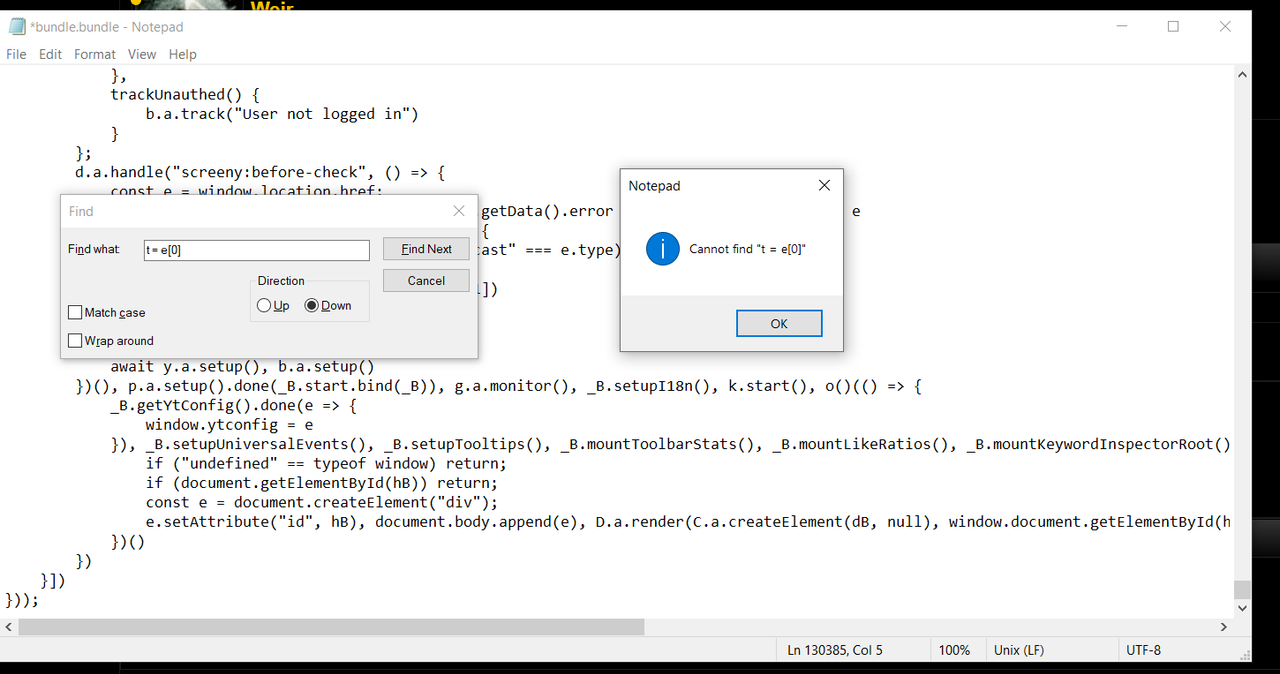
stuck at
  1. t = e[0]
cannot find

vidiq-enterprise.png
 
Back
Top