Search Console Google CLS issue: more than 0.25 (mobile) On Shopify Website

Nw_Work

Senior Member
Joined
Nov 23, 2019
Messages
906
Reaction score
345
Dear community,

I have a site and in the core web vitals, I get
CLS issue: more than 0.25 (mobile). There are apparently 9 URLs which are involved. Would like help to fix it

Not sure if can share website url as per rules here, so will wait till someone clarifies
 
Any search console pro?
 
CLS issues are usually triggered by a few factors but the most common ones I see on a day-to-day work are...
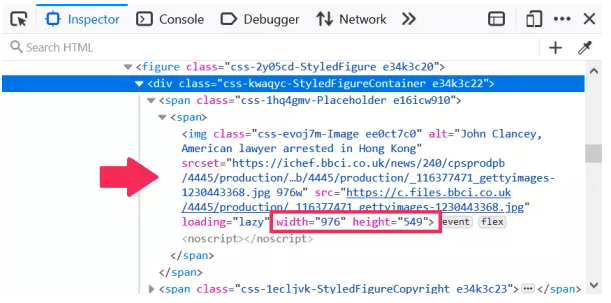
  • Media files (images and videos) NOT having their respective dimensions specified in the HTML document of the page
9ca66e5e00e61a9d7d1b2576b0e94976.png

  • Web fonts causing flashes of unstyled or invisible text - FOUT and FOIT
    • Add a fallback attribute (swap) to the @font-face property inside the CSS serving the font.
  • Ads embeds and iFrames without reserved space
    • Use width and height in the HTML markup to reserve space for ads in advance
 
CLS issues are usually triggered by a few factors but the most common ones I see on a day-to-day work are...
  • Media files (images and videos) NOT having their respective dimensions specified in the HTML document of the page
9ca66e5e00e61a9d7d1b2576b0e94976.png

  • Web fonts causing flashes of unstyled or invisible text - FOUT and FOIT
    • Add a fallback attribute (swap) to the @font-face property inside the CSS serving the font.
  • Ads embeds and iFrames without reserved space
    • Use width and height in the HTML markup to reserve space for ads in advance
Thank you for the fast reply:)

please also see the search console screenshot and urls effected;
paste.pics

Screenshot, 2022-04-29 19:17:09 - Paste.Pics

Screenshot view
paste.pics
paste.pics
and server 5xx error according to below on some pages;
paste.pics

Screenshot, 2022-04-29 19:16:04 - Paste.Pics

Screenshot view
paste.pics
paste.pics
 
Back
Top