[Scrapebox] Check for "keyword" in URL List?

gamingneeds

Regular Member
Joined
Jul 18, 2008
Messages
407
Reaction score
86
Quick question...

I have a list of website URLs loaded into Scrapebox and I want to see if a keyword appears on the page.

How do I do this?

Thanks!
 
Gamingneeds,

You can load the list of URL's into the harvester and use the merge footprint feature. The footprint would be:

site:%KW% "WordYourLookingForonPageHere"

This should return a list of pages on each site that contain the word(s) your looking for. Hope this helps.

GoldenGlovez
 
Gamingneeds,

You can load the list of URL's into the harvester and use the merge footprint feature. The footprint would be:

How do you use the merge footprint feature to search these links for one specific keywords? Would I create a txt file? How would it be formatted?

For example, say I wanted to search a forum for any instance of the word "chocolate chips". So I have my list of the 10,000 threads in the forum...

How do I tell scrapebox to search every single one of those threads for "chocolate chips"?

Thanks.
 
Last edited:
How do you use the merge footprint feature to search these links for one specific keywords? Would I create a txt file? How would it be formatted?

For example, say I wanted to search a forum for any instance of the word "chocolate chips". So I have my list of the 10,000 threads in the forum...

How do I tell scrapebox to search every single one of those threads for "chocolate chips"?

Thanks.

Create a new text file. Inside you're going to put the following footprint:

%KW% "chocolate chips"

Now in Scrapebox import your list of harvested URL's into the Keyword section. Then click the "M" button at the top left and load the footprint text file you just made. You're keywords should now look like:

URL1 "chocolate chips"
URL2 "chocolate chips"
and so on...

Start harvesting and the returned results should be a list of URL's that contained the word 'chocolate chips'.

Cheers,
GoldenGlovez
 
I just tried what you said...

I loaded my URLs into the "Keywords" section and my custom footprint using the "M" button...

The results looked like:

domain.com/blog/post1.php "chocolate chips"
domain.com/blog/post2.php "chocolate chips"
domain.com/blog/post3.php "chocolate chips"
domain.com/blog/post4.php "chocolate chips"
domain.com/blog/post5.php "chocolate chips"
Etc...

I then clicked "Start Harvesting" under the "URLs Harvested" section.

It started using Google to do some searches which was the first red flag and then when it finished, it had loaded about 17 URLs into the "URLs Harvested" section, none of which were domain.com but someotherdomain.com.

Any advice?
 
Quick question...

I have a list of website URLs loaded into Scrapebox and I want to see if a keyword appears on the page.

How do I do this?

Thanks!

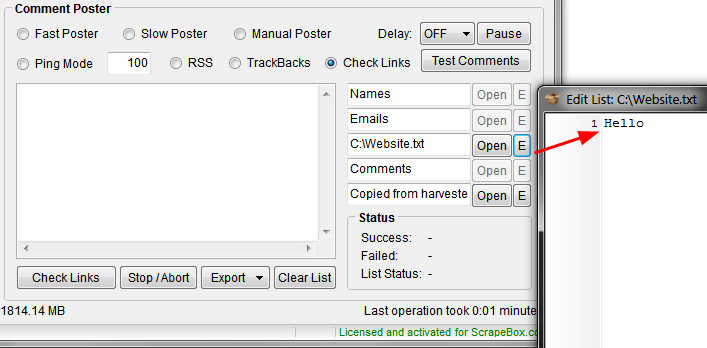
One way you can do it is the Check Links, it's also a string checker as well as a link checker. Add the word to the Websites input

VL2Kw


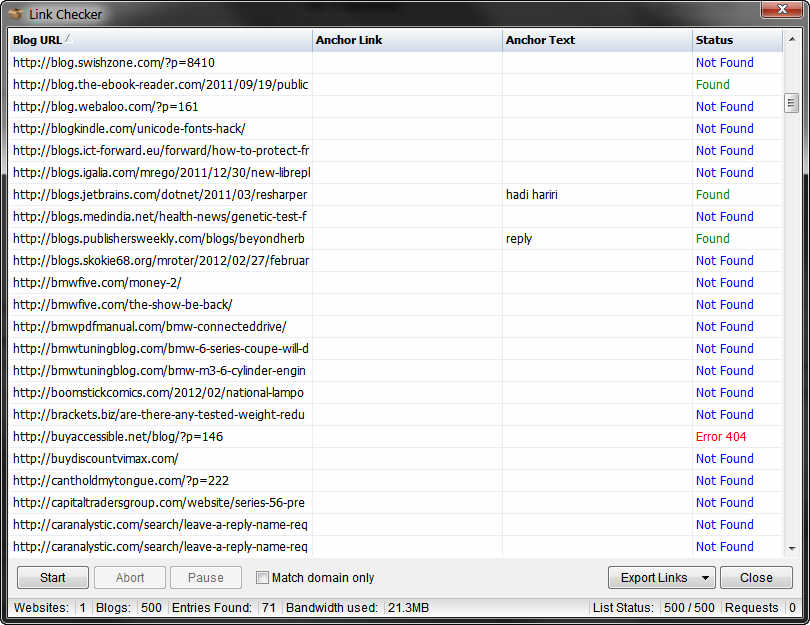
The "Found" results all contain the word Hello in the page

eOgh1


71 of those blogs contain the word Hello.

Just 2 caveats, you can't have spaces it must be a single string/word and the anchor text columns get thrown off because you aren't checking for a link but that doesnt matter it's just the found that counts.

But you can use this to find your competitors other sites by scanning for his adsense pub-id, you can find sites running specific themes/plugins by searching for a piece of the html etc. :)
 
Last edited:
Yes! That worked!

Awesome, now if only I could search a 2-word keyword like "chocolate chip" instead of just "chocolate"!

Awesome for now though, thanks again!
 
So I googled the problem and this was top result. I am amazed I am findng the method described in post No. 7 useful even in 2018. Considering the original purpose of feature was to post and check for links and everything. I can't help but hope that in 6 years some new options might have become available, which allow you to search for more than just 1 word keywords like 'chocolate' , but for 2 word and 3 word strings like 'chocolate chips' etc as well. Any suggestions, please?
 
So I googled the problem and this was top result. I am amazed I am findng the method described in post No. 7 useful even in 2018. Considering the original purpose of feature was to post and check for links and everything. I can't help but hope that in 6 years some new options might have become available, which allow you to search for more than just 1 word keywords like 'chocolate' , but for 2 word and 3 word strings like 'chocolate chips' etc as well. Any suggestions, please?
Maybe you should ask on the actual Scrapebox thread https://www.blackhatworld.com/seo/s...auto-blog-commenter-with-prstorm-mode.129096/
 
Sure, thanks for link. But would be impolite to ask for alternative tools over there,so the question still stands
Ah, ok. I assumed you were asking about updated Scrapebox features. Perhaps creating a new thread with your question would be best. Threads this old usually end up closed if they're bumped.
 
Back
Top