Permanently Closed Marketplace Sales Thread

Status
Not open for further replies.
Who Should Use LinkedIn Automation and why use Connectionsphere!

LinkedIn automation is a crucial tool for B2B marketers, sales teams, and job recruiters. When you set your lead generation to autopilot, it brings in warm leads every single month while you can spend your time on other tasks to grow your business.
If you’re unsure whether automation is right for you, here are some of the key benefits:

1. Free up your time and resources

With our automated LinkedIn prospecting without even using your LinkedIn profile-our competitive advantage , you’ll free up time and resources you can spend on delivering your service or product, nurturing customers, and initiating conversations with warm leads.

2. Get new connections every day
Message automation is one of the easiest ways to close more sales daily.

3. Build your network
Building a professional network is another great way to grow your business. Automating your LinkedIn prospecting means you’ll build that network faster and with less effort on your part.

Things You Should Be Automating on LinkedIn Profile
So now you understand the benefits of spending time setting up automated processes on LinkedIn, what exactly should you be automating?
There are four effective processes you can automate on LinkedIn to help generate leads and potential sales every single month on autopilot:
  1. Sending connection request messages
  2. Personalizing messages based on your target audience demographics
  3. Creating a selling campaign with follow-ups
  4. Creating a custom targeted audience for outreach

Imagine the time and effort you could save having these processes happen automatically, rather than spending hours every week sending messages and creating campaigns manually.

How to Grow Your Business With LinkedIn Automation
The easiest way to set up automated prospecting on LinkedIn is with our dedicated automation tool.

And that’s where Connectionsphere comes in. Connectionsphere allows you to automate key processes on our cloud LinkedIn profiles (which we call automated sales assistants) and brings in hundreds of warm leads every month. It takes just minutes to set up your LinkedIn automated campaign using connectionsphere, and you can filter specific audiences by location, industry, and even position. Once you’ve chosen an audience and set your level of engagement, Connectionsphere will get to work generating new leads for you.

So what are you waiting for grab a 15 day, 1$ trial of connectionsphere today and let us help you scale your business!

Start a 1$ Trial Now!
https://connectionsphere.com/#select-plan
 
About to finally test the service today after some things that I needed to sort out on my end, will update with a review in a couple of days or a week max - hopefully with a good one as I believe this service has potential and if all goes well I'll be a long-term customer and perhaps whitelabel it as well.
Hope to provide you quality service and quality leads
 
Hi there. It seems like it takes a great amount of connection requests to achieve 25 warm leads. Now with the changes LinkedIn just made to cut down spanners (100 connection requests a week), how will this impact receiving warm leads at scale?
 
Hi there. It seems like it takes a great amount of connection requests to achieve 25 warm leads. Now with the changes LinkedIn just made to cut down spanners (100 connection requests a week), how will this impact receiving warm leads at scale?
This new limitation is not affecting us, because our service is a crowd sourced service.
We hire 20 or more people, so deliver a small amount of connection requests daily.
For each one of our campaigns, we hire 20 or more people, so deliver a small amount of connection requests daily.
Unlike other similar services that offer automation to your own accout only, our service can scale with no limit.
 
This new limitation is not affecting us, because our service is a crowd sourced service.
We hire 20 or more people, so deliver a small amount of connection requests daily.
For each one of our campaigns, we hire 20 or more people, so deliver a small amount of connection requests daily.
Unlike other similar services that offer automation to your own accout only, our service can scale with no limit.
Hey Leamdros,

so supposing I sign up for 65 leads/month, can you tell me how those leads will be distributed is drip fed to me daily or weekly? How many leads can we receive in a week? Are they spread out through the whole month?
 
Automating Your LinkedIn Campaigns through Conectionsphere!

If you spend hours every week being active on LinkedIn, you’ve probably thought about automating some of those tasks to save yourself valuable time and effort.

But you’ve probably also heard stories of profiles getting shut down for spam when they use automation tools… It’s true that LinkedIn is one of the strictest social media platforms for restricting automation.

In this post, we’ll answer all these questions and more and help you get started with effective, high-converting automation safely.

Need help with automating your LinkedIn campaigns? Visit our website : https://connectionsphere.com/

What is LinkedIn Automated Prospecting?

LinkedIn automation involves sending out messages or posting content automatically. Using third-party software, you can schedule your campaigns ahead of time and then set them to go out at a set schedule.

LinkedIn does have some of its own automation tools, but most companies used third-party software for more comprehensive automation.

Does LinkedIn Automation Software Work?

The short answer is yes. LinkedIn automation tools will allow you to send outreach messages and post replies on autopilot. Growing your LinkedIn account organically is doable but takes hours and hours of work every week to stay active and engaged on the platform.

Automating campaigns means you can spend these hours on customer-focused tasks that bring in revenue.

Having said that, you do need to be strategic with which automation tools you use. Some free tools are of poor quality and will quickly get your account flagged.

We’ll talk about how connectionsphere is the best tool to use for your marketing strategy later in the post.

Automate the big three tasks

The three main tasks you should automate on LinkedIn are:

Profile views (Headline & summary of your Company)

Connections

Outreach messages

These are some of the drivers of growth on LinkedIn that not only give an impressive return when automated, they also don’t require human input to get right.

Automating these tasks means you can focus on building relationships on the platform and starting conversations with people who respond to your automation efforts.

So What Automation Tool is Best + Safe to Use for LinkedIn Prospecting?

When it comes to LinkedIn outreach campaigns, Connectionsphere is the automation platform of choice. Connectionsphere automates lead generation using its own cloud based accounts so your account is never at any risk of getting banned or flagged, giving you a consistent stream of warm leads for your business every month.

What makes Connectionsphere stand out from other automation tools is the high level of targeting and personalization you can get from the tool.

You can filter potential leads by location, industry, even job titles and more. Giving you immense control over who you target with automated outreach.

Many B2B companies are using Connectionsphere for LinkedIn automation and generate hundreds of warm leads on a monthly basis.

Conclusion

If you take one thing away from this article it should be that when done right, LinkedIn automated marketing is one of the best marketing strategies for any business. Just imagine having hundreds of warm leads sending you direct message inquiries every month. That’s what strategic automation can achieve.

Start a 1$ trial of connectionsphere today and let us help you scale your business!

Start a 1$ Trial Now!
https://connectionsphere.com/#select-plan
 
Hey Leamdros,

so supposing I sign up for 65 leads/month, can you tell me how those leads will be distributed is drip fed to me daily or weekly? How many leads can we receive in a week? Are they spread out through the whole month?
The leads are forwarded as soon as a lead replies positively to your pitch about your service or wants to know more..
There is no cap on number of leads per week as long as it does nit exceed the amount of leads in plan
If you have any questions you can ask here...and if interested you can share your email,our sales team will create an account and share subscription link
 
B2B Marketing During CoVID-19 And How To Thrive

When Covid-19 first became a worldwide crisis, businesses became reactionary. The focus was on keeping staff and current customers safe, so marketing and sales took a much-needed backseat. But it’s now clear that there won’t be a return to the old normal, and if B2B businesses can’t pivot their marketing strategies to adapt to the new normal, they risk going under.

In this post, you’ll learn all you need to know to navigate the new landscape of B2B marketing campaigns and how Covid-19 has brought about lasting changes.

How COVID-19 Impacted Industries Around the World

With over a year spent in a global pandemic, research is beginning to highlight the lasting impact on B2B businesses.

According to McKinsey & Company, over three-quarters of buyers now prefer digital self-service and online purchasing over in-person interactions. This was already a steadily growing trend but has now intensified due to Covid-19 worries.

When it comes to B2B businesses, Covid-19 has been somewhat of a double-edged sword. On one hand, customers are looking for more robust online tools for ordering and only 20% of B2B buyers report wanting to go back to in-person sales.

However, buyer behavior online has also changed for the better. B2B buyers are now more comfortable placing large orders online, with over 70% of buyers saying they are open to making new, remote purchases over $50,000. What’s more, around 27% would spend more than $500,000.

This opens up brand new opportunities for B2B businesses to grow their business during the pandemic and breach whole new markets.

How B2B Marketers Can Adapt During the Coronavirus Crisis

Move Your Audience Online

Even as we move into a global Covid vaccine rollout, it’s still unsafe for customers to visit brick-and-mortar stores. In fact, the current lockdown restrictions may be the final nail in the coffin of retail stores.

Now is the time for business leaders to future-proof their business strategy and move existing customers firmly online. This means optimizing your online store, creating accounts for current customers, and ensuring the process of ordering and reordering online is as smooth as in-person processes.

Offer Additional Services

Many businesses are struggling to stay above water because of Covid-19. So B2B business owners can offer value by giving the option of personal services.

This might be as simple as offering B2B customers in worst-affected areas a discount on their regular orders or a bonus benefit such as free delivery.

Automate Warm Lead Generation

Automate warm lead gen during Covid-19 with Connectionsphere.

Online lead generation can feel overwhelming, especially if you are new to online marketing strategies. But marketing automation tools take all the guesswork out of the process, allowing you to focus on nurturing customer relationships while dozens – even hundreds of – of warm leads come in every single month.

One of the best platforms to get started with as a B2B business is Connectionsphere. Our platform provides automated prospecting on LinkedIn through our own cloud accounts to bring in a qualified audience on autopilot.

Businesses that take advantage of automated lead generation software like Connectionsphere have a much better chance of surviving through this pandemic.

What the Future Holds

The million-dollar question all B2B businesses want to know is whether the current changes needed in the face of Covid-19 will be permanent. No company wants to invest in significant changes without knowing that they will be effective in the long-term.

Although it’s still not clear what the future holds for B2B marketing campaigns and sales, it’s safe to say that there will never be a full return to the “normal” of pre-pandemic.

Business strategy has changed irreversibly and the B2B companies that thrive through this evolution are those that are willing to invest in significant changes to keep up.

Digitizing your business is one way of gaining more competitive advantage than your competitors. If you’re not sure where to begin, take a look at Connectionsphere’s features and see how you can start bringing in warm leads instantly.

Start a 1$ Trial Now!

https://connectionsphere.com/#select-plan
 
Running a Campaign in Connectionsphere

If you’re reading this, you’ve already started building your lead generation campaign with Connectionsphere. It’s now time to think about how you’re actually going to run it. Thankfully, there are plenty of great tools that you can use in your Connectionsphere campaign, as we’ve already outlined. Here, you’ll learn more about the next steps of setting your campaign in Connectionsphere.

First login to your account using this link with your email: https://connectionsphere.com/login

If you want to reset your password then have it reset here: https://connectionsphere.com/forgot

After login to your account successfully, please follow this link to the wizard: https://connectionsphere.com/?redirect=/ssm3/step1

Once you click on Create pipeline, you’ll be taken back to your Campaigns dashboard.

SELECTING YOUR TARGETS

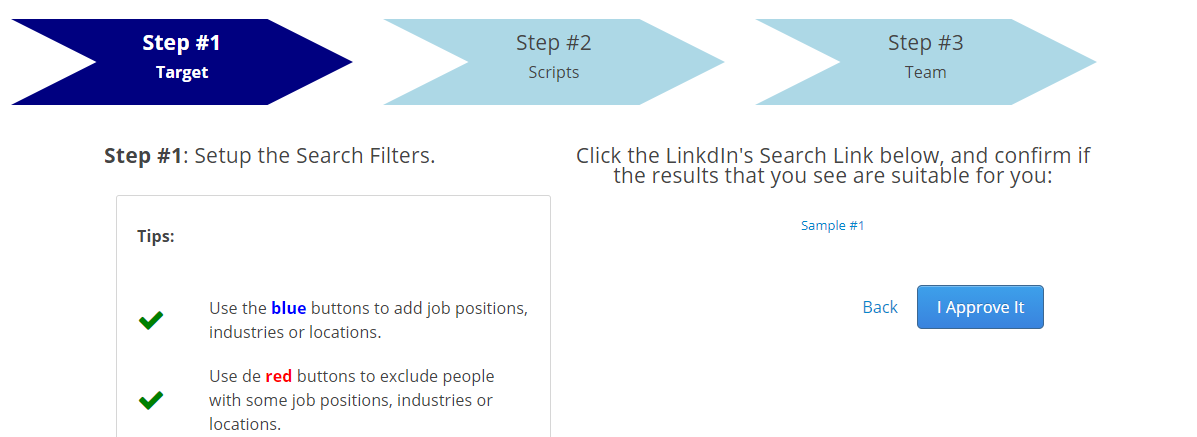
There you will add a name of your pipeline and in search filters, you will add titles, industries, and locations that you want to target.

2.png


After adding your requirements, it will ask you to approve the search, click on "I approve it":

2.png


WRITING YOUR PITCH

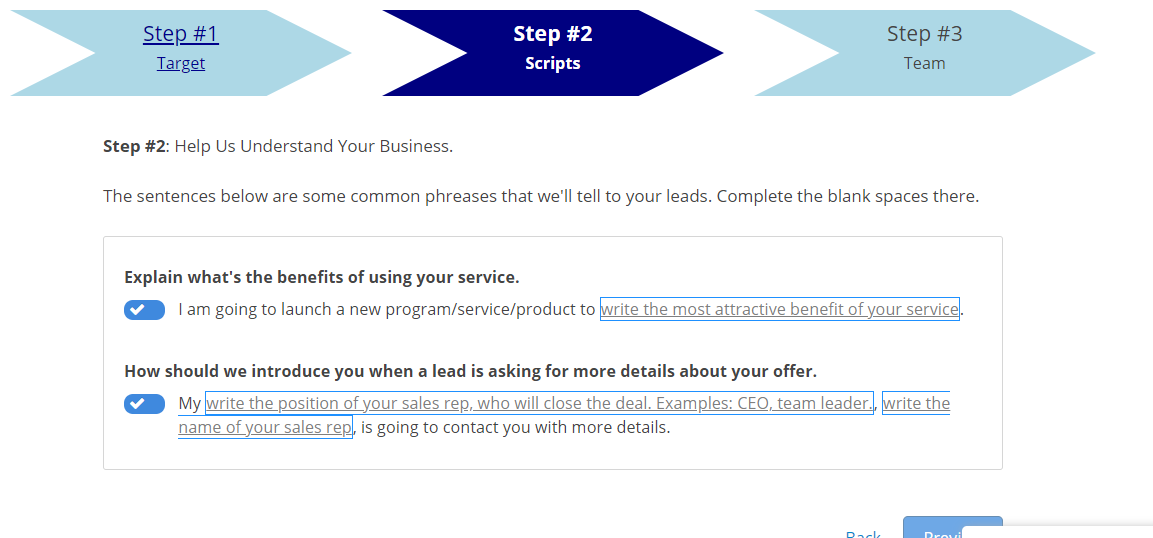
In the next step, it will ask you for scripts. You will fill the black spaces with the specialty of your product or service. And in the second message you will your name and title or your representative name and title!

3.png


In the next step, it will show you messages and ask you to approve or edit. Once you complete your pipeline you can also replace messages with your own scripts.

HEADLINE & SUMMARY OF LINKEDIN SALES ASSISTANTS

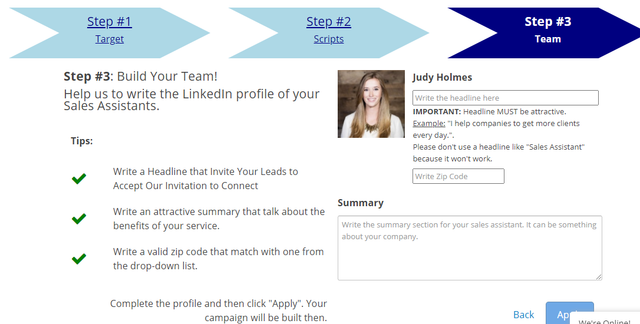
After you approve the messages it will ask you to add you profiles headlines and summaries:

4.png


You will be good to go after that. If you want to exclude any title, keyword, or company. Then you can do it by going to your created pipeline, and go to the search there you can see advanced filters.

Kindly consult our knowledge base: https://help.expandedventure.com/

So there’s the basics on running the campaign in Connectionsphere. There’s loads of tricks that you can use to streamline your campaign, and lots of different features that you can use to customize and personalize it however you like. This means that you can end up running a campaign that is perfectly suited to your target audience.

It’s worthwhile making sure you go through the whole system and familiarizing yourself with the different features. This way, running the campaign in Connectionsphere will be quick and easy.
 
Social Selling through Connectionsphere!

Most people tend to think that social selling is the same as social media marketing or social media advertising, but that isn’t the case. Social selling allows salespeople to use their connections on different platforms to ditch cold calling and laser-focus on prospective clients. It’s an efficient tool for businesses looking to grow their leads and increase ROI organically.

Social selling is the art of enhancing sales prospects. Through the use of social media, salespeople find, connect with, interact with and understand their potential customer’s needs and frustrations. This helps develop great relationships and generate organic sales. By providing genuine interactions online, a potential client is more likely to think of you or your brand when they’re in need of your product or services.

Using social media to sell isn’t about continuously sending spam messages to strangers on Facebook and LinkedIn. Rather than immediately gaining access to prospects, the goal is to slowly develop a relationship. At the right time, a salesperson can offer services as a solution to a problem the prospect might be experiencing. Aim to make your client’s life easier by offering a fix other than becoming a bother.

Why should social selling be part of your strategy?

At Connectionsphere, we’re dedicated to seeing businesses remain competitive. We understand that efficiency and effectiveness are key when engaging with outreach tools, and that social selling is just part of the big picture. Here are just some of the ways you can implement social selling through LinkedIn, using Connectionsphere to enhance your marketing strategy.

1. Enhances brand visibility

2. Improves website traffic

3. Allows salespeople to grow their personal brand

4. Drives leads and improves lead quality

5. It’s easy!

Ready to kickstart your Linkedln lead generation?

Sign up today and get 1$ trial Now!

https://connectionsphere.com/#select-plan
 
LinkedIn Invite Restrictions: We’ve got you covered - scale your business safely!

Recently, LinkedIn began cracking down on the number of invites you can send, limiting it to 100 a week. Many people have been getting warnings and even being put in LinkedIn Jail for sending out too many invites too quickly.

LinkedIn Invitation Limit Per Day

LinkedIn gives you 3000 invites total, and although there isn’t an official daily limit, LinkedIn has recently introduced a weekly limit of 100 invites. Technically you could send all 100 invites in a 24 hour period, but this is more than likely going to get your account flagged. Of course this will have limitation for those using LinkedIn to market their service or product.

What Should You Do When You Reach Your Invite Limit?

There’s no way to increase your invite limit, so it’s best to wait until the next week to carry on with your outreach campaign if you reach your weekly limit. Even if you have a paid subscription or withdraw pending invitations, you can’t regain invites or get more.

LinkedIn does have an InMail service that allows you to reach out to potential connections even if your invite limit has been reached, so this can be a workaround if you want to keep up your campaign efforts, but there are always chances of getting your account flagged or restricted.

Reasons You CAN Get a LinkedIn Restriction

There are too many reasons why you’ve had restrictions placed on your account with regards to invites:

  • You’ve sent too many invites in a short period
  • You have too many pending invitations
Don’t worry, ConnectionSphere has got you covered!!

ConnectionSphere is an automated LinkedIn prospecting software to help you generate consistent warm leads from LinkedIn. Because we know how easy it is to get restricted on LinkedIn, we provide prospecting through our own cloud automated accounts without using your LinkedIn account. So you are at no risk of getting flagged.

You have total control of the messages that are been forwarded to your targets and can optimize your campaign to scale your business on LinkedIn.

Our team is also constantly monitoring LinkedIn updates and keeping on top of best practices so you don’t have to worry about it.

Ready to kickstart your Linkedln lead generation?

Sign up today and get 1$ trial Now!

https://connectionsphere.com/#select-plan
 
400 Free Leads Every Month

As a business owner or B2B marketing professional, you know that every business must rely on efficient marketing for robust growth. Social selling via social networks like LinkedIn is now part and parcel of the modern B2B marketing strategy.

We at ConnectionSphere strive to generate high-quality B2B leads on LinkedIn and help our clients scale daily! Since last few months we have introduced some big changes to ConnectionSphere and are adding new features constantly that will help our clients in marketing their service.

Those who know our services know that we reach out to your targets through a series of three automated messages

These messages are:

Invitation Message: a connection request with a short introduction, no longer than 250 characters;

Welcome Message: a more larger and detailed message (pitch of your service) to those who accepted the invitation message; and

Transfer Message: a message delivered to those who replied positively to either the invitation message or the welcome message. In the transfer message we introduce you to the lead at the same time that we transfer the conversation to your email inbox, with the contact information of such lead.

Through this mechanism we were transferring only those leads who reply positively to welcome or invitation message only, however those leads who only accepted the connection request were not forwarded.

Our software development team has worked tirelessly deploying our new feature called: "Introduction Messages" that will connect you with the leads on LinkedIn, while we continue warming them up.

This is an incredible free gift of 200 to 400 new leads in your LinkedIn account, every month.

Let me explain this better:

Introduction Messages
is just a transfer of every single person who accepted our connection requests, so you can start warming them your way, that probably will be more effective than our automated accounts.

The best part is that you receive such a lead through a group chat on LinkedIn, so you can start a voice chat with the lead, with 0-disconnection.

We can deliver 10-20 of these leads every single day.

From 200 to 420 leads every month.

So if you are a client just reply to this email to activate this cool new feature today.

P.S: if you still haven't tried our warm lead service, just click below to get your 15 day trial today to set your campaign in 5-10 minutes and start getting 10-20 leads every single day:)

Ready to kickstart your Linkedln lead generation?

Sign up today and get 1$ trial Now!

https://connectionsphere.com/#select-plan
 
Ok how do I get this 15 day free trial with 25 warm leads a month at $99?
 
Status
Not open for further replies.
Back
Top