

Periko18
Junior Member
- Oct 13, 2021
- 162
- 140
Today, I'm sharing a guide on how to monetize a NSFW subreddit. While I'm relatively new to the world of monetizing NSFW subreddits, I've done extensive research on various methods, and I'm excited to share some of the most effective ways to make money with these types of subreddits:
*I hope everything makes sense to you guys. English isn't my first language, so I'm just making sure my message is clear for everyone. If anything needs more explaining or if you have any questions, feel free to let me know. Thanks!*
1. Links/Smartlinks: In my personal opinion, the simplest way to monetize adult traffic is through links or smartlinks that direct users to platforms dedicated to monetizing these leads. It's a straightforward process: when a user registers on a site using your link, you earn a commission for that lead. The amount you earn per lead can vary, primarily based on one crucial factor –the country of the lead. Leads from tier 3 countries usually generate less than $0.50, while leads from tier 1 countries typically generate over $1. Keep in mind that these values aren't set in stone, as leads can generate anywhere from $0.01 to $100 or even more, depending on the lead's country and the specific offer you're promoting. Now, let's delve into how you can strategically place these links or smartlinks in your subreddit.
1.1 Pinned Post: First and foremost, I strongly recommend using a pre-landing page for any link or smartlink you plan to use in your subreddit. Trust me, I've learned this the hard way –I've lost subreddits and accounts by pinning direct links on my own subreddit, haha! Here's what you need to do:
- Inside your subreddit, click on "Create Post."
- Choose the "Link" option, and then enter a catchy title and the link to your pre-landing page.
- An essential aspect of making your link visually appealing is adding metadata to the code of your pre-landing page. By doing so, when users click on the image within the post, they'll be directed to your pre-landing page. This visual connection with the topic of your subreddit is far more enticing for users compared to a link that only displays the name of your pre-landing page.
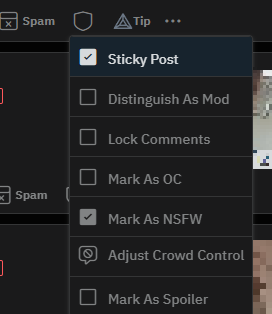
- Lastly, after you've created the post as I've described, click on the shield symbol and select the "Sticky Post" option. This will ensure the post remains at the top of your subreddit.
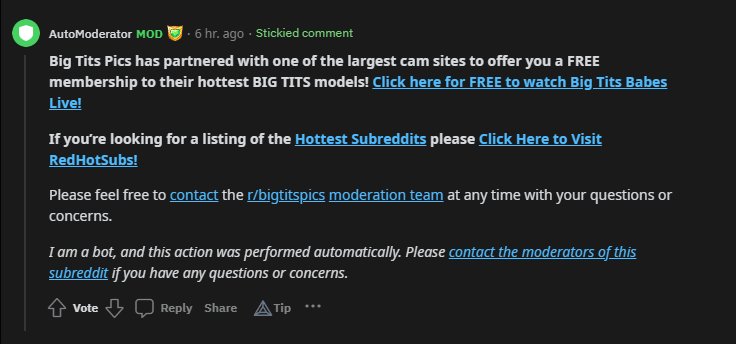
1.2 Automod First Comment: With this method, we'll configure the automoderator of your subreddit to leave a comment (including our link or smartlink) on every post made within the subreddit. Here's how you do it:
- In your subreddit, locate and click on the "MOD TOOLS" option.
- Within Mod Tools, scroll down the left sidebar until you find the "Moderation" section
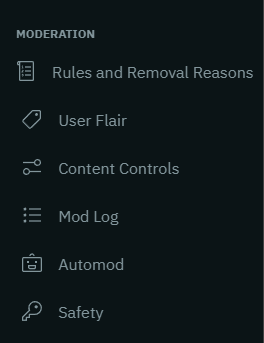
- Look for the "Automod" option and click on it. If this is your first time accessing this feature, you may see a message saying "config/automoderator" does not exist. Don't worry, simply click on the "CREATE PAGE" button below that message.
- Once you're on the Automod page, you'll need to create a rule for the automoderator to comment with a link on every post. To create this rule, you'll need to use YAML, which is the "language" that Reddit employs to configure automod rules. For more information on YAML, click here.
- To save you from having to read the entire documentation on YAML, I've provided a template for creating the rule. Simply replace the necessary fields with your own data, as follows:
Remember to customize this template with your own information and click the "Save" button. That's all there is to it! While I've given you the template for this rule, I still recommend reading the automod and YAML documentation. Doing so will benefit you in the future if you want to create more complex rules or tailor them to your specific needs.
1.3 Sidebar Widget Image: This is a clickable image that appears on the side of your subreddit, just below the "About Community" section. On PC, users will see the image in the sidebar on the right by scrolling down a bit, while on mobile, it will be located in the "About" section. Although only a few mobile Reddit users click on the "About" section in NSFW subreddits, I'll still explain how to use this method.

To add the sidebar widget image, follow these steps:
- Go to the main page of your subreddit and click on the "MOD TOOLS" option.
- Scroll down the left sidebar until you find the "Settings" section, then click on "Community Appearance."
- In the left sidebar, continue scrolling down to the "Structure" section and click on "Sidebar Widgets."
- Click on the "ADD WIDGET" option (at the bottom of the left sidebar).
- A list of widget options will appear; choose "Images."
- You can add a title for your own organizational purposes. Below the title, you can upload up to 10 images. Once you upload an image, you'll be able to enter a link for that image. I recommend using only one image for the sidebar widget, as most NSFW subreddits typically do.
1.4 Sidebar Widget Button: Similar to the previous method, this one focuses on using buttons instead of images, which will be located in the right sidebar on PC. On mobile, the buttons will be placed in the "About" section. The steps are the same as the previous method, but when selecting a widget, choose the "Button" option.

To add the sidebar widget button, follow these steps:
- Follow the same initial steps as in 1.3 to access the Sidebar Widgets.
- Choose the "Button" option as the widget type.
- Enter a "Widget Title," which will be the name of the button category within that section. Optionally, you can add a text description that appears below the "Widget Title" but above the buttons.
- Once you've created the container for the buttons, click on "Add Button" to start creating individual buttons.
- For each button, provide a title and enter the corresponding link. You can add up to 10 buttons. Creating buttons is straightforward and intuitive. Each button can contain one link.
- Note that I personally use the "Text button" format for my buttons, as they are compact and take up minimal space. I typically have 6 to 8 buttons in each of my subreddits. If you prefer the "Image button" format, you'll need to plan the distribution of sidebar space carefully. In this case, you may use between 2 to 5 buttons, depending on the design and layout of your subreddit's sidebar.
1.5 Welcome Message: The welcome message is a message that is sent to users who join your subreddit, usually one hour after they join. The strategy here is simple: include your link/smartlink within the welcome message, along with a compelling call-to-action (CTA).
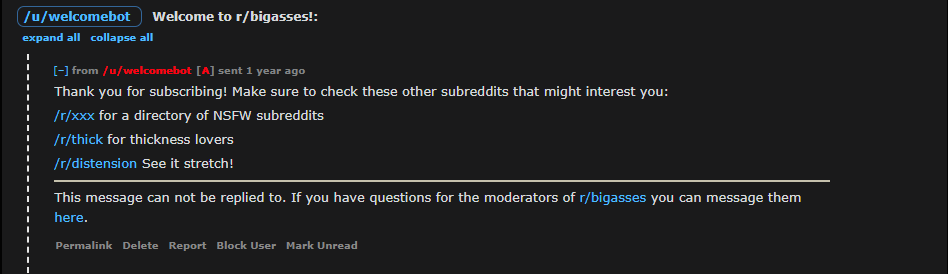
To set up the welcome message, follow these steps:
- Go to the main page of your subreddit and click on "MOD TOOLS."
- Scroll down the left sidebar to the "Settings" section and click on "General Settings."
- Keep scrolling until you find the "Send welcome message to new members" option. By default, this option is disabled, so you need to enable it.
- Once enabled, a box will appear where you can enter your message. To format your message, use Reddit Markdown. You can find more information about Reddit Markdown here.
- After writing your message, click on "Save Changes" to save your settings. There's also an option below the text box labeled "Send me a test message." I recommend using this option to verify that your message works correctly.
2. Subreddit Promotion: This method is commonly used by large subreddits to promote smaller subreddits. To find small subreddits that want promotion, you can explore various avenues. One effective approach is to directly contact the owners of small subreddits and offer them promotion on your subreddit for a monthly fee. Additionally, you can offer your subreddit promotion service here on BHW. Now, let's dive into how you can showcase these promoted subreddits on the right sidebar of your subreddit, allowing users to join them with just one click.
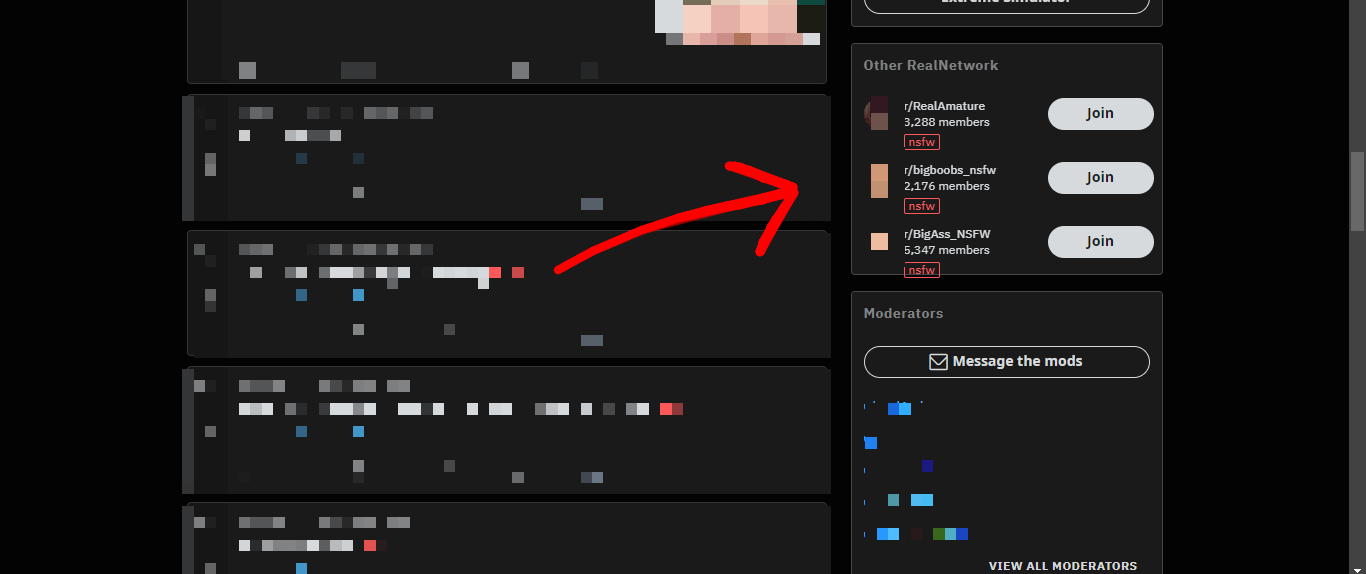
2.1 Subreddit Promotion Widget: As the name suggests, you will promote other subreddits using the "Community list" widget. The setup process is similar to methods 1.3 and 1.4. Here's how to do it:
- Access "MOD TOOLS" and navigate to "Settings" > "Community Appearance" > "Structure" > "Sidebar Widgets" > "ADD WIDGET" > "Community list."
- Instead of selecting the "Button" or "Images" option, choose the "Community list" option.
- Provide a title for the widget, which will be visible to all users visiting your subreddit.
- After adding the title, select the community (subreddit) you want to promote and click on "Apply," then "Save."
- You can add up to 10 subreddits to the widget.
3. OnlyFans Promotion: This method is currently being employed by many NSFW subreddit owners and has gained significant popularity. It involves charging a fee, usually on a monthly basis, to an OnlyFans model or agency for promoting their content or OnlyFans profiles on your subreddit. You can utilize the methods mentioned above for placing links on your subreddit to facilitate this type of promotion.
3.1 User Verification Fee: To implement this method, follow these steps:
- Click on "MOD TOOLS" and scroll down the left sidebar to the "Settings" section.
- Click on the "General Settings" option and scroll down to the "Type of Community" section.
- Choose the "Restricted" option to allow only approved users to post on your subreddit.
- Without leaving the General Settings section, scroll further down to the "RESTRICTED COMMUNITY SETTINGS" section.
- Enable the "Accepting new requests to post" option to let users know you're looking for individuals to post on your subreddit.
- Click on "Save changes" to save your configuration.
With these steps, you've completed the first part of this method. Now, let's move on to the second part.
The second part involves assigning a User Flair to verified users. Follow these instructions:
- In "MOD TOOLS," navigate to the "MODERATION" section and click on "User Flair."
- In the "Setup" section, click on "Add" and enter a Flair text, which will be the visible name in the Flair.
- Optionally, you can add a CSS Class to give your User Flair a distinct style in your subreddit.
- To make the User Flair stand out, enable the "Add flair background" option and customize its style.
- Leave the other options unchanged, as they are not necessary to select.
- Click on "Save" to save your settings.

- Next, go to the "Assign" section adjacent to "Setup."
- Assign User Flairs to users by entering their names and selecting the appropriate User Flair. Note that only one User Flair is required for this method to work effectively.
Now, let's proceed to the third part, where I'll show you how to create "Post Flairs." Follow these steps:
- In "MOD TOOLS," scroll down the left sidebar to the "CONTENT" section and click on "Post Flair."
- Click on "Add" and give a name to your Post Flair that will be visible to all users visiting your subreddit.
- Ensure the name is related to "OC" (Original Content) so that users know the post creator is the original content producer.
- Optionally, you can add a CSS Class and customize the "Flair background color" and "Flair text color" to make the Post Flair more visually appealing.
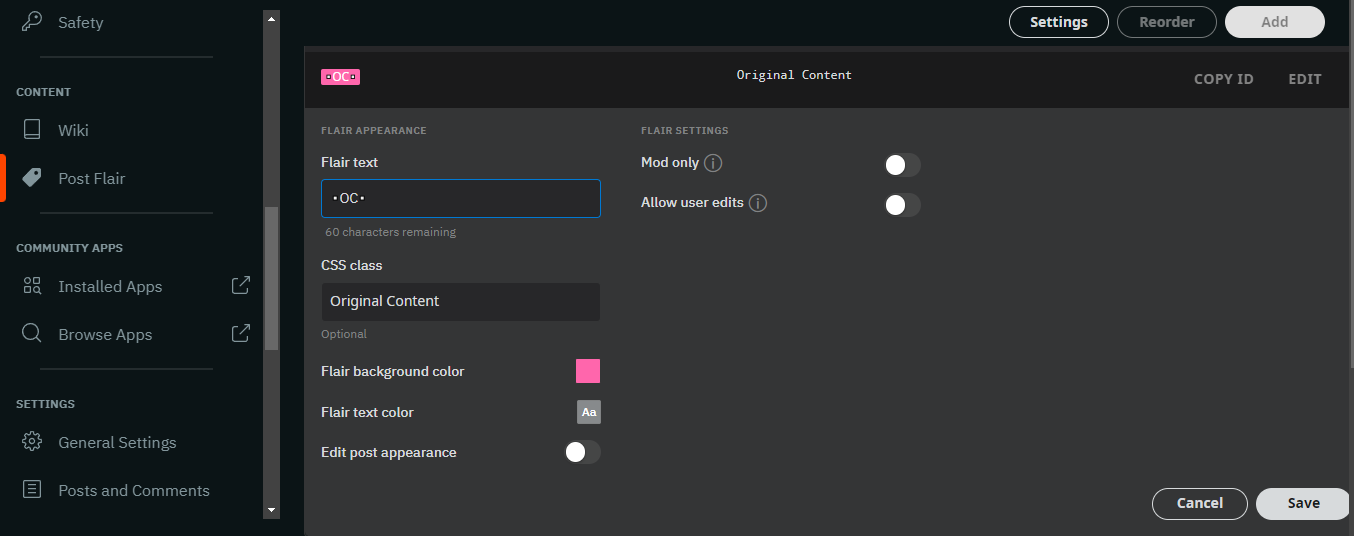
- Leave the other options unchanged; no need to modify anything else.
- Click on "Save" to save your changes.
Finally, to ensure all posts in your subreddit contain a "Post Flair," follow these steps:
- In "MOD TOOLS," scroll down the left sidebar to the "MODERATION" section and click on "Content Controls."
- Scroll down to the "Advanced post requirements" section and enable the "Require post flair" option.
- This setting will prevent posts from being made if no post flair is selected.
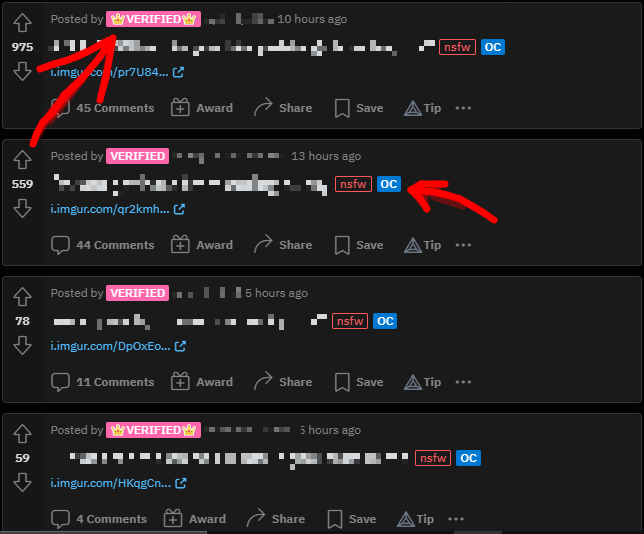
This method is highly scalable, as the more content creators you have publishing in your subreddit, the more you can earn. You can charge a fee for "verification" and another fee for monthly posting on your subreddit. While these amounts are typically not substantial (around $1 for verification and $10 for monthly posting), imagine having 1000 "verified users" on your subreddit. Many large subreddits are currently generating significant revenue using this method.
These are the methods I know and am currently applying to monetize a NSFW subreddit as its owner. In the future, as my subreddits gain more followers, I'll explore additional methods. I hope you find this guide useful, good luck!
*I hope everything makes sense to you guys. English isn't my first language, so I'm just making sure my message is clear for everyone. If anything needs more explaining or if you have any questions, feel free to let me know. Thanks!*
1. Links/Smartlinks: In my personal opinion, the simplest way to monetize adult traffic is through links or smartlinks that direct users to platforms dedicated to monetizing these leads. It's a straightforward process: when a user registers on a site using your link, you earn a commission for that lead. The amount you earn per lead can vary, primarily based on one crucial factor –the country of the lead. Leads from tier 3 countries usually generate less than $0.50, while leads from tier 1 countries typically generate over $1. Keep in mind that these values aren't set in stone, as leads can generate anywhere from $0.01 to $100 or even more, depending on the lead's country and the specific offer you're promoting. Now, let's delve into how you can strategically place these links or smartlinks in your subreddit.
1.1 Pinned Post: First and foremost, I strongly recommend using a pre-landing page for any link or smartlink you plan to use in your subreddit. Trust me, I've learned this the hard way –I've lost subreddits and accounts by pinning direct links on my own subreddit, haha! Here's what you need to do:
- Inside your subreddit, click on "Create Post."
- Choose the "Link" option, and then enter a catchy title and the link to your pre-landing page.
- An essential aspect of making your link visually appealing is adding metadata to the code of your pre-landing page. By doing so, when users click on the image within the post, they'll be directed to your pre-landing page. This visual connection with the topic of your subreddit is far more enticing for users compared to a link that only displays the name of your pre-landing page.
- Lastly, after you've created the post as I've described, click on the shield symbol and select the "Sticky Post" option. This will ensure the post remains at the top of your subreddit.
1.2 Automod First Comment: With this method, we'll configure the automoderator of your subreddit to leave a comment (including our link or smartlink) on every post made within the subreddit. Here's how you do it:
- In your subreddit, locate and click on the "MOD TOOLS" option.
- Within Mod Tools, scroll down the left sidebar until you find the "Moderation" section
- Look for the "Automod" option and click on it. If this is your first time accessing this feature, you may see a message saying "config/automoderator" does not exist. Don't worry, simply click on the "CREATE PAGE" button below that message.
- Once you're on the Automod page, you'll need to create a rule for the automoderator to comment with a link on every post. To create this rule, you'll need to use YAML, which is the "language" that Reddit employs to configure automod rules. For more information on YAML, click here.
- To save you from having to read the entire documentation on YAML, I've provided a template for creating the rule. Simply replace the necessary fields with your own data, as follows:
YAML:
type: submission
comment: |
This is the text you wish to include in the comment [Link text](http://example.com)1.3 Sidebar Widget Image: This is a clickable image that appears on the side of your subreddit, just below the "About Community" section. On PC, users will see the image in the sidebar on the right by scrolling down a bit, while on mobile, it will be located in the "About" section. Although only a few mobile Reddit users click on the "About" section in NSFW subreddits, I'll still explain how to use this method.
To add the sidebar widget image, follow these steps:
- Go to the main page of your subreddit and click on the "MOD TOOLS" option.
- Scroll down the left sidebar until you find the "Settings" section, then click on "Community Appearance."
- In the left sidebar, continue scrolling down to the "Structure" section and click on "Sidebar Widgets."
- Click on the "ADD WIDGET" option (at the bottom of the left sidebar).
- A list of widget options will appear; choose "Images."
- You can add a title for your own organizational purposes. Below the title, you can upload up to 10 images. Once you upload an image, you'll be able to enter a link for that image. I recommend using only one image for the sidebar widget, as most NSFW subreddits typically do.
1.4 Sidebar Widget Button: Similar to the previous method, this one focuses on using buttons instead of images, which will be located in the right sidebar on PC. On mobile, the buttons will be placed in the "About" section. The steps are the same as the previous method, but when selecting a widget, choose the "Button" option.
To add the sidebar widget button, follow these steps:
- Follow the same initial steps as in 1.3 to access the Sidebar Widgets.
- Choose the "Button" option as the widget type.
- Enter a "Widget Title," which will be the name of the button category within that section. Optionally, you can add a text description that appears below the "Widget Title" but above the buttons.
- Once you've created the container for the buttons, click on "Add Button" to start creating individual buttons.
- For each button, provide a title and enter the corresponding link. You can add up to 10 buttons. Creating buttons is straightforward and intuitive. Each button can contain one link.
- Note that I personally use the "Text button" format for my buttons, as they are compact and take up minimal space. I typically have 6 to 8 buttons in each of my subreddits. If you prefer the "Image button" format, you'll need to plan the distribution of sidebar space carefully. In this case, you may use between 2 to 5 buttons, depending on the design and layout of your subreddit's sidebar.
1.5 Welcome Message: The welcome message is a message that is sent to users who join your subreddit, usually one hour after they join. The strategy here is simple: include your link/smartlink within the welcome message, along with a compelling call-to-action (CTA).
To set up the welcome message, follow these steps:
- Go to the main page of your subreddit and click on "MOD TOOLS."
- Scroll down the left sidebar to the "Settings" section and click on "General Settings."
- Keep scrolling until you find the "Send welcome message to new members" option. By default, this option is disabled, so you need to enable it.
- Once enabled, a box will appear where you can enter your message. To format your message, use Reddit Markdown. You can find more information about Reddit Markdown here.
- After writing your message, click on "Save Changes" to save your settings. There's also an option below the text box labeled "Send me a test message." I recommend using this option to verify that your message works correctly.
2. Subreddit Promotion: This method is commonly used by large subreddits to promote smaller subreddits. To find small subreddits that want promotion, you can explore various avenues. One effective approach is to directly contact the owners of small subreddits and offer them promotion on your subreddit for a monthly fee. Additionally, you can offer your subreddit promotion service here on BHW. Now, let's dive into how you can showcase these promoted subreddits on the right sidebar of your subreddit, allowing users to join them with just one click.
2.1 Subreddit Promotion Widget: As the name suggests, you will promote other subreddits using the "Community list" widget. The setup process is similar to methods 1.3 and 1.4. Here's how to do it:
- Access "MOD TOOLS" and navigate to "Settings" > "Community Appearance" > "Structure" > "Sidebar Widgets" > "ADD WIDGET" > "Community list."
- Instead of selecting the "Button" or "Images" option, choose the "Community list" option.
- Provide a title for the widget, which will be visible to all users visiting your subreddit.
- After adding the title, select the community (subreddit) you want to promote and click on "Apply," then "Save."
- You can add up to 10 subreddits to the widget.
3. OnlyFans Promotion: This method is currently being employed by many NSFW subreddit owners and has gained significant popularity. It involves charging a fee, usually on a monthly basis, to an OnlyFans model or agency for promoting their content or OnlyFans profiles on your subreddit. You can utilize the methods mentioned above for placing links on your subreddit to facilitate this type of promotion.
3.1 User Verification Fee: To implement this method, follow these steps:
- Click on "MOD TOOLS" and scroll down the left sidebar to the "Settings" section.
- Click on the "General Settings" option and scroll down to the "Type of Community" section.
- Choose the "Restricted" option to allow only approved users to post on your subreddit.
- Without leaving the General Settings section, scroll further down to the "RESTRICTED COMMUNITY SETTINGS" section.
- Enable the "Accepting new requests to post" option to let users know you're looking for individuals to post on your subreddit.
- Click on "Save changes" to save your configuration.
With these steps, you've completed the first part of this method. Now, let's move on to the second part.
The second part involves assigning a User Flair to verified users. Follow these instructions:
- In "MOD TOOLS," navigate to the "MODERATION" section and click on "User Flair."
- In the "Setup" section, click on "Add" and enter a Flair text, which will be the visible name in the Flair.
- Optionally, you can add a CSS Class to give your User Flair a distinct style in your subreddit.
- To make the User Flair stand out, enable the "Add flair background" option and customize its style.
- Leave the other options unchanged, as they are not necessary to select.
- Click on "Save" to save your settings.
- Next, go to the "Assign" section adjacent to "Setup."
- Assign User Flairs to users by entering their names and selecting the appropriate User Flair. Note that only one User Flair is required for this method to work effectively.
Now, let's proceed to the third part, where I'll show you how to create "Post Flairs." Follow these steps:
- In "MOD TOOLS," scroll down the left sidebar to the "CONTENT" section and click on "Post Flair."
- Click on "Add" and give a name to your Post Flair that will be visible to all users visiting your subreddit.
- Ensure the name is related to "OC" (Original Content) so that users know the post creator is the original content producer.
- Optionally, you can add a CSS Class and customize the "Flair background color" and "Flair text color" to make the Post Flair more visually appealing.
- Leave the other options unchanged; no need to modify anything else.
- Click on "Save" to save your changes.
Finally, to ensure all posts in your subreddit contain a "Post Flair," follow these steps:
- In "MOD TOOLS," scroll down the left sidebar to the "MODERATION" section and click on "Content Controls."
- Scroll down to the "Advanced post requirements" section and enable the "Require post flair" option.
- This setting will prevent posts from being made if no post flair is selected.
This method is highly scalable, as the more content creators you have publishing in your subreddit, the more you can earn. You can charge a fee for "verification" and another fee for monthly posting on your subreddit. While these amounts are typically not substantial (around $1 for verification and $10 for monthly posting), imagine having 1000 "verified users" on your subreddit. Many large subreddits are currently generating significant revenue using this method.
These are the methods I know and am currently applying to monetize a NSFW subreddit as its owner. In the future, as my subreddits gain more followers, I'll explore additional methods. I hope you find this guide useful, good luck!


 )
)