Need Help with Wordpress Speed

newon

Power Member
Joined
Dec 16, 2011
Messages
701
Reaction score
118
Hello everybody, I am facing issues with loading speed for my site.


Here is the Pingdom Result:
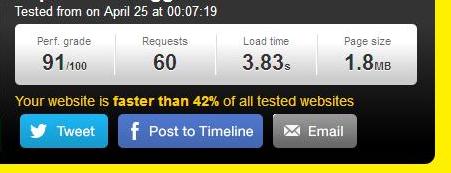
aFhesV6


Here is PageSpeed insight result:


Desktop
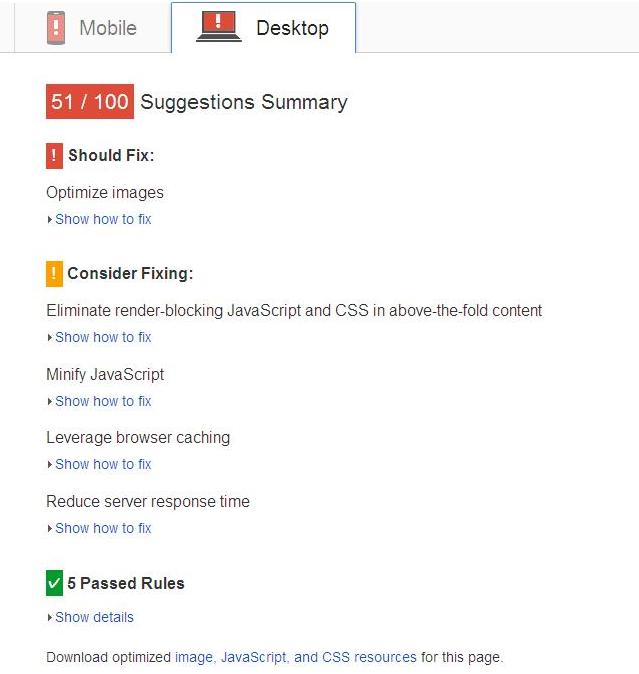
823MHwc


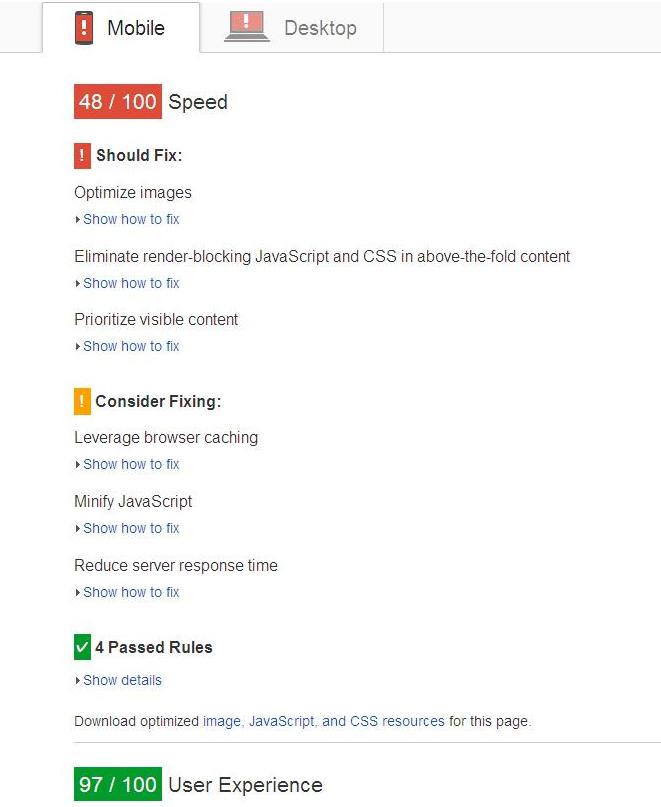
Mobile

vK1SjaF


Basic details of my site:
Theme: Urbanmag
Hosting: iPage shared hosting

Plugins:
Adjustly Nextpage
BackUpWordPress Backup Plugin
Compress JPEG & PNG images
Delete Pending Comments
Email Subscribers
Google Analytics by Yoast
Jetpack by WordPress.com
oik-privacy-policy
oik base plugin
P3 (Plugin Performance Profiler)
Shortcodes Ultimate
Stylish Popular Posts
W3 Total Cache
Wordfence Security
WordPress SEO
WordPress Shortcodes
WP-Optimize

Other details:
>> Using subdomain as CDN
>> Using Cloudflare free speed boosting
>> has 15 posts
>> Has 18 images (compressed)

I want to improve speed and improve rank mainly in PageSpeed Insights. Please help.
 
First biggest problem you have there is Wordfence.It monitors real-time and takes away a lot of resources.
Beside it is hackable...they did hack mine.Change to something else.
Strip down all your plugins to the ones that you really need.The more plugins you have the slower your site.
Remove:

BackUpWordPress Backup Plugin
Delete Pending Comments
Email Subscribers
Google Analytics by Yoast
Jetpack by WordPress.com
oik-privacy-policy
P3 (Plugin Performance Profiler)
Shortcodes Ultimate
Stylish Popular Posts
W3 Total Cache
Wordfence Security
WordPress Shortcodes
WP-Optimize

These are all the plugins that you can do it yourself and do it different way.
Back yourself every 2 days - 7 days
Why do you need a plugin for privacy policy?
Email subscriber...use something different - try a free service.Maybe mailchimp.
You don't need any additional plugin to organize your plugins - defets the purpose.
Shortcode - ....you can add shortcode to wordpress files yourself - just google it.
Stylish popular posts - rather choose a theme that has it already.
W3 total cache -did more harm than it is usefull,breaking tha layout etc...
Wordfence - really bad experience... hacked and created additional 3 admin profiles
Shortcodes - again,why do u have 2 plugins for shortcodes?
WP-optimize...another useless plugin to optimize what you can do.

Cloudfare is so-so..used them,but not that much of a diference.
Either go for a payed CDN or change your hosting to wordpress hosting - which will lower the load time under 1,5 second.
 
First biggest problem you have there is Wordfence.It monitors real-time and takes away a lot of resources.
Beside it is hackable...they did hack mine.Change to something else.
Strip down all your plugins to the ones that you really need.The more plugins you have the slower your site.
Remove:

BackUpWordPress Backup Plugin
Delete Pending Comments
Email Subscribers
Google Analytics by Yoast
Jetpack by WordPress.com
oik-privacy-policy
P3 (Plugin Performance Profiler)
Shortcodes Ultimate
Stylish Popular Posts
W3 Total Cache
Wordfence Security
WordPress Shortcodes
WP-Optimize

Cloudfare is so-so..used them,but not that much of a diference.
Either go for a payed CDN or change your hosting to wordpress hosting - which will lower the load time under 1,5 second.

I have disabled all the plugins you said except w3 total cache still not so much improvement found. Should I now consider upgrading the hosting to wordpress essential?
 
Hi there pm me your website url so that i can check which part is hogging you down(if you want to).
Now remove all plugins(Ok don't get mad at me but without knowing what is hogging down your resources nothing can be said) first disable and unsintall them, no just for an extra measure remove any left overs by hand with your ftp client(from the plugins directry). Also make sure you clean your htaccess and the lot so that the changes done by the cache plugins are reverted. Now also delete and remove unwanted and unused themes.

SO by now the installation should be pretty clean. Now what you're gonna do it install Wordfence(Although not the best still a good one for free).Enable the falcon engine, now install the seo plugin and most important other plugins. Do a few pingdom checks after installing each plugin.Now you'll know which plugins are bogging you down(If they are the actual cause).Do not install any plugin if its really not a must have.

Now CLoudflare is a good guys but not the best. What are the settings in the cloudflare page go through them and check if they are properly setup, if you don't know for sure just google and you should get a few recommended settings posts.

Have you enabled Gzip compression? How about minifying the code(Use minify plugin form the wp repository)? Have yo optimized the pics before uploading through photoshop or gimp for web use? If not try passing through smushit .. There just a ton more to worry about.

Remember it is a service people charge shit for..

It could also be your host hogging you down.And also don't know how optimized your theme code is... Lots of factors you know..
 
Almost all the issues found there are client-side and not related to WP. Fix your theme and HTML.
 
Your biggest hog are the images. Use Smush.it (plugin) to optimize your images or run your entire image folder through https://kraken.io/. Free users can only optimize files that are not larger then 1 MB. Could you do that first and report back what the result is?
 
Check wpcurve's blog and search for their wordpress speed article. They have really extensive read-worthy article, and it will help with your problem for sure.
 
Back
Top