

- Feb 28, 2019
- 7,445
- 7,906
Most webmasters exclusively target Google and completely ignore Bing due to low traffic share. Even if you don't want any traffic from Bing, you can take advantage of their search console that offers a lot more data in comparison to Google. While Google plays with your search rankings without giving you much information, Bing provides some solid recommendations. You can follow this step by step guide to identify easy fixes for quick ranking improvement.
Step 1: Login to your Bing Webmaster Tools. You can login with your gmail account.
https://www.bing.com/webmaster/login/redirecttohomepage
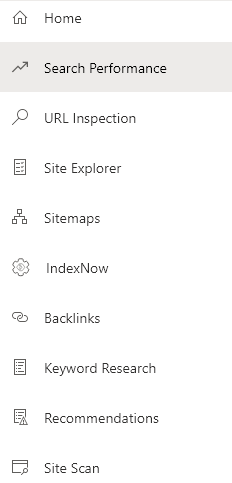
Step 2: Click "Recommendations" in left panel.
Step 3: Identify and fix errors.
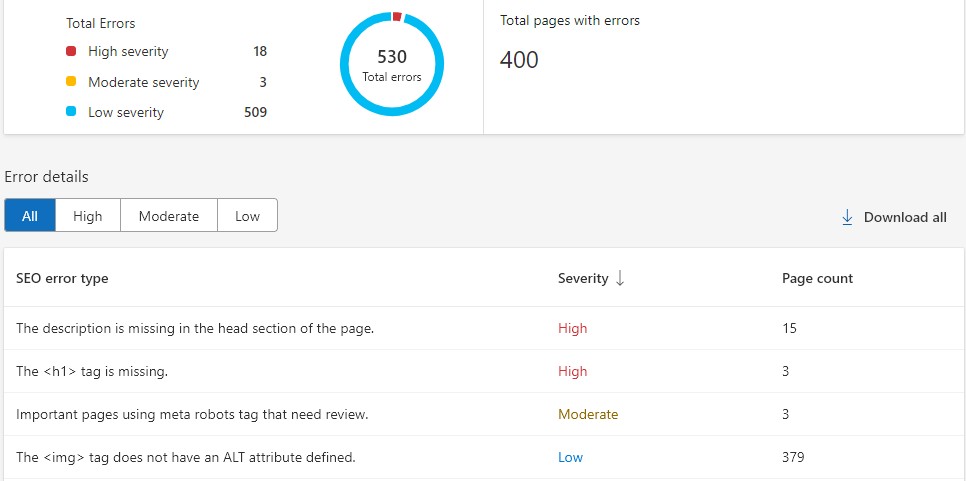
Please keep in mind that some errors go against the recommendations of SEO plugins. For example, many SEO plugins don't recommend using h1 tag on home page as they don't have a traditional title for SEO purposes. Some also advise against using alt tag on brand image. So, it's a personal preference when it comes to these errors. But you can identify and fix some obvious errors that affect pages in bulk like having similar titles or description.
Step 4: You can also use Bing Webmaster Tools for keyword research and backlinks.
Bonus: Go to "Search Performance" from left panel. Click on "List by" Pages. Identify your top pages and check their keywords. You can update your content to target some high performance or new keywords. Although you can do the same from Google, GSC gives generic results that won't change over time while Bing may surprise you with new opportunities.
Results: Here are my results after applying these strategies to a site. Bing suggested me to build some high authority backlinks, so there is still scope for improvement.
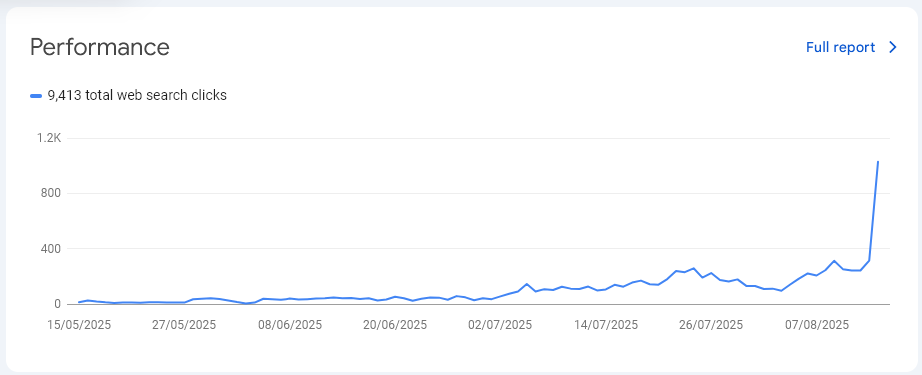
As far as white hat SEO is concerned, Bing and Google have similar recommendations. So we can follow Bing's recommendations to improve Google rankings.
Step 1: Login to your Bing Webmaster Tools. You can login with your gmail account.
https://www.bing.com/webmaster/login/redirecttohomepage
Step 2: Click "Recommendations" in left panel.
Step 3: Identify and fix errors.
Please keep in mind that some errors go against the recommendations of SEO plugins. For example, many SEO plugins don't recommend using h1 tag on home page as they don't have a traditional title for SEO purposes. Some also advise against using alt tag on brand image. So, it's a personal preference when it comes to these errors. But you can identify and fix some obvious errors that affect pages in bulk like having similar titles or description.
Step 4: You can also use Bing Webmaster Tools for keyword research and backlinks.
Bonus: Go to "Search Performance" from left panel. Click on "List by" Pages. Identify your top pages and check their keywords. You can update your content to target some high performance or new keywords. Although you can do the same from Google, GSC gives generic results that won't change over time while Bing may surprise you with new opportunities.
Results: Here are my results after applying these strategies to a site. Bing suggested me to build some high authority backlinks, so there is still scope for improvement.
As far as white hat SEO is concerned, Bing and Google have similar recommendations. So we can follow Bing's recommendations to improve Google rankings.


