batu
Junior Member
- Jul 20, 2022
- 130
- 238
Hello BHW,
Last week, I shared my Free DR86 DF Backlink Method, and some of you successfully got your backlinks indexed.
Thread: https://www.blackhatworld.com/seo/m...f-backlink-for-my-guys-youre-welcome.1490622/
Now, I'm leveling up my game one step ahead and showing you how to make the internet even more spammy.
Introducing: Your new DF .edu links.
So I was reverse-engineering some .edu websites and found this technique just now by myself. It felt like a great life hack and I'm sipping my victory whiskey as I write this thread. Cheers
Couldn't find another thread on BHW so I'm sharing it with you, believing that it's goodenough to share.
The topic explains itself, so let's skip the intro and begin with our steps.
Since most plain .edu sites are unavailable for this technique (they are spammed frequently so they fix those stuff), we will be using local TLDs for our search. You can find some .edu sites if you search well, but I want it to be easy for all of you so this guide will use country-specific .edu TLDs.
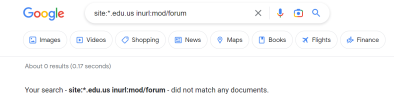
Your search query:
You will find some moodle sites with forum sections.
If you don't understand the language, just use google translate.
Click the links you've found. And check/do the following:
Create an article with chatgpt or spin some content.
Inject your backlinks into the text. Moodle has a strangely advanced settings panel for URLs so you can set every attribute of your <a> tag, including the rel="" attribute. But by default, all post URLs are DF.
But just to be sure, you may use an indexer. And please share your indexer preferences with me, too.
That's all, folks.
Last week, I shared my Free DR86 DF Backlink Method, and some of you successfully got your backlinks indexed.
Thread: https://www.blackhatworld.com/seo/m...f-backlink-for-my-guys-youre-welcome.1490622/
Now, I'm leveling up my game one step ahead and showing you how to make the internet even more spammy.
Introducing: Your new DF .edu links.
So I was reverse-engineering some .edu websites and found this technique just now by myself. It felt like a great life hack and I'm sipping my victory whiskey as I write this thread. Cheers
Couldn't find another thread on BHW so I'm sharing it with you, believing that it's goodenough to share.
The topic explains itself, so let's skip the intro and begin with our steps.
Step 1: Find your Target .Edu Websites
Well, we will use our beloved Google for this step. We need to find Edu websites that use Moodle and have a forum or blog section.Since most plain .edu sites are unavailable for this technique (they are spammed frequently so they fix those stuff), we will be using local TLDs for our search. You can find some .edu sites if you search well, but I want it to be easy for all of you so this guide will use country-specific .edu TLDs.
Your search query:
site:*.edu.{country code} inurl:mod/forum
You will find some moodle sites with forum sections.
Step 2: Refine Your Search
We want a site that has a forum section and allows us to create topics.If you don't understand the language, just use google translate.
Click the links you've found. And check/do the following:
- Do they have a Create Topic button on the screen?
- If they don't, the game is still not over. Navigate through the website and find an interactive section that allows users to engage in a public setting.
- Does it have a signup button somewhere?
- 99.99% of Moodle websites require you to log in before posting anything. Just find where you can sign up, and create an account with a fake e-mail.
- You may use Protonmail for creating your burner mail.
- Moodle requires verification so use a valid e-mail.
- Can you see some public forum threads / blog posts within the site?
- Some Moodle sites are private. Don't waste your time with the private ones.
- Did you check the courses one by one?
- Check them. They have blogs and forums inside.
- Does it ask for your Student ID when signing up?
- Just type random numbers.
- Is it a hopeless case?
- If so, rinse and repeat. Find another site, there are plenty of fish in the sea.
Step 3: Create Your Forum Thread / Blog Post
That's the easiest part. Just go ahead and create your post. Try to make it seem not spammy and don't create hundreds of posts in a single site as it may alert the Moodle admin. Go easy.Create an article with chatgpt or spin some content.
Inject your backlinks into the text. Moodle has a strangely advanced settings panel for URLs so you can set every attribute of your <a> tag, including the rel="" attribute. But by default, all post URLs are DF.
Step 4: Send The Links to Your Favourite Indexer
That step may not be necessary as I have seen that such websites have 1000+ indexed pages already so your page will also be indexed as well in time. The pages have no "noindex" tag or robots exclusion so we may easily say that you have successfully generated a fair and square backlink.But just to be sure, you may use an indexer. And please share your indexer preferences with me, too.
Step 5: Roast the OP for not providing pics
Guys, I am a lazy guy. But let me give you a sithy motivation speech to compensate for it:I believe in you, and I believe you will have multiple .edu backlinks in the following hour if you start now. Just breathe, let your anger go and begin grinding. 777 all the way through the universe and ask for some edu backlinks.
That's all, folks.
Last edited: