

armur
Regular Member
- Jul 20, 2017
- 460
- 249
Hey guys,
This is a neat twist on a method that I'm pretty sure almost all of you already know about. One of the tricks that almost everyone uses in affiliate articles is to include the current year in the title of the article. This works brilliantly but has the disadvantage that you will need to update the title at the start of each year. You forget to update and suddenly your site doesn't attract as many clicks as those in the SERPs around you. With hundreds of articles, the process is often painstakingly difficult. Check out the following screenshot:

That last link - that's gonna get very very few clicks for the simple reason that it looks outdated. Of late, I've been coming across a lot of sites that even have the current month in the title - something like [Updated April 2020] or simply (Apr 2020). These get a crazy amount of clicks simply due to the novelty factor - people want the latest and the best when they look for products. Check the following screenshot:

So, how do they do it? I did a bit of digging and turns out, it needs just a couple of lines of PHP code to be included in your functions.php file. Here are the detailed step-by-step instructions:
1) Go to your site's Admin Dashboard and then select Appearance->Theme Editor.

2) Click on functions.php in the right panel.
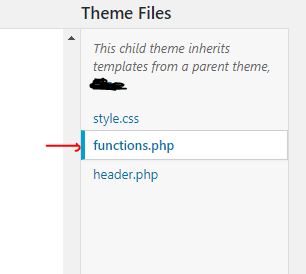
3) Include the following code in the file and click 'Update File' at the bottom.
4) That's it. The above code will create a couple of shortcodes that you can use not only in the Post Titles, but also in Yoast's Meta Title and Meta Description fields and also anywhere inside the article.
Bonus:
The above shortcode [month_year] outputs the month and year as Nov 2020. This is preferable for use in Post Titles since the number of characters that Google can display in the SERPs is limited. However, in your H2s or other locations where you have no such restriction, you can use the full month name and year as November, 2020 with the comma in between as well. For that insert the following code into the same functions.php file and click Update File:
To display the full month and year, you can now use the shortcode [long_month_year] anywhere in the article.
Cheers!
Armur
This is a neat twist on a method that I'm pretty sure almost all of you already know about. One of the tricks that almost everyone uses in affiliate articles is to include the current year in the title of the article. This works brilliantly but has the disadvantage that you will need to update the title at the start of each year. You forget to update and suddenly your site doesn't attract as many clicks as those in the SERPs around you. With hundreds of articles, the process is often painstakingly difficult. Check out the following screenshot:
That last link - that's gonna get very very few clicks for the simple reason that it looks outdated. Of late, I've been coming across a lot of sites that even have the current month in the title - something like [Updated April 2020] or simply (Apr 2020). These get a crazy amount of clicks simply due to the novelty factor - people want the latest and the best when they look for products. Check the following screenshot:
1) Go to your site's Admin Dashboard and then select Appearance->Theme Editor.
Code:
/* Activate shortcode function in Post Title */
add_filter( 'the_title', 'do_shortcode' );

/* Activate shortcode function in Yoast Title and Meta Description */
add_filter( 'wpseo_title', 'do_shortcode' );
add_filter( 'wpseo_metadesc', 'do_shortcode' );


/* Shortcode to display the current month and year in WordPress */
/* shortcode: [month_year] */
add_shortcode( 'month_year' , 'current_month_year' );
function current_month_year() {
$year = date("Y");
$month = date("M");
return "$month $year";
}

/* Shortcode to display the current year in WordPress */
/* shortcode: [year] */
add_shortcode( 'year' , 'current_year' );
    function current_year() {
    $year = date("Y");
    return "$year";
}
4) That's it. The above code will create a couple of shortcodes that you can use not only in the Post Titles, but also in Yoast's Meta Title and Meta Description fields and also anywhere inside the article.
- To include just the current year in your Title, use the shortcode [year]
- To include the current month and year in your Title, use the shortcode [month_year]
Bonus:
The above shortcode [month_year] outputs the month and year as Nov 2020. This is preferable for use in Post Titles since the number of characters that Google can display in the SERPs is limited. However, in your H2s or other locations where you have no such restriction, you can use the full month name and year as November, 2020 with the comma in between as well. For that insert the following code into the same functions.php file and click Update File:
Code:
/* Shortcode to display the current month and year in WordPress */
/* shortcode: [long_month_year] */
add_shortcode( 'long_month_year' , 'current_long_month_year' );
function current_long_month_year() {
$year = date("Y");
$month = date("F");
return "$month, $year";
}
To display the full month and year, you can now use the shortcode [long_month_year] anywhere in the article.
Cheers!
Armur


