✅ Keyword Research with this Neat Trick!

RealDaddy

Repeatedly violating rules
Joined
Jun 30, 2018
Messages
9,011
Reaction score
11,299
Source - SEO Tooth & Jeff Collins via Linkedin​
  1. Basically, you’ll want to install the following https://chrome.google.com/webstore/detail/amz-suggestion-expander/cpeaihkccbeemkfefcapijechkbfjlhb/related?hl=en
  2. Then you’re going to head over to Amazon and start performing searches.
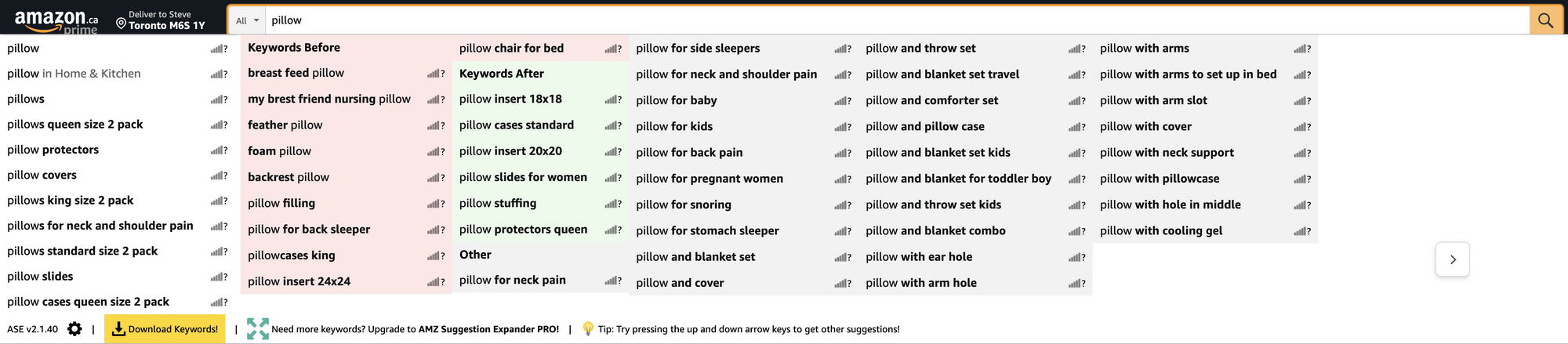
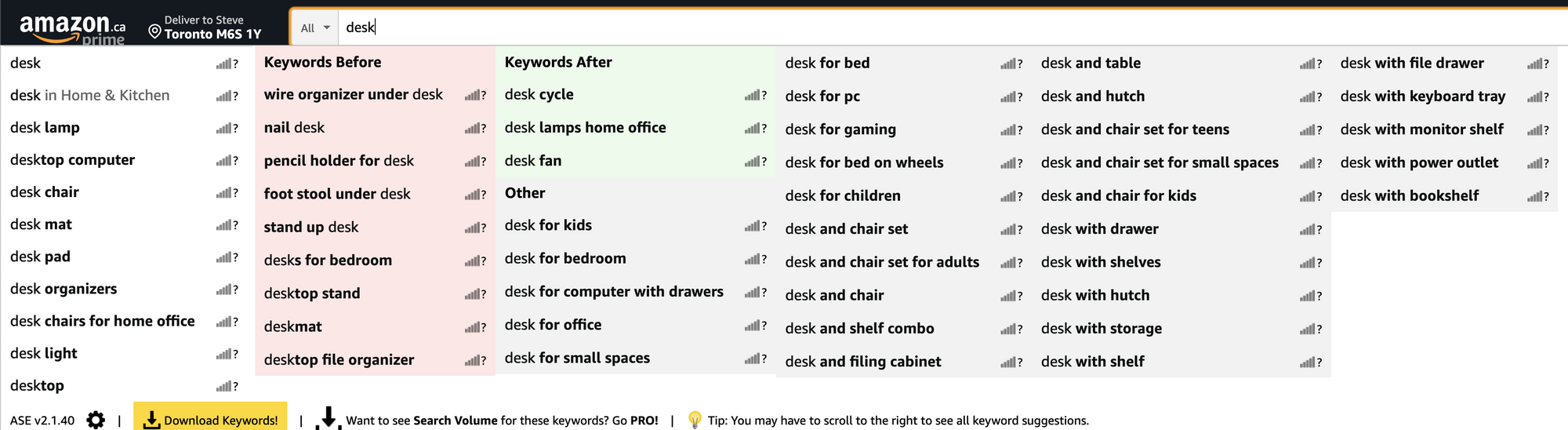
  3. The tool expands upon the keyword you typed to include keywords before and after the products you search for.

Let’s take a look at a few:

uSC2CE2


-------

rKsHaWD


-------

FS2bN0E

If you’re cheap, but you still want to take it to the next level you can use http://www.structurise.com/screenshot-ocr/ to turn your screenshots of these keywords into plain text.

Let's take the first example about guitars. We can see that people search for guitars related to the kids’ ages. You could easily create pages for:
  • Guitars for 4 year olds
  • Guitars for 5 year olds
  • Guitars for 6 year olds
  • Guitars for 7 year olds
  • Guitars for 8 year olds
  • Guitars for 9 year olds
  • Guitars for 10 year olds

Take it a step further and add “girls” to the end, get the picture?
 
You do realize that there is a download button to donwload all the keywords in an Excel file, whitout taking screenshots and converting them

Edit: i will add something: and if your already have the extension of 'keyword everywhere' they will give you the search volume from Amazon itself
 
I use this for my Amazon research and it gives me a lot of long tail keywords that I can use.
 
Source - SEO Tooth & Jeff Collins via Linkedin​
  1. Basically, you’ll want to install the following Chrome extension
  2. Then you’re going to head over to Amazon and start performing searches.
  3. The tool expands upon the keyword you typed to include keywords before and after the products you search for.

Let’s take a look at a few:

uSC2CE2


-------

rKsHaWD


-------

FS2bN0E

If you’re cheap, but you still want to take it to the next level you can use http://www.structurise.com/screenshot-ocr/ to turn your screenshots of these keywords into plain text.

Let's take the first example about guitars. We can see that people search for guitars related to the kids’ ages. You could easily create pages for:
  • Guitars for 4 year olds
  • Guitars for 5 year olds
  • Guitars for 6 year olds
  • Guitars for 7 year olds
  • Guitars for 8 year olds
  • Guitars for 9 year olds
  • Guitars for 10 year olds

Take it a step further and add “girls” to the end, get the picture?
This is a neat trick and/or tool. While this focuses on Amazon and would beneficial to sellers on Amazon. Somenthing to note is, if people are searching for these on Amazon they likely searched for same thing on Google.
 
Is it only me? Image broke for me :weep:

Screenshot-1.png
 
I like it, not something I've done before and ill give it a try
 
I use this for my Amazon research and it gives me a lot of long tail keywords that I can use.
Do you mean Amazon eCommerce/FBA?
 
I'll check out this extension
Looks more like keywords everywhere alternative for amazon
 
Source - SEO Tooth & Jeff Collins via Linkedin​
  1. Basically, you’ll want to install the following Chrome extension
  2. Then you’re going to head over to Amazon and start performing searches.
  3. The tool expands upon the keyword you typed to include keywords before and after the products you search for.

Let’s take a look at a few:

uSC2CE2


-------

rKsHaWD


-------

FS2bN0E

If you’re cheap, but you still want to take it to the next level you can use http://www.structurise.com/screenshot-ocr/ to turn your screenshots of these keywords into plain text.

Let's take the first example about guitars. We can see that people search for guitars related to the kids’ ages. You could easily create pages for:
  • Guitars for 4 year olds
  • Guitars for 5 year olds
  • Guitars for 6 year olds
  • Guitars for 7 year olds
  • Guitars for 8 year olds
  • Guitars for 9 year olds
  • Guitars for 10 year olds

Take it a step further and add “girls” to the end, get the picture?
Seems like an interesting option, especially since it's free so it's worth trying and could especially be interesting for some newbies here that are often looking for some good and free keywords research tools. As I could see in the image there is an option for exporting results in Excel which means that the process can even be easier as you don't have to make any screenshots to save results and manage them. I will definitely try this out at some point, as it looks useful for obtaining some fast results while you're searching for something or visiting some specific web page. Thanks for sharing.
 
this plugin does the same & let you DL for free

https://chrome.google.com/webstore/detail/huge-amazon-search-sugges/mmdamlknnafgffhlobhlmiljonijdnid
hmm, seems interesting.
 
i'm new to seo & i see many post says maake a page for that long tail keyword but i dont get it , do they mean by page a POST in wordpress or REAL PAGE ( assuming that WP is the platforme)
does it make diffrence to make a page or post in seo ? i know a page can gather many posts tho

thanks
 
Back
Top