Intercepting website's API - data is updated after API loads?

spiderscrape

Newbie
Joined
Mar 25, 2020
Messages
18
Reaction score
1
Hi guys,

So I have found the endpoint for the API used by a website (http://www.oddschecker.com) - which allows me to grab the odds that are shown on the website as soon as the page loads - but about 1 second after, the data changes - however this is not reflected in the API until quite a few seconds later.

My question is - where is the updated data coming from? I can see no requests in the Network tab in Chrome - nor within WrapAPI extension.. any idea how the new updated odds get pushed to the webpage?

For reference, any "market" page on Oddschecker will be a good example for what I am referring to. (You can pick any link from here to see: https://www.oddschecker.com/horse-racing)

Any questions let me know.

Thanks,

Rob
 
My question is - where is the updated data coming from? I can see no requests in the Network tab in Chrome - nor within WrapAPI extension.. any idea how the new updated odds get pushed to the webpage?
There is a websocket connection, you looked into that?
 
There is a websocket connection, you looked into that?

I researched Websockets, but couldn’t find the connection on the website, and wasn’t sure how to get a connection to it.

Would really appreciate some pointers. Thanks.
 
don't know what you mean by "market" page
but if you open this for example: https://www.oddschecker.com/horse-racing/tampa-bay-downs
you get a websocket connection with binary data, filter the requests by WS
UIzK5zw

This is interesting... I have managed to get a connection, with the Binary Messages coming back - although I'm finding it difficult how to read these messages into data that would be useful?
 
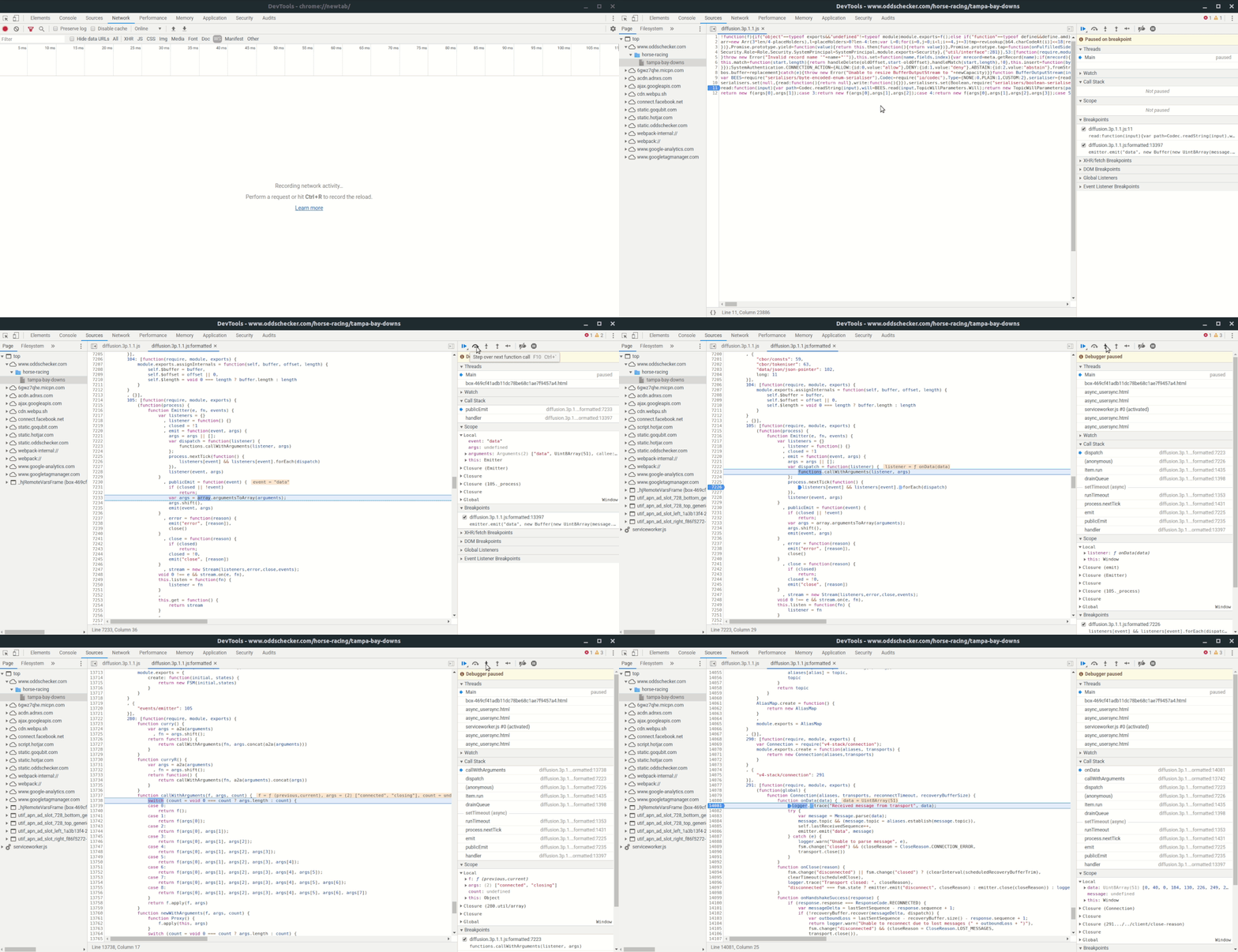
Use the debugger to find the javascript code that decodes the data.
First go the js file with the "Initiator" column in the network tab. That gives you the line in that the socket is created. But you are interested in the handler for the onmessage event, it's assigned a few lines below and declared a few lines above. Set a breakpoint there and refresh the page.
Stepping through the code you will find the important line where the emitter is calling its listeners: 'functions.callWithArguments'. Break there and step in until you find something that parses the data.

emitter-callback.gif


on imgur as video so you can pause it
https://imgur.com/KYfek1b
 
Use the debugger to find the javascript code that decodes the data.
First go the js file with the "Initiator" column in the network tab. That gives you the line in that the socket is created. But you are interested in the handler for the onmessage event, it's assigned a few lines below and declared a few lines above. Set a breakpoint there and refresh the page.
Stepping through the code you will find the important line where the emitter is calling its listeners: 'functions.callWithArguments'. Break there and step in until you find something that parses the data.

emitter-callback.gif


on imgur as video so you can pause it
https://imgur.com/KYfek1b

Thank you for your help - I have now debugged through the JS, and I think I am closer to finding the answer - but not quite.

Have you found the answer for how the messages are decoded?
 
Last edited by a moderator:
I only looked like one layer deep.
First byte is one of these types:
Code:
SERVICE_REQUEST: 0,
SERVICE_RESPONSE: 1,
SERVICE_ERROR: 2,
TOPIC_LOAD: 20,
DELTA: 21,
SUBSCRIBE: 22,
UNSUBSCRIBE: 23,
PING_SERVER: 24,
PING_CLIENT: 25,
CREDENTIALS: 26,
CREDENTIALS_REJECTED: 27,
ABORT_NOTIFICATION: 28,
CLOSE_REQUEST: 29,
TOPIC_LOAD_ACK_REQUIRED: 30,
DELTA_ACK_REQUIRED: 31,
ACK: 32,
FETCH: 33,
FETCH_REPLY: 34,
TOPIC_STATUS_NOTIFICATION: 35,
COMMAND_MESSAGE: 36,
COMMAND_TOPIC_LOAD: 40,
COMMAND_TOPIC_NOTIFICATION: 41

If it's one of the first three then it's a systemmessage with the rest of the data as body.
Otherwise you have to read the headers first, each one is terminated with a 0x02 and the last one with 0x01. The remaining data is then the body.
Also took a brief look in how the systemmessage gets decoded, starts with a int32 followed by int64 (if i remeber correctly) and it uses variable-length quantity. That's where i stopped.
 
they are using WebSocket click on the ws tab on network manager and reload the page you will see there is one ws connection which is continuously sending and receiving the data from the server.
 
Back
Top