

jeongsubin
Newbie
- Dec 21, 2022
- 29
- 8
The Instagram automation program has web/mobile methods.
Which method is best will depend on your experience, skills, budget, and goals.
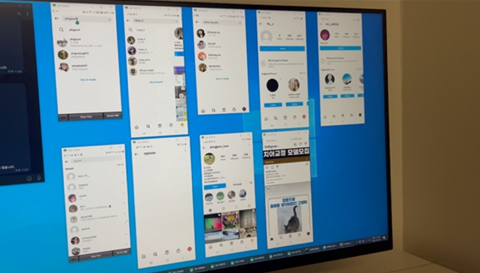
I have experience with both methods, and the automated method of directly controlling the mobile device (ADB) suited me best.
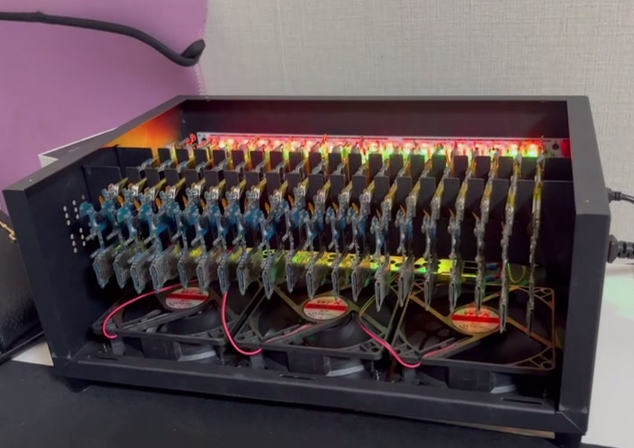
So far, I have automatically configured 10 Android devices,
and each device is equipped with a SIM card in a 1:1 ratio.
Each device has five Instagram accounts logged in. A total of 50 accounts.
A total of 50 accounts interact with each other at set times every day,
such as following/liking/commenting.
10 devices process an average of 1500 actions per day.
=========================
Ad Analysis
CTR: 1.0%
UV: 15 people
Customer Transaction: $3.5
Daily sales: UV * CT = $52.5
1 month sales: UV * CT * 30d = $1,575
=========================
As you can see above, if you calculate it as monthly sales, it is not a small amount.
However, it is still very small compared to the size of my business.
So I recently purchased 20 more Android devices.
What this means is that we will be adding 100 Instagram accounts.
But a problem arose.
Since I already have 10 sim cards, I couldn't get any more sim cards (due to my country's communication restrictions), and an additional problem was that the sim cards would cost too much.
So I set out to find a new solution.
GOAL
1. Low cost and high efficiency
2. Connect multiple devices using a small number of SIM cards.
3. The network must bypass Instagram spam detection.
The way I already tried
I connected my home Wi-Fi to the newly purchased device and attempted to log in to my Instagram account,
but as expected, the account was blocked after a certain number of login attempts. 30 accounts blocked
A method I haven't tried yet
MiFi Router (Single SIM)
A method of connecting up to 5 devices by installing a single SIM card at a relatively low price
4G/5G SIM card router (Dual SIM ~ Octuple SIM)
A method of dividing high-quality cellular data using a router and connecting to new devices.
Raspberry Pi SIM card router (proxy server)
No detailed information yet.
I need your advice to solve this problem.
If you have a better network configuration method than the one I mentioned above,
or if you have any helpful information, please leave a comment.
It is of great help to me.
Which method is best will depend on your experience, skills, budget, and goals.
I have experience with both methods, and the automated method of directly controlling the mobile device (ADB) suited me best.
So far, I have automatically configured 10 Android devices,
and each device is equipped with a SIM card in a 1:1 ratio.
Each device has five Instagram accounts logged in. A total of 50 accounts.
A total of 50 accounts interact with each other at set times every day,
such as following/liking/commenting.
10 devices process an average of 1500 actions per day.
=========================
Ad Analysis
CTR: 1.0%
UV: 15 people
Customer Transaction: $3.5
Daily sales: UV * CT = $52.5
1 month sales: UV * CT * 30d = $1,575
=========================
As you can see above, if you calculate it as monthly sales, it is not a small amount.
However, it is still very small compared to the size of my business.
So I recently purchased 20 more Android devices.
What this means is that we will be adding 100 Instagram accounts.
But a problem arose.
Since I already have 10 sim cards, I couldn't get any more sim cards (due to my country's communication restrictions), and an additional problem was that the sim cards would cost too much.
So I set out to find a new solution.
GOAL
1. Low cost and high efficiency
2. Connect multiple devices using a small number of SIM cards.
3. The network must bypass Instagram spam detection.
The way I already tried
I connected my home Wi-Fi to the newly purchased device and attempted to log in to my Instagram account,
but as expected, the account was blocked after a certain number of login attempts. 30 accounts blocked
A method I haven't tried yet
MiFi Router (Single SIM)
A method of connecting up to 5 devices by installing a single SIM card at a relatively low price
4G/5G SIM card router (Dual SIM ~ Octuple SIM)
A method of dividing high-quality cellular data using a router and connecting to new devices.
Raspberry Pi SIM card router (proxy server)
No detailed information yet.
I need your advice to solve this problem.
If you have a better network configuration method than the one I mentioned above,
or if you have any helpful information, please leave a comment.
It is of great help to me.
Last edited:

