
You are using an out of date browser. It may not display this or other websites correctly.
You should upgrade or use an alternative browser.
You should upgrade or use an alternative browser.
How to fix technical SEO errors?
- Thread starter mrrankseo
- Start date


theusualkeysersoze
BANNED - Failed to resolve a dispute
- Oct 11, 2025
- 900
- 513
Whoever has done that page should never again do a website except static brochure sites as hobby, this is what you get.“I am facing some issues with technical SEO errors. How can I fix them? Can any expert friend help me resolve these errors?
Youre at a point where professional intervention and takeover is required, nobody will go into your codebase and give you the fix just like that.
And yes, this needs to be fixed in the code base.
Start a hire a freelancer topic and make sure you hire someone who is not a BS artist.

- Jan 17, 2015
- 5,266
- 4,953
Dud, you are the most exaggerated guy in earth.Whoever has done that page should never again do a website except static brochure sites as hobby, this is what you get.
He only has 7 pages in `noindex` but there are still hundreds to be crawled.
@mrrankseo first of all, try to find out if you have a sitewide noindex tag set. If you are using WordPress maybe you have the Discourage search engines from indexing this site enabled.
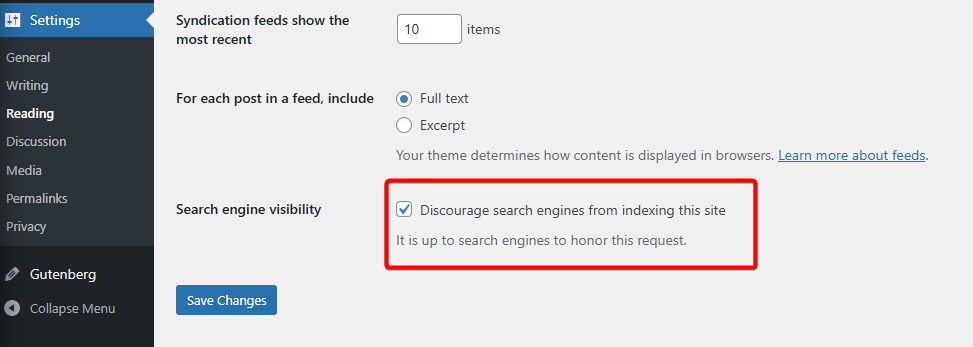
If that is the case, just disable it.
theusualkeysersoze
BANNED - Failed to resolve a dispute
- Oct 11, 2025
- 900
- 513
Yeah why do you believe there are hundreds yet to be crawled? Did he forget to ask for indexing?Dud, you are the most exaggerated guy in earth.
He only has 7 pages in `noindex` but there are still hundreds to be crawled.
@mrrankseo first of all, try to find out if you have a sitewide noindex tag set. If you are using WordPress maybe you have the Discourage search engines from indexing this site enabled.
If that is the case, just disable it.
Rthetoric question, the floor is yours, you remotely help him lol

- Sep 25, 2025
- 132
- 97
lol , tf you talking about?Whoever has done that page should never again do a website except static brochure sites as hobby, this is what you get.
Youre at a point where professional intervention and takeover is required, nobody will go into your codebase and give you the fix just like that.
And yes, this needs to be fixed in the code base.
Start a hire a freelancer topic and make sure you hire someone who is not a BS artist.

EternalEsper
BANNED
- Nov 7, 2023
- 91
- 17
Technical SEO errors often stem from crawlability or indexability problems so start by auditing your site with tools like Google Search Console and Screaming Frog to identify the specific issues. Hiring an experienced SEO consultant is a great idea, as they can quickly diagnose and implement fixes you might miss, look for someone with technical expertise.“I am facing some issues with technical SEO errors. How can I fix them? Can any expert friend help me resolve these errors?

- Nov 8, 2025
- 131
- 19
These are normal technical SEO issues, no need to worry.
Most errors are about indexing.
Check noindex tags on important pages, fix extra redirects, improve thin content, and clean 404 pages with proper redirects.
For “crawled but not indexed”, improve content quality and internal linking.
These fixes usually solve the problem,
Most errors are about indexing.
Check noindex tags on important pages, fix extra redirects, improve thin content, and clean 404 pages with proper redirects.
For “crawled but not indexed”, improve content quality and internal linking.
These fixes usually solve the problem,

olivergray231
Newbie
- Nov 5, 2025
- 8
- 0
Start simple and fix issue step by step:
- Check Google Search Console > it shows the real errors
- Fix indexing issues (noindex, blocked URLs, wrong canonicals)
- Improve site speed & mobile usability
- Fix 404 pages and add proper redirects
- Make sure XML sitemap and robots.txt are correct
Dibbert66389
Newbie
- Nov 13, 2025
- 2
- 1
To resolve technical SEO errors effectively, you need to move from identifying the problems to implementing fixes based on clear data. In 2025, technical SEO focuses heavily on user experience signals (Core Web Vitals) and crawling efficiency.

- Nov 4, 2025
- 629
- 40
Fix noindex and redirect issues first, resolve 404/soft-404 pages improve content quality for crawled but not indexed URLs, and request reindexing in Google Search Console.

danielmiller77
BANNED
- Dec 23, 2025
- 8
- 0
- Run a site audit (GSC/Ahrefs/Screaming Frog).
- Fix indexing issues (noindex, blocked pages, sitemap errors).
- Resolve 404s & redirects.
- Improve page speed & mobile usuability.
- Check internal links and duplicate titles/descriptions.

- Oct 29, 2021
- 8,696
- 3,605
It seems most of these errors don't make sense. Inspect every errors by clicking it.