How to check HIDDEN ADMIN in BM and Delete ADMIN without waiting 7 days

Ghost Agency

Regular Member
Jr. VIP
Joined
Oct 20, 2022
Messages
448
Reaction score
144
After you buy to ensure safety, check all admins in that BM because some admins have been banned from Profile so they do not appear in the Admin section, so we need to check carefully to ensure safety.
Step 1:
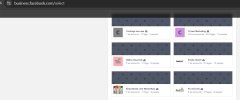
Check the number of people (including administrators, system users, instar, whastap, page owners)
MUST MATCH the total number of people on BM
Link to check the total number of people: https://business.facebook.com/select
Step 2:
Delete the application owner, delete the person in the system user. Click Revoke access.
Note that for some BMs that you have not participated in for 7 days to delete another Admin, use this link: https://business.facebook.com/confirm_business/?business_id=" BM ID" . You will delete the admin before 7 days.
Good luck!
 

Attachments

  • photo_2024-11-27_14-30-11.jpg
    photo_2024-11-27_14-30-11.jpg
    34.7 KB · Views: 91
Useful information! Check carefully when buying BM, otherwise, maybe one day, your advertising account will disappear
 
I have admin accounts but can't delete them, is it possible to delete them all this way?
 
sorry i don't know about this rule can you delete my post and i will repost a new one to ensure the forum rules

No need for that, I mean on deleting the whole thread for 3 posts.

I've merged all 3 of your posts into 1, so, all good.
 
After you buy to ensure safety, check all admins in that BM because some admins have been banned from Profile so they do not appear in the Admin section, so we need to check carefully to ensure safety.
Step 1:
Check the number of people (including administrators, system users, instar, whastap, page owners)
MUST MATCH the total number of people on BM
Link to check the total number of people: https://business.facebook.com/select
Step 2:
Delete the application owner, delete the person in the system user. Click Revoke access.
Note that for some BMs that you have not participated in for 7 days to delete another Admin, use this link: https://business.facebook.com/confirm_business/?business_id=" BM ID" . You will delete the admin before 7 days.
Good luck!
Very valuable information! Thanks.
 
Thanks for sharing, very useful information. Have a nice day.
 
It's great that you shared this with me, it's also what I was wanting to learn
 
Thanks for your share. Important information. Be sure to double check when purchasing BM, as failing to do so could result in your advertising account being suspended or removed
 
Thank you very much for sharing your valuable knowledge! Your support has broadened my understanding and is truly valuable in my work.
 
Thanks for sharing useful information, respect to you
 
After you buy to ensure safety, check all admins in that BM because some admins have been banned from Profile so they do not appear in the Admin section, so we need to check carefully to ensure safety.
Step 1:
Check the number of people (including administrators, system users, instar, whastap, page owners)
MUST MATCH the total number of people on BM
Link to check the total number of people: https://business.facebook.com/select
Step 2:
Delete the application owner, delete the person in the system user. Click Revoke access.
Note that for some BMs that you have not participated in for 7 days to delete another Admin, use this link: https://business.facebook.com/confirm_business/?business_id=" BM ID" . You will delete the admin before 7 days.
Good luck!
Thank you for the knowledge you share, it's very useful. I usually use FFB or SMIT to check
 
Back
Top