

- Nov 29, 2022
- 2,504
- 285

By 2025, video quality has become a critical factor in digital performance. Whether you're building brand awareness or running performance-driven campaigns, sharp and engaging visuals can significantly impact how audiences respond. The evolution of neural networks has fundamentally reshaped video production workflows, enabling creators to improve image clarity, modernize outdated footage, and even automate complex editing processes — all through artificial intelligence.
How Neural Networks Are Changing Video Editing
Modern neural networks are no longer experimental tools — they are practical, production-ready solutions used across industries. These systems can identify frame-level imperfections and apply precise enhancements without human intervention.Among the most impactful capabilities:
- Upscaling resolution and restoring lost detail
- Increasing frame rates to improve motion fluidity
- Removing compression noise and visual artifacts
- Colorizing black-and-white footage
- Stabilizing handheld or shaky recordings
- Filling in missing or corrupted frames
- Automatically editing and sequencing clips
- Recognizing and erasing unwanted objects
Top AI Tools for Upscaling and Sharpening Video
Several AI-based platforms now stand out for their ability to transform raw or low-quality footage into production-ready content. These tools are especially valuable for affiliate marketers working with limited resources or time.Topaz Video Enhance AI

One of the most widely adopted tools in professional video enhancement, Topaz combines multiple specialized models to handle different types of visual degradation:
- Artemis focuses on general upscaling, with support for resolutions up to 8K
- Proteus targets facial detail recovery
- Apollo is optimized for reducing noise and compression damage
DAIN (Depth-Aware Frame Interpolation)
DAIN excels at generating intermediate frames to increase FPS (frames per second). This makes motion smoother and more natural — ideal for:
- Low-frame-rate archival videos
- Slow-motion edits
- Animation sequences
DeepFaceLab
Originally created for facial replacement, DeepFaceLab has also proven effective for improving facial clarity in video. It can:
- Sharpen facial features
- Restore subtle expressions
- Adjust shadows and lighting
- Improve skin textures
RunwayML
Runway offers a suite of generative AI tools built for video creators. It supports:
- Style transfers and artistic transformations
- Object removal and background editing
- Text-to-video generation
- Realistic texture synthesis
Video2X
An open-source solution geared toward customization and batch processing. It supports several enhancement models:
- Waifu2X — optimized for animated content
- SRMD — well-suited for realistic scenes
- RealSR — delivers strong results in architectural or nature footage
AVCLabs Video Enhancer AI

This all-in-one solution is designed for fast, accessible enhancement without compromising on quality. Features include:
Upscaling to 4K and 8K
- Black-and-white colorization
- Stabilization of shaky footage
- Noise reduction and visual cleanup
How to Use AI to Restore or Improve Low-Quality Footage
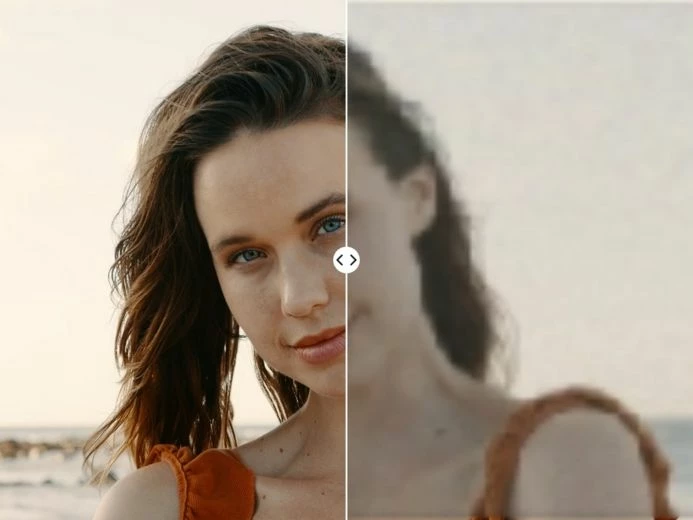
Improving video with neural networks typically involves a multi-step process. To achieve the best results:
- Start by analyzing the source: Is the problem resolution, jitter, artifacts, or color?
- Choose the most appropriate tool based on the issue
- Apply basic pre-processing if needed — such as cropping or stabilizing
- Run tests on short clips to find optimal settings
- Process the full video using the chosen model
- Apply finishing touches, such as color grading or visual effects
For older footage, additional factors come into play:
- Legacy video formats may require decoding or conversion
- Film grain or analog noise can confuse AI models
- Frame rates may be inconsistent
- Audio and visual syncing might need manual correction
Limitations and What to Watch Out For
AI tools are powerful, but not perfect. Among the key limitations:- High hardware requirements — most tools need modern GPUs to run efficiently
- Processing time — even one minute of video can take hours to upscale at full resolution
- Risk of artificial detail — AI may “hallucinate” elements that didn’t exist
- Difficulty with small text or thin lines — captions and titles can distort
- Manual review often needed — especially for content used in professional or legal contexts
- Licensing costs — professional software usually comes at a premium
Getting Started: Tools and Tips for Beginners
Affiliate marketers and content teams new to AI video tools can get started with minimal investment. A few suggestions:- Explore free or freemium platforms like RunwayML to test capabilities
- Review tutorials and comparison videos to understand strengths and weaknesses
- Use Google Colab to try open-source AI models without buying hardware
- Begin with short clips to speed up rendering and reduce risk
- Join online forums or creator communities to share learnings and get feedback
- RunwayML’s trial access
- Mobile apps with basic upscaling features
- Open-source implementations via GitHub or Hugging Face
Conclusion: Is AI the Future of Video Enhancement?
Neural networks are already a core part of the professional video pipeline — and their influence will only grow. For affiliate marketers, they offer a rare combination of speed, quality, and flexibility that once required entire creative departments.The technology still has learning curves and limitations, but its creative potential is enormous. AI can’t replace storytelling or strategy — but it can elevate content and dramatically improve how it performs. As tools become faster, more affordable, and easier to use, the ability to deliver premium-quality video is no longer reserved for studios with seven-figure budgets.
Today, even a solo creator can compete — with the right tools, clear vision, and a bit of processing power.


